
ruonanyan
Participant
December 16, 2018
解決済み

Ellipse tool missing

  • December 16, 2018
  • 返信数 3.
  • 8238 ビュー

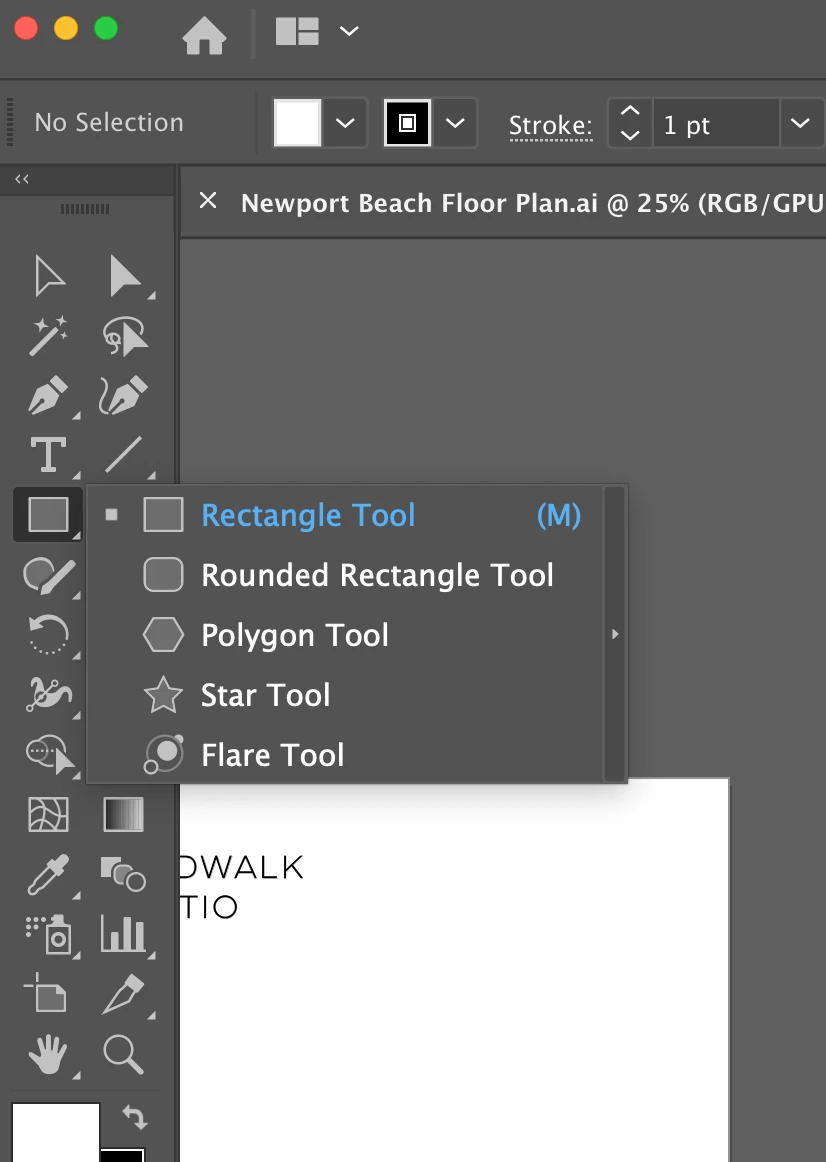
I have a feeling I'm the only one who has this problem. But I can't find the ellipse tool in the toolbar. Please see the attached picture.

This is so weird.

Anyone could help? Thank you so much! I'm using Illustrator 2019. Updated.
このトピックへの返信は締め切られました。
解決に役立った回答 Monika Gause

Click on the 3 dots button at the bottom of the toolbar. Then a dialog box opens. In its menu select "Reset"

返信数 3

Participant
October 14, 2024

I can't even see the dods in the bottom of the tool kid

Ton Frederiks
Community Expert
Community Expert
October 14, 2024

Click the arrows at the top to get a 2 column toolbar.

Doug A Roberts
Community Expert
Community Expert
October 14, 2024

Are they not there with single column on Mac?


ruonanyan
ruonanyan作成者
Participant
December 16, 2018

WOW! IT WORKS! THANK YOU SO MUCH!

Monika Gause
Community Expert
Monika GauseCommunity Expert解決!
Community Expert
December 16, 2018

Click on the 3 dots button at the bottom of the toolbar. Then a dialog box opens. In its menu select "Reset"

Participant
January 22, 2019

Had this problem! that's the solution ! thank you so much!