Participant
December 20, 2020
Answered

embed button

  • December 20, 2020
  • 2 replies
  • 4706 views

Where is the "Embed" button located on Adobe Illustrator?

This topic has been closed for replies.
Correct answer femkeblanco

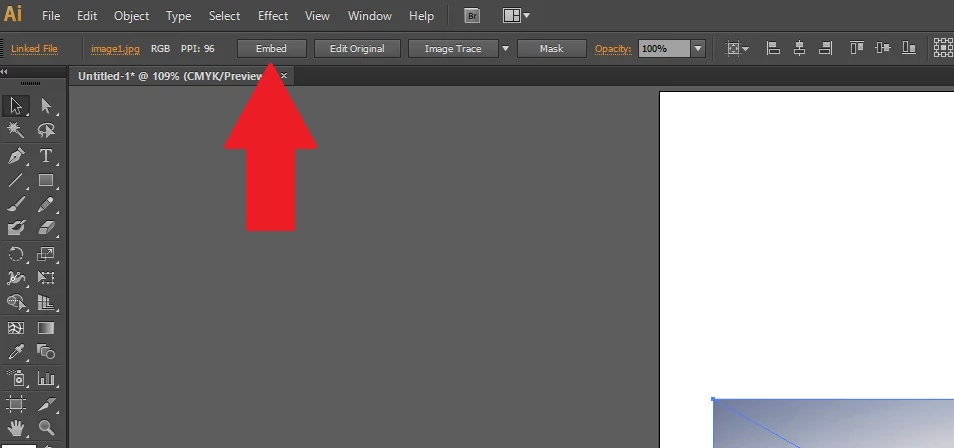
It should appear in the control panel (under the menu bar, at the top of the window) when you have a selected placed item you can embed.
2 replies

tromboniator
Community Expert
Community Expert
December 20, 2020

It also appears in the Properties panel when an embeddable object is selected.


Peter

Participant
February 11, 2021

I tried the "properties" and don't see it.

Can you screen shot where it is, for better

understanding?  I am using the Illustrator

in the Adobe Cloud - -  in case that helps.

femkeblanco
Legend
February 11, 2021

femkeblanco
femkeblancoCorrect answer
Legend
December 20, 2020

It should appear in the control panel (under the menu bar, at the top of the window) when you have a selected placed item you can embed.

Participant
December 20, 2020
Thanks so much!


Sent from Mail for Windows 10