
Participant
August 7, 2017
Answered

embedding pdf file removes strokes

  • August 7, 2017
  • 4 replies
  • 4279 views

Hi all,

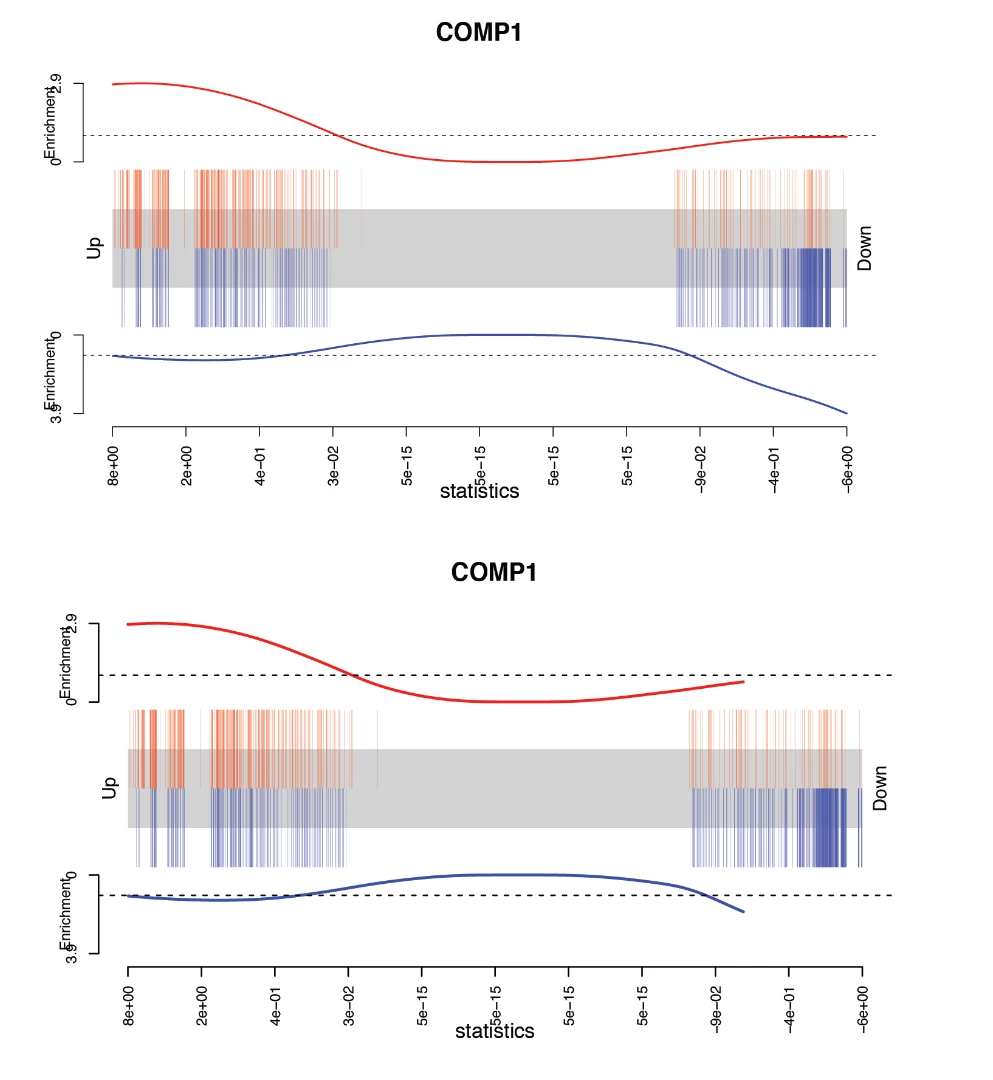
I have a problem with embedding a pdf file into ai. After placing a pdf and embedding it some of the strokes (red and blue line on the right) get cut off.

Same file before and after embedding:
Please help!

Thanks
This topic has been closed for replies.
Correct answer Luke Jennings

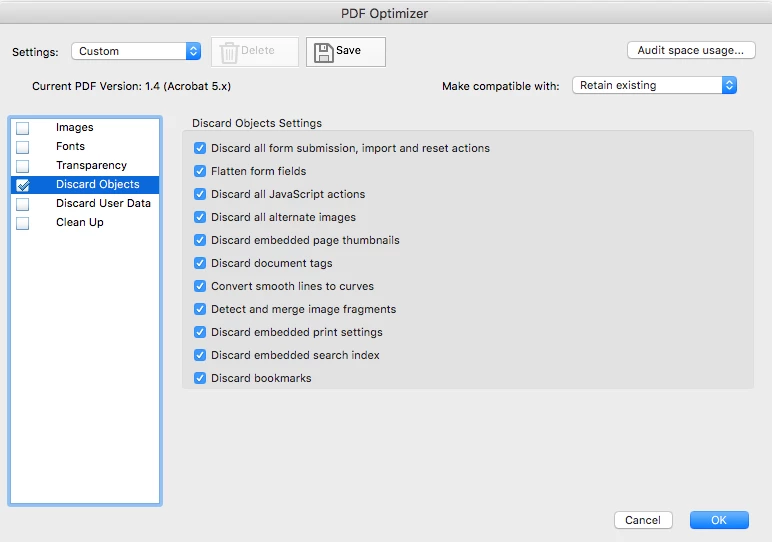
I was able to open your PDF in Illustrator (CC 2017) without the truncated lines by first optimizing it with Acrobat. I didn't try each setting individually, to narrow down what fixed it, but the settings in the attached screen shot worked.

From Acrobat DC, go to File> Save as other> Optimized PDF

4 replies

JonathanArias
Legend
August 7, 2017

i see what you mean. things get dropped of the file for me too. too much art drops. I work with scientific data so its most important for this to be accurate.

If i was doing this. i would make a page on adobe indesign, place the graphic of the chart, crop what i don't need out. and redo what i want to remake with the new type and stroke you want. than generate a .pdf out of that. 

I think that would be the best way to do what you need to do and make sure the graphic stays accurate as far as displaying data correctly visually.

Luke Jennings
Luke JenningsCorrect answer
Inspiring
August 8, 2017

I was able to open your PDF in Illustrator (CC 2017) without the truncated lines by first optimizing it with Acrobat. I didn't try each setting individually, to narrow down what fixed it, but the settings in the attached screen shot worked.

From Acrobat DC, go to File> Save as other> Optimized PDF

Kurt Gold
Community Expert
Community Expert
August 8, 2017

Using just the Convert smooth lines to curves option would be sufficient in this case. It removes thousands of redundant anchor points, so in Illustrator the maximal amount of anchor points per path will not be exceeded and therefore Illustrator does not remove parts of the strokes anymore.

Nevertheless, there are still more than 25000 points on the two lines. That should be simplified (both paths could be drawn with just a couple of anchor points).

Also, there are a lot of very thin strokes (0,08 pt, 0,09pt) which could cause trouble if the file is going to be printed. That could be detected and corrected with a standard preflight profile in Acrobat Pro.

Kurt Gold
Community Expert
Community Expert
August 7, 2017

Can you share a sample .pdf file?

Kurt Gold
Community Expert
Community Expert
August 7, 2017

The red and the blue line obviously eceed the maximal number of anchor points that a single path may contain. Each of them contain 32000 anchor points which is kind of ridiculous.

What application did you use to create the .pdf file? Acrobat says it's an application called 'R'. Don't know that programme. Can you perhaps simplify the paths in the original application?

JonathanArias
Legend
August 7, 2017

try to open the .pdf with illustrator. don't place it.  drag the .pdf to the illustrator app icon and open it that way. if its an image and not vector it will all be flat and will not be editable.

you will and might get missing font dialog and it will will you it will turn the text to outline. ..

Participant
August 7, 2017

I tried, but it didn't help. It still removes part of the lines..

JonathanArias
Legend
August 7, 2017

May i ask why you are trying to do this?  A you going to trace it on illustrator?

Participant
August 7, 2017

I need to edit the file, change fonts, stroke thickness etc. I can't seem to find a way to do it without embedding the file first.