Participating Frequently
December 14, 2018
Answered

Envelope Disort - how to swap disorted image / halt processing

  • December 14, 2018
  • 3 replies
  • 1658 views

Hello. I'm working on a quite large scale image and I have a lot of points to disort. Every time I move one point processing time takes 20-30 sec.

Is there a way to swap image for low-res one, make operation faster, then switch to high-res again?

Or just halt prosessing, move points and then process all at once at the end?
This topic has been closed for replies.
Correct answer Ton Frederiks

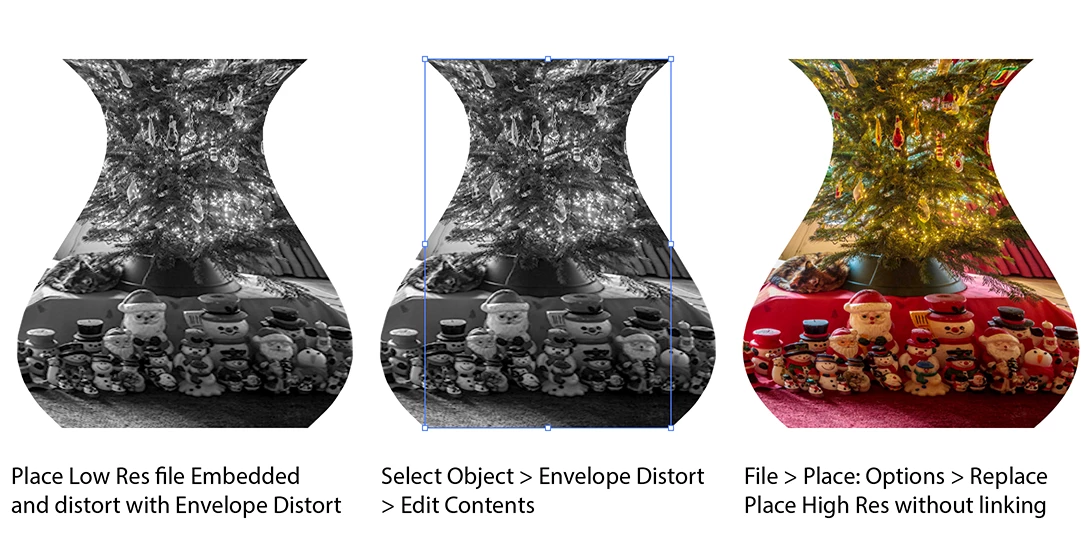
Don't use the Links panel, just replace the content with File > Place when editing the content of the envelope.

This is CC 2017:

3 replies

Myra Ferguson
Community Expert
Community Expert
December 14, 2018

You can make your low res version a symbol then make your adjustments to it with Envelope Distort. When you get it how you want, make another symbol with the high res version. Double click to get inside the envelope or select Edit Contents in the Envelope section of the Properties panel. Then in the Control Panel (set your workspace set to Essentials Classic to see it), use the Replace drop-down menu to swap out which symbol is being distorted. The symbols don't need to be the same size. You could swap symbols containing with completely different content, however, the new replacement will take on the dimensions used to set the previous symbol.

Ton Frederiks
Community Expert
Community Expert
December 14, 2018

Yes, you can work on a low res image and replace it by a high res version.

Both images have to be the same print size with a different resolution.

Start placing the low res as embedded image.

Apply your Envelope distortion.

Choose > Object > Envelope Distort > Edit Contents

Choose: File > Place

Select the high res image and check > Replace

Monika Gause
Community Expert
Community Expert
December 14, 2018

Could you try with the Links panel?

Participating Frequently
December 14, 2018

I've tried Links Panel and Edit Contents and I have only Relink option there which resets disortion. I'm using Illustrator 2017 btw.

Ton Frederiks
Community Expert
Ton FrederiksCommunity ExpertCorrect answer
Community Expert
December 14, 2018

Don't use the Links panel, just replace the content with File > Place when editing the content of the envelope.

This is CC 2017: