


Participant
January 26, 2021
Question

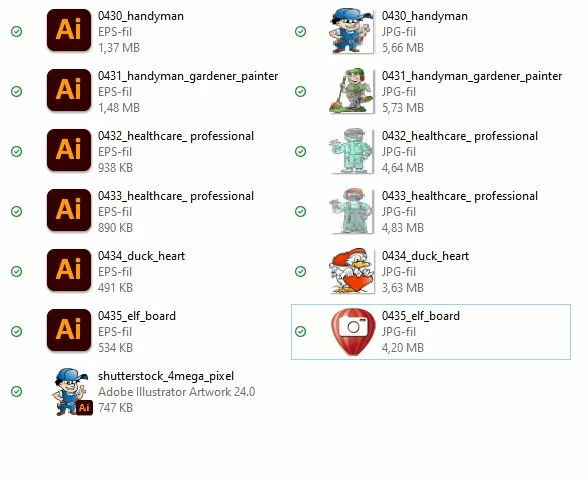
eps icon looks like ai icon in folders

  • January 26, 2021
  • 2 replies
  • 2231 views

Hello

I just istalled a new version illustrator. The eps icons showing "ai" icon.
Strange before instelling the new version of illustrator the eps have its own icon ( with the moving vecors on icon ) - how can I get this back ???
2 replies

Ashutosh_Mishra
Inspiring
February 8, 2021

Hi there,


Apologies for the delayed response. I tried to replicate this but couldn't on a Windows 10 machine. EPS files have their own icon even if they're associated to open with Adobe Illustrator. You may follow instructions given on this article to change the icon of these files.

Hope it helps.


Regards,

Ashutosh

Participant
November 1, 2023

The issue is coming back again. Also, I want to know the solution without uninstalling the apps. By the way, @Ashutosh_Mishra the article is gone!

Thanks. 

Anubhav M
Community Manager
Community Manager
December 15, 2023

Hello @SK-10,


Thanks for reaching out. Would you mind trying to use Adobe Bridge to preview, manage, and organize your Creative Cloud files and assets and checking if it helps? Get started here: (https://adobe.ly/3uYTBgK). Learn more: (https://adobe.ly/3RGDWLQ).

Feel free to reach out if you have more questions or need assistance. We'd be happy to help.


Thanks,
Anubhav

Bill Silbert
Community Expert
Community Expert
January 26, 2021

I cannot duplicate what is happening to you on a Mac using Illustrator 25.1. Is that the version of Illustrator that you are using? What operating system are you on?

Poul5CC7Author
Participant
January 26, 2021

windows 10