


MahaB82A
September 6, 2025
Answered

Equal Gap Width

  • September 6, 2025
  • 1 reply
  • 349 views

There are two images. One is round corner with hollow closed image & other one is round corner, filled rectangular image inside the hollow image. I used transform effect to equate the vertical & horizontal gap between them but it is not precise. Is there any other way to do so? file is also uploaded.
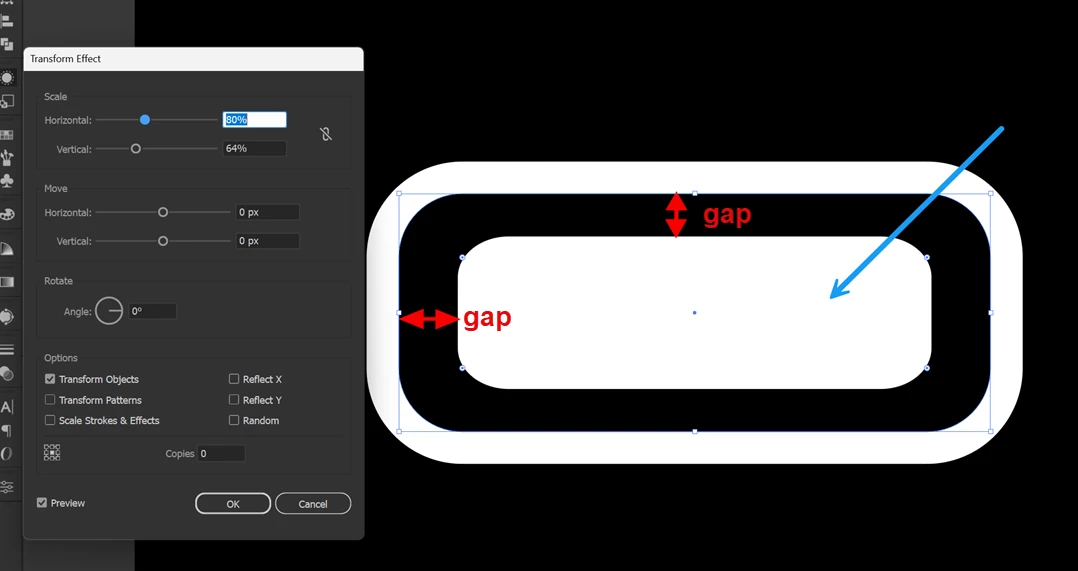

 

Equate Gap


Correct answer Monika Gause

THere is a method with using shapes and then applying pathfinder effects, but using strokes is easier: https://youtu.be/kbp1KoWmXnA 

1 reply

Monika Gause
Community Expert
Community Expert
September 6, 2025

Would be better to create a new fill in the Appearance panel and apply Offset path instead of transform.

MahaB82A
MahaB82AAuthor
September 6, 2025

Thanks for the help.