
Participant
February 7, 2017
Question

Eraser tool is leaving a weird mark on my project

  • February 7, 2017
  • 6 replies
  • 2130 views

Hi,

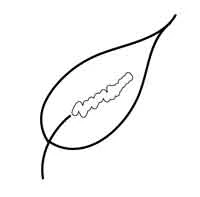
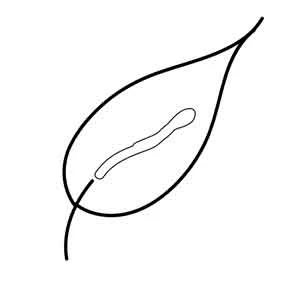
I just got a Wacom tablet and was using it on one of my projects. When I try to use the eraser on the pen, it leaves a weird bubble mark where the eraser was used. So I tried the eraser tool to see if it was just my tablet acting up. When I use the eraser tool it does the same thing. I made sure that none of my shapes had a fill color and its worked fine before so I don't know what to do. I've attached pictures to illustrate my problem. The first is when I use the Wacom eraser and the second is when I use the eraser tool in AI. Please help!
6 replies

Inspiring
March 23, 2025

The Eraser erases everything below it when nothing is selected.

But when something is selected, only the selected object(s) is erased.


Yeah, Ton! You are totally right. In this example it need to select "steam" and apply eraser tool.


Best regards!

Ton Frederiks
Community Expert
Community Expert
March 23, 2025

The Eraser erases everything below it when nothing is selected.

But when something is selected, only the selected object(s) is erased.

Kevin Stohlmeyer
Community Expert
Community Expert
February 7, 2017

Somewhere there is a fill applied - does the object have a mask or compound path applied?

If you select an object the eraser will honor the appearance settings for that object.

Monika Gause
Community Expert
Community Expert
February 7, 2017

Upload the file before and after erasing.

Jacob Bugge
Community Expert
Community Expert
February 7, 2017

Audra,

It looks more like the Fall Armyworm Tool.

rcraighead
Legend
February 7, 2017

I would still guess there is a white fill assigned to something. It may be at the object, group or layer level.

If you are trying to erase only the stem you can first select it. Then the "erase" tool will only affect what is selected.