
TheLadyRaven
Participant
April 18, 2020
Answered

Error 125 while installing Illustrator from Creative Cloud Desktop app on Windows 7

  • April 18, 2020
  • 36 replies
  • 17509 views

Hi everyone,  How are you all doing during this pandemic?


Not sure if anyone else is having this problem right now, but I can't seem to get Illustrator CC to update.


I first was not able to update Illustrator CC on my desktop, and after a few tries (even leaving it for a day or two, than retrying) it still came up with an error.  With an attempt to uninstall the file, I proceeded to reinstall Illustrator, and it still failed fatality with the Error Code: 125


As a test, my husband download it onto his system, and he had no problems.  I did my best in reading through all available solutions (none of which seems relatable to what I can see).  All other apps are successfully updating and downloading - Just Illustrator is having this issue.


Is there perhaps someone I can talk with to help me troubleshoot this problem?


Thank you.


{Renamed by MOD}
This topic is closed to new replies. Start a new post to keep the conversation going.
Correct answer Srishti_Bali

Hi,


Sorry about the inconvenience caused. Error 125 has been fixed by our Product team. If you are still getting that error, please restart your system and try again and let us know how it goes.


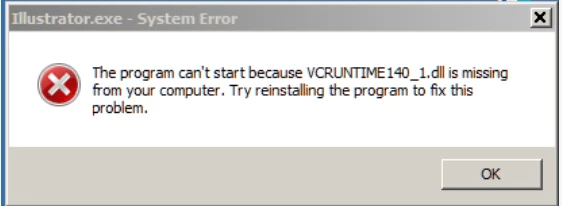
We have also observed that few users are getting VCruntime140_1.dll error while launching the application.


This is a windows error which generally occurred due to the missing or corrupt  Visual C++ redistributable files. If you get this error while launching Illustrator, please try the steps shared in this help article (https://helpx.adobe.com/illustrator/kb/vcruntime-error-on-launch.html) and let us know how it goes.


Regards,

Srishti

36 replies

Jacob Bugge
Community Expert
Community Expert
April 23, 2020

LadyRaven, all,


The full reinstallation suggestion was given because there had already been a reinstallation in the O(riginal) P(ost).


The key may be the deletion of preferences mentioned in 1) under uninstallation, but when there is a succesful installation it is possible to use a non destructive replacement of the preferences so you can go back to the old preferences.


You can find the location of the prferences folder here,

https://helpx.adobe.com/illustrator/kb/preference-file-location-illustrator.html


and move it to a suitable place/folder (for easy recognition) while AI is closed down, then start up again and, and if it fails to help you can (again while AI is closed down) delete the newly created folder and move the original folder back.


Or you can wait and see better suggestions here: I will ask an Adobe staff friend to look into this.


Participating Frequently
April 24, 2020

Same problem for me since a few days but only on my deskop Win 7 Pro PC. Mac version on 2015 MacBook Pro has updated OK.

Can uninstall/reinstall all PC versions except 24.1.2 using the old CC App interface (new one not avail on Win 7)

Hopefully a complete clean won't be required, but as there don't seem to be a lot of users affected, it could be very specific to just a few systems.

I did use Acronis system cleaner not long before the problem, and although I believe I de-selected anything that had to do with CC, I might have missed something. Is this a common tread?


WeaselByDesign
Participant
April 23, 2020

Same issue here:

Exit Code: 125
-------------------------------------- Summary --------------------------------------
 - 2 fatal error(s), 0 error(s), 0 warnings(s) 

FATAL: Fatal Error '125' occurred while download
FATAL: Error occurred in install product workflow with error code 125 error message {https://cdn-ffc.oobesaas.adobe.com/core/v2/applications?name=ILST&version=24.1.2&platform=win64&build=24.1.2.408,P:-4,PS:404,G:-4}
-------------------------------------------------------------------------------------


nicguy59
Participating Frequently
April 21, 2020

Just ran into this.  Error 125 is for internet connection, but the other apps updated.  Just Illustrator had this issue.  Also, no logs in any of the locations provided.  Not a thing in any of them related to the update today (20 April 2020).

So, the solution is a complete re-install?  Really? Perhaps I'll just keep using Illustrator without updates.

Jacob Bugge
Community Expert
Community Expert
April 18, 2020

LadyRaven,


You may try a full reinstallation:


A) Uninstall (ticking the box to delete the preferences),
B) Run the Cleaner Tool, and
C) Reinstall.


To uninstall:
https://www.adobe.com/search.html#q=uninstall%20illustrator&sort=relevancy&start=1


Cleaner Tool:
http://www.adobe.com/support/contact/cscleanertool.html


Participant
April 21, 2020

have the same problem. dont want to reinstall because it is an issue with reachability of adobe server.  a reinstall costs me at least a complete working day - can i adress the bill to adobe? i pay 50€ every month for CC 2020 which also includes free updates for all purchased applications.