

Participant
August 18, 2025
Question

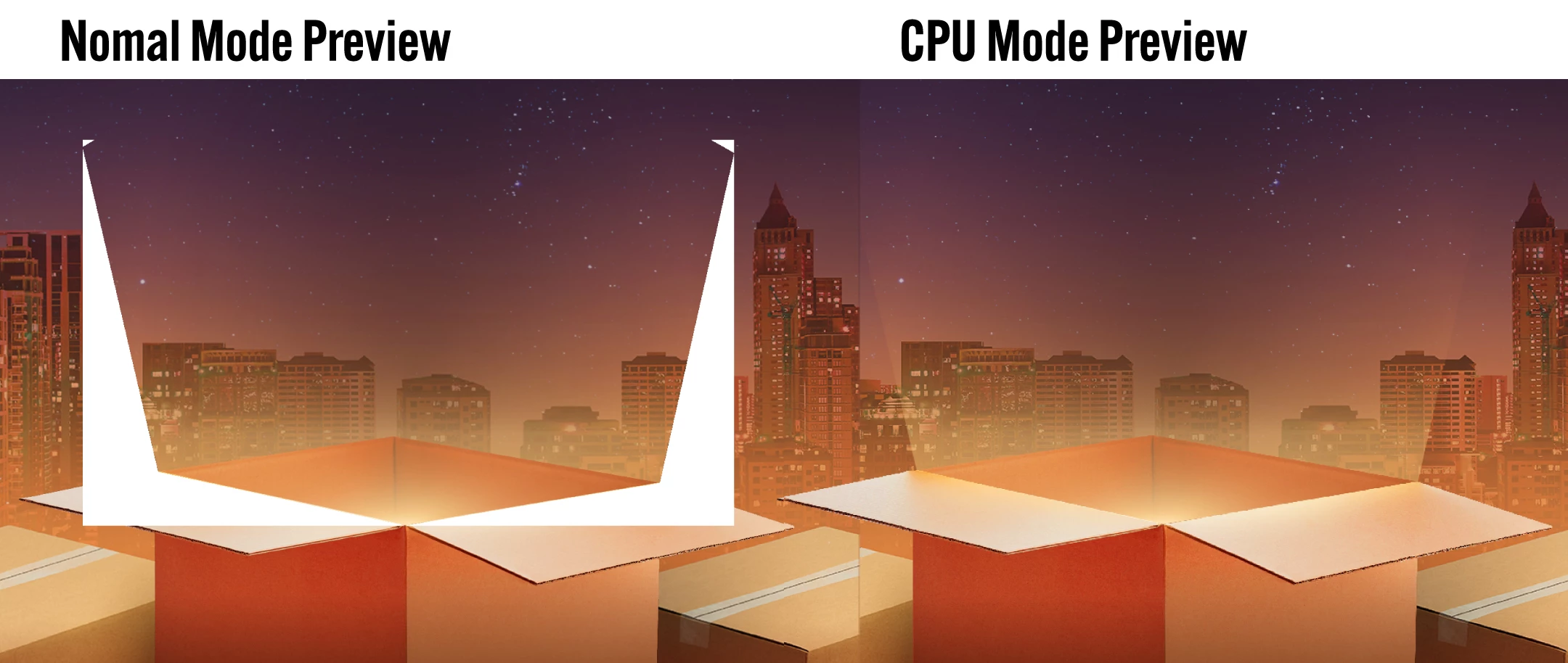
Error : Blending modes are not working

  • August 18, 2025
  • 2 replies
  • 214 views

Hi everyone, How can I fix it. My Illus isn't show blending effect correctly on nomal mode preview but can show on CPU mode.
______
macOS : Sequoia 15.6

Illustrator : Ver. 29.6.1
 

2 replies

Doug A Roberts
Community Expert
Community Expert
August 18, 2025

What blending mode are you using? Can you share the appearance and transparency panel for those objects? What is your document colour mode?

Participant
August 18, 2025

I only used screen mode and clipping mask an asset

Abhishek Rao
Community Manager
Community Manager
August 18, 2025

Hi @theerawat_4119,


Thanks for sharing the details and screenshot. Could you try updating Illustrator to the latest available update (29.7.1)? If the issue persists, try toggling GPU Performance off and on from Preferences to see if that helps. Also, let me know if this happens with all files or only certain ones for a deeper look.


Looking forward to your update.

Abhishek

Participant
August 18, 2025

I already updated but it's still happening. it's a bug? because I try to open on older version of Illus (v.28.0) from another PC and it's works.
Thanks for helping me.

Anubhav M
Community Manager
Community Manager
August 26, 2025

Hello @theerawat_4119,

Thanks for confirming. Could you share a link to a sample file along with a screen recording of your workflow and the problem, so I can check this with the team?

Looking forward to hearing from you.

Anubhav
