

"Error: Internal Error" when accessing PathItem.zOrderPosition
I need to create a JSON that replicates the Layers panel as it appears exactly, which realistically means that I need to iterate through all layers and their contents then sort by ZOrderPosition (in order to accurately know sublayer and pageItem positions within a parent layer). Given a document as simple as this:
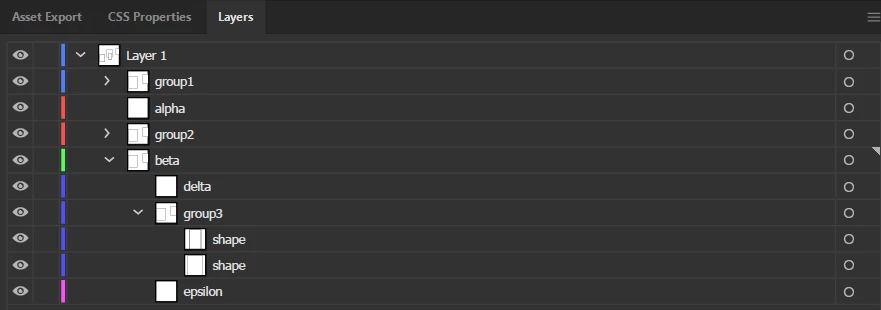
Where the latin alphabet ones above are sublayers inside Layer 1 and I'm trying to recurse through Layer 1 to get the canonical list as it appears, I thought this would be pretty easy with a script like so:
function getAllLayerDetails() {
    var result = [];
    for (var i = 0; i < app.activeDocument.layers.length; i++)
        result.push(getItemDetails(app.activeDocument.layers[i]));
    return result;
}

function getItemDetails(obj) {
    try {
        var item = {
            name: obj.name,
            order: obj.zOrderPosition,
            type: obj.typename.replace(/item/i, ""),
        };
        if (!/group|layer/i.test(obj.typename)) return item;
        if (obj.layers || obj.pageItems) {
            item["children"] = [];
            if (obj.layers && obj.layers.length)
                for (var i = 0; i < obj.layers.length; i++)
                    item.children.push(getItemDetails(obj.layers[i]));

            if (obj.pageItems && obj.pageItems.length)
                for (var e = 0; e < obj.pageItems.length; e++)
                    item.children.push(getItemDetails(obj.pageItems[e]));

            if (item.children && item.children.length)
                item.children.sort(function (a, b) {
                    return b.order - a.order;
                });
        }
        return item;
    } catch (err) {
        alert(err);
        alert("error at " + obj.name);
        return {
            name: obj.name,
            type: obj.typename.replace(/item/i, "")
        };
    }
}

var data = getAllLayerDetails();

writeTestFile(Folder.desktop + "/result.json", JSON.stringify(data));
function writeTestFile(path, data) {
    var file = new File(path);
    file.open("w");
    file.write(data);
    file.close();
}
^ You'll need JSON.stringify before you can use this yourself.
If you run this, you get 4 errors with the given document I have: "Error: Internal Error" and "null is not an object". Curiously if you comment out the zOrderPosition line, the errors disappear. When you adjust it to catch an error and assign -1 as the ZOrder like this:
function getItemDetails(obj) {
  var order = 0;
  try {
    order = obj.zOrderPosition;
  } catch (err) {
    order = -1;
  }

  try {
    var item = {
      name: obj.name,
      order: order,
      type: obj.typename.replace(/item/i, ""),
    };
Then you get results resembling what I'm going for, with the full JSON being this:
[
  {
    "name": "Layer 1",
    "order": 1,
    "type": "Layer",
    "children": [
      {
        "name": "group1",
        "order": 2,
        "type": "Group",
        "children": [
          { "name": "shape", "order": 2, "type": "Path" },
          { "name": "shape", "order": 1, "type": "Path" }
        ]
      },
      { "name": "alpha", "order": 2, "type": "Layer", "children": [] },
      {
        "name": "group2",
        "order": 1,
        "type": "Group",
        "children": [
          { "name": "shape", "order": 0, "type": "Path" },
          { "name": "shape", "order": -1, "type": "Path" }  // ERROR
        ]
      },
      {
        "name": "beta",
        "order": 1,
        "type": "Layer",
        "children": [
          { "name": "delta", "order": 2, "type": "Layer", "children": [] },
          { "name": "epsilon", "order": 1, "type": "Layer", "children": [] },
          {
            "name": "group3",
            "order": -1, // ERROR
            "type": "Group",
            "children": [
              { "name": "shape", "order": -1, "type": "Path" }, // ERROR
              { "name": "shape", "order": -1, "type": "Path" }  // ERROR
            ]
          }
        ]
      }
    ]
  }
]
But you can see that the above is not actually correct. The fact I need to add some static value as the zOrder completely defeats the purpose of using it to sort unless I just assume it must be in a specific position. In this example specifically, "group3" should be between "delta" and "epsilon" but instead it's below both because it has a negative zOrder as a try/catch replacement.
Am I making some typo here? It seems like certain items when nested beneath a depth of 2 seem to not have a zOrderPosition at all, which causes scripting to throw an error when you try to access it. Am I wrong? Is there a better way to do this?


 AdChoices