


Known Participant
March 14, 2026
Answered

Error when running script through a batch action

  • March 14, 2026
  • 2 replies
  • 115 views

So I’m obviously missing an important step here, but I cannot get my script to run via a batch action.

I’ve put together a script that does the following to an open file: 

-names the path the same as the filename - extension

-add text frame withe contents of the filename - extension

-sends the text frame to the back

-aligns the text frame to the bottom center of the path

-hides the textframe

-groups the path and textframe together

-names the group as the filename - extension

(removed these final steps for testing:
-copies the group

-open the .ai file - All.ai

-paste group from first file in place on all.ai

-save all.ai

-close all.ai)


This script runs perfectly when I run it from File->Scripts but the second I put it into an action it doesn’t work properly. I’ve narrowed it down the the select sections that appear to be messing up. 
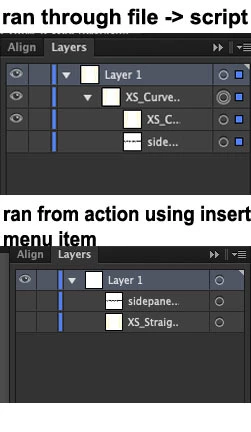
 

I’ve tried the select a few different ways to try and get it to work with the action, but the multiple ways don’t seem to be working. 
Select before sending the textframe to the back and align script:

// clear selection
selection = [];

// get all text frames
var textFrames = app.activeDocument.textFrames;

// grouped text frames will have a 'GroupItem' as parent
for (var i = 0; i < textFrames.length; i++) {
if (textFrames[i].parent.typename == "Layer") {
textFrames[i].selected = true;
}
}
doc.textFrames.getByName('sidepanelsOutline');

app.executeMenuCommand("sendToBack"); //Send to Back

app.activeDocument.layers["Layer 1"].hasSelectedArtwork = true; ///Select before align


script for textframe visibility and to make all objects into a group.
 

selection = [];
app.activeDocument.textFrames.getByName("sidepanelsOutline").selected = true;

app.executeMenuCommand("hide");

app.activeDocument.layers["Layer 1"].hasSelectedArtwork = true;

app.executeMenuCommand("group");
app.activeDocument.groupItems[0].name = docName;


I’ve tried multiple different ways to select and complete this but none seem to have worked when running the script from an action. But they work perfect just running the script by itself.

Are there certain commands (like executeCommands) that you can’t use if you are going to run the script through an action for batch work?

    Correct answer CarlosCanto

    @JustMeTrying5564 oh ok, I re-wrote your script, it does the same your script does for now. I’ll show you how to process multiple files later, to avoid using Actions

    // add text frame, rename both frame and compound path as file name, align frame to bottom of compound path
    // https://community.adobe.com/questions-652/script-runs-correctly-on-its-own-but-errors-when-ran-with-a-batch-action-1553642?postid=7518669#post7518669

    function main() {
    var doc = app.activeDocument;
    selection = null; // clear selection from the start

    var docName = doc.name.replace(/\.[^\.]+$/, '');
    var compoundPathItems = app.activeDocument.compoundPathItems;

    var grp = doc.groupItems.add(); // add an empty group;

    // name and move compound paths to group - this is not really needed if there's always on compound path
    for (var a = compoundPathItems.length - 1; a>=0; a--) {
    compoundPathItems[a].name = docName;
    compoundPathItems[a].move (grp, ElementPlacement.PLACEATBEGINNING);
    }

    var labelFrame = doc.textFrames.add();
    labelFrame.contents = docName;
    labelFrame.name = "TextField";

    // align text to compound path bottom-center;
    labelFrame.position = [
    grp.left + grp.width/2 - labelFrame.width/2,
    grp.top - grp.height + labelFrame.height];

    // group text frame to compound path
    labelFrame.move (grp, ElementPlacement.PLACEATEND); // SEND TO BACK
    labelFrame.hidden = true;

    grp.name = docName;


    // removed for testing purposes.
    //app.activeDocument.layers["Layer 1"].hasSelectedArtwork = true;

    //app.executeMenuCommand('copy');
    //app.open(File('~/all.ai')); //actual filepath removed.
    //app.executeMenuCommand('pasteInPlace');
    //app.executeMenuCommand("save");
    //app.executeMenuCommand("close");
    }
    main();


    2 replies

    CarlosCanto
    Community Expert
    Community Expert
    March 14, 2026

    your script is all over the place, I can fix it for you if you share a sample file


    also, is there a reason to run the script in batch Action? you could have the script handle the whole thing sans the Action

    Known Participant
    March 14, 2026

    Yeah I know the script is all over the place, I kind of just kept adding to it, its a mess. haha but it worked for the most part haha Thank you for taking a look at it. 
    I was going to run it as a batch through an action just because I wanted to run it on a folder and thought that batch would be the best way.
    This isn’t even the main project Im working on, this is just to batch edit and save the files in preparation for the main template I’m making. I have been using a different software that works but the batch/data variable aspect is time consuming. I have an old version of Illustrator, CS6 so I figured I’d give that a try instead.
    The file I’m trying to copy and the file I’m pasting to attached.

    CarlosCanto
    Community Expert
    Community Expert
    March 15, 2026

    thanks for sending the sample ai file, but there’s nothing in it.


    also, the script goal is to align object to bottom-center, is that correct?

    CarlosCanto
    Community Expert
    Community Expert
    March 14, 2026

    can we see the Action?

    Known Participant
    March 14, 2026

    for some reason it keeps blocking my responses. 
    I’m trying to include the script to but it won’t let me.
    Here is how I have the action setup. just a menu item. 


    Known Participant
    March 14, 2026

    .