


Participant
Oct 18, 2024 12:44 AM UTC
Answered

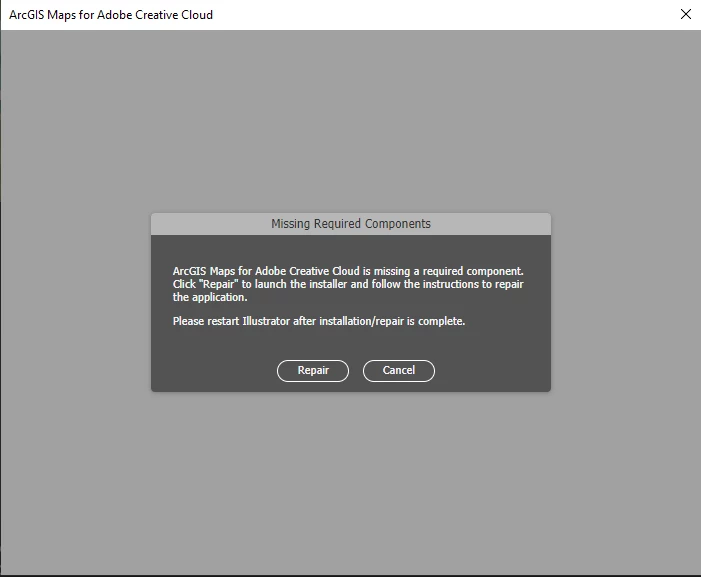
Error when using ArcGIS Maps for Adobe Creative Cloud

Greetings:


I am writing to you because when using ArcGIS Maps for Adobe Creative Cloud I get this error using the latest version of Illustrator and I would like to know how to solve it. Thank you all for your attention.


Luis M

This topic is closed to new replies. Start a new post to keep the conversation going.
Luis36215374n491Correct answer
Participant
Oct 25, 2024 3:27 PM UTC

Greetings, Brad

Thanks for your reply, it is indeed a bug in ArcgisPro as it seems they have not been able to adjust the integration of the Adobe extension to the map export. It looks like they are fixing it now. In my case, I had to install an older version of Illustrator and now it is working fine.

Regards

2 replies

Brad @ Roaring Mouse
Community Expert
Community Expert
Oct 18, 2024 1:33 AM UTC

This would be a question for ArcGIS people. It could be you've updated  to a version of Illustrator that they have yet to support. Check that your plugin is compatible with them.

Also, did you attempt the Repair as suggested?

Translate
Luis36215374n491AuthorCorrect answer
Participant
Oct 25, 2024 3:27 PM UTC

Greetings, Brad

Thanks for your reply, it is indeed a bug in ArcgisPro as it seems they have not been able to adjust the integration of the Adobe extension to the map export. It looks like they are fixing it now. In my case, I had to install an older version of Illustrator and now it is working fine.

Regards

Translate