



DEAR BD
Participating Frequently
September 24, 2025
Question

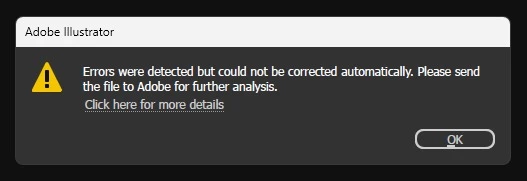
“Errors were detected but could not be corrected automatically” in Adobe Illustrator
  • September 24, 2025
  • 1 reply
  • 186 views


Hello,
I am facing a problem in Adobe Illustrator. When I open or work with some files, I get this error message:

“Errors were detected but could not be corrected automatically. Please send the file to Adobe for further analysis.”

After checking Adobe’s documentation, I found the suggestion about unexpected global objects (swatches, symbols, brushes) and running the fixBadPluginGlobalObjectNames script. But I am still confused about how to properly fix the issue.

I would really appreciate it if someone could guide me step by step:

  1. Why does this error occur?

  2. Is running the script safe for all Illustrator files?

  3. What should I do if the error keeps appearing even after running the script?

Thank you in advance for your help.

Best regards,

Md. Shanto Mir
DEARBD

1 reply

Anubhav M
Community Manager
Community Manager
September 24, 2025

Hello @40484813,

Would you mind providing some details about the circumstances under which these files were saved or edited and the location of the files where they were stored? For example, were there any unexpected Illustrator crashes, sudden app closures, system shutdowns, or power cuts during the editing process?


Also, kindly share a link to a sample file after uploading it to Dropbox/Google Drive/etc. so we can check it on our end. Although we cannot guarantee a successful recovery, we will try our best to do so.

Looking forward to hearing from you.

Anubhav

DEAR BD
DEAR BDAuthor
Participating Frequently
November 9, 2025

Hi Anubhav,

There were no crashes, unexpected shutdowns, or power cuts during the editing process — everything seemed normal. However, the issue appeared suddenly without any warning.

Also, I noticed that when I copy any element from this file and paste it into another new file, the same problem occurs there as well.

I’ve uploaded the sample file here for your reference:

Please have a look and let me know if there’s anything that can be done.

Best regards,
Md. Shanto Mir (DEAR BD)

Anubhav M
Community Manager
Community Manager
November 14, 2025

Hello @40484813,

Thanks for confirming. It appears that the file upload was not successful. Kindly upload the file to a file-sharing service and share the link to it here or via DM, so I can check it with the team. Although I cannot guarantee a successful recovery, I will try my best.

Anubhav