Participant
December 20, 2016
Frage

Evenly distribute objects

  • December 20, 2016
  • 3 Antworten
  • 446 Ansichten

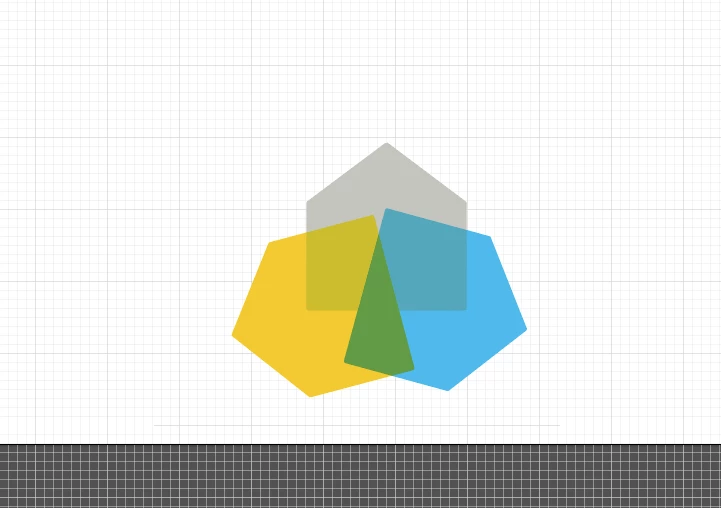
I am trying to distribute these three objects so that the tops of the "Houses" are pointing outward in even measurements.  I am not sure how to achieve this.

    Dieses Thema wurde für Antworten geschlossen.

    3 Antworten

    Ray Yorkshire
    Participating Frequently
    December 20, 2016

    Select one house

    decide where you want the rotation spot to be

    for example if you want it centre bottom of the house

    then to make that spot easy to find

    Object > Add Anchor Points

    With the object selected

    switch to the Rotate tool

    to add the rotation point

    hover the cursor over the the bottom  centre , until you see 'anchor'

    then Alt Click

    the rotate dialogue box will open

    type in 120

    and Copy

    next, to repeat the operation  so as to get the 3rd house go

    Object > Transform ;> Transform again

    Kevin Stohlmeyer
    Community Expert
    Community Expert
    December 20, 2016

    You could draw an equilateral triangle using the polygon tool and use that as a guide for the tips.

    You can use Guide/Make Guides to convert the shape to a snap-able guide.

    Kurt Gold
    Community Expert
    Community Expert
    December 20, 2016

    Take one house and rotate two copies 120°. Then recolour the copies and change their opacity.

    Is that what you want to do?