
Evenly place anchor points along a path, while keeping its form
Best Adobe Illustrator Community,
I want to evenly place anchor points along a path, which has been created from a graph by using the Line Graph Tool, while keeping its form. The reason is that I want to create a dashed line of this path where every dash regards one or more anchor points, instead of selecting the path and using Object > Path > Join and hence making the dashed line regard the length of the path. The more specific reason for this is that I want to add an arrow to a dash, which is made up by a (joined) number of anchor points. This will create a dashed line where one dash has an arrow (to indicate direction) while keeping the distance between the dashes equal.
The graph/path regards the function y = x2 and the image below shows the result if you immediately dash the unjoined path/graph. As you can see the dashes are unevenly placed since the graph/path is nonlinear:
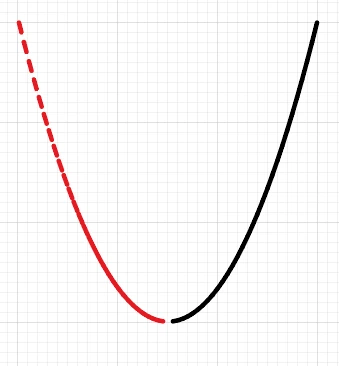
The dashes in the image above do regard the anchor points, but I want the distance between every dash to be equal...
The enlarged image below shows the result if you select and join the graph/path, then select Dashed Line and lastly make sure that Direct Select is selected (the latter will reveal the anchor points):
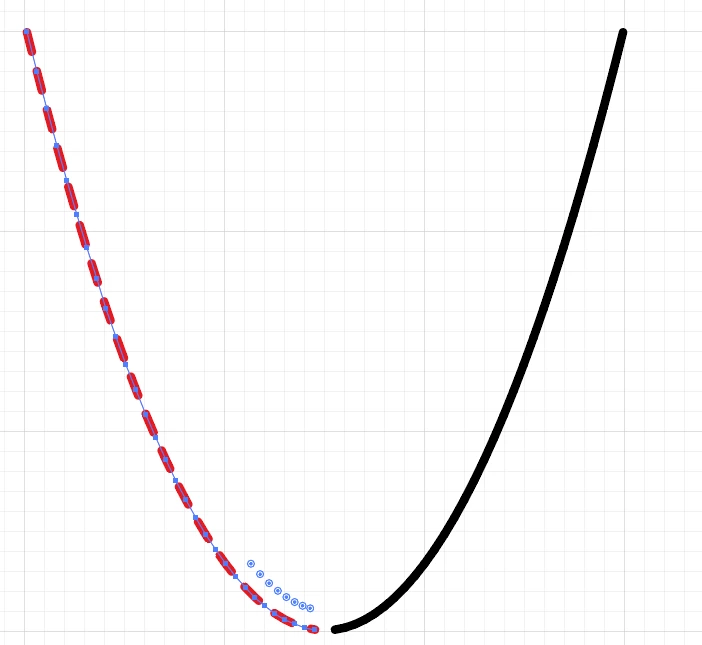
As you can the dashes don't regard the anchor points, so you won't be able to join a number of anchor points and add an arrow to that created path without making the distances unequal.
Help would be highly appreciated but the last image raises one more question… How do I reverse the dashed line in the last image (if I ever wanted to) so that the last, shortened, dash is in the other end?
Thank you so much on beforehand!
Best regards,
Andreas
 AdChoices