
Participant
November 10, 2019
Answered

Every Menu option is greyed out Illustrator 2020

  • November 10, 2019
  • 5 replies
  • 15068 views

I have a macOS 10.15.1 I switched from a chrome tab back to the illustator tab and then I suddenly couldn't do anything. I couldn't deselect my current selection, I couldn't select something else, I couldn't zoom in or out basically, I couldn't use any commands or do anything. All the options from the toolbar were greyed out, seen below. I temporarily fixed it by closing adobe illustrator using the red x button and saving it but the same bug just kept on happening and I have to restart illustrator every 5 minutes.
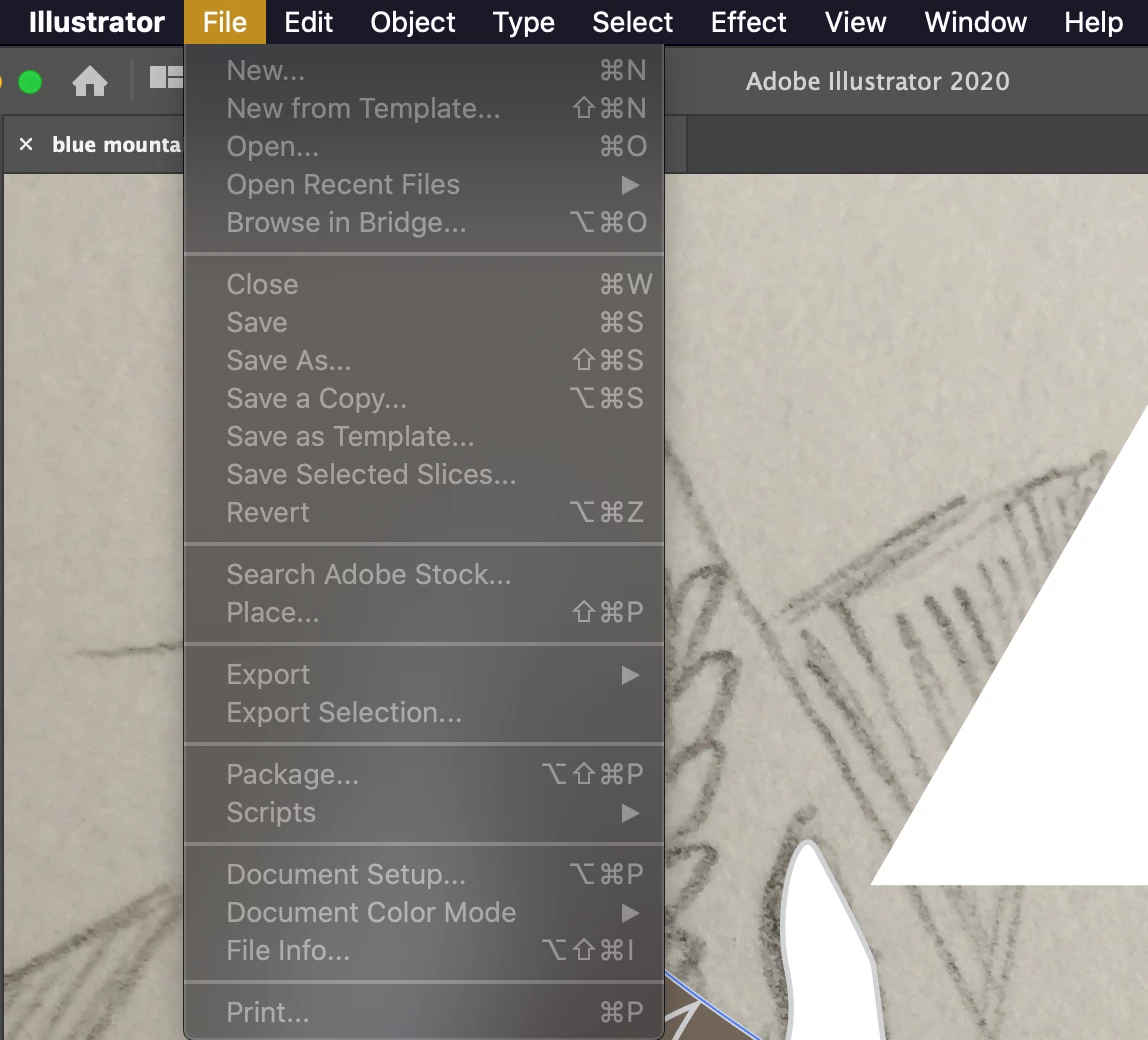
 

{Renamed by MOD}

This topic has been closed for replies.
Correct answer Rishabh_Tiwari

Hi there,


Thanks for reaching out. I hope the issue has been resolved by the steps shared by Monika. In case if you are still facing the issue, you can also try resetting the preferences by following the steps below:


  • Close Illustrator.
  • Click on the Finder icon on the dock, choose Go on the top> Go To Folder.
  • In the Go To Folder dialog box, type "~/Library". Click Go.
  • Open the Preferences Folder > rename the Illustrator  24 Settings folder to Illustrator  24 Settings folder.old
  • Under Preferences, Open Adobe folder and rename Adobe Illustrator folder to Adobe Illustrator.old
  • Go back to library->open caches->rename  com.adobe.illustrator to com.adobe.illustrator.old
  • Go back to library->open application support-> open adobe->rename the Illustrator  24 folder to Illustrator  24 folder.old


Let us know if this helps or if you need any further assistance.


Regards

Rishabh

5 replies

Participant
November 9, 2023

I have this same issue. Nothing happens when I click on anything to select or deselect, and all menu items are greyed out (screenshot).

I can't close the app wihtout force quitting, and I'd rather not need to do that on this powerful machine that I have with lots of memory.

Illustrator shoudl be able to do more than an hour of work without suddenly crashing!

PS. it has been "saving" for 15 minutes now. >(

Monika Gause
Community Expert
Community Expert
November 9, 2023

Perhaps some open dialog box hidden somewhere?

Participant
November 9, 2023

This is the first thing I checked for. No open dialogs, and closing floating toolbars likewise had no effect.

Participant
October 31, 2022

Can we please agree that Adobe bugs are not solved by blaming web browsers??? Can we also agree that users should not have to destroy their own work by force quitting or deleting all of their preferences on a regular basis? Wasn't the entire point of forcing people to adopt creative cloud to supply more stable and less bug ridden software?

I am experiencing this same issue where every menu item is greyed out, I can't select or unselect anything, and my keyboard inputs are useless. But I can still manually scroll with the scrollbar and switch tabs to other Illustrator files, and can click on layers despite not being able to do anything with those layers (meaning the entire application is not frozen).

Adobe, which enjoys an absolute excess of profits while maintaining a monopoly on the creative industry, needs to do better at fixing bugs.

tanelm52350406
Participant
March 23, 2023

I had the same issue just now and I thought I've lost all my unsaved work. Luckily I discovered that when you try to close the document by clicking on the "x" on the document tab then it prompts you to save the document before closing it. And then I force quit the Illustrator and reopen my documents.

I hope it will work and save some frustration to everyone else too.


Cheers,

Tanel

brendan42069333
Participating Frequently
July 20, 2023

Tanel, you just saved my complex illustration! I tried everything else I could find online, but clicking the X brought up the Save dialog. Thank you so much! 

julial48423438
Participant
April 14, 2021

I had the exact same issue but I was using Opera, not Chrome. I couldn't save anything. Deleted the prefs and force quit illustrator. Glad it seems to be working again but I lost all my work.

Rishabh_Tiwari
Community Manager
Rishabh_TiwariCommunity ManagerCorrect answer
Community Manager
November 26, 2019

Hi there,


Thanks for reaching out. I hope the issue has been resolved by the steps shared by Monika. In case if you are still facing the issue, you can also try resetting the preferences by following the steps below:


  • Close Illustrator.
  • Click on the Finder icon on the dock, choose Go on the top> Go To Folder.
  • In the Go To Folder dialog box, type "~/Library". Click Go.
  • Open the Preferences Folder > rename the Illustrator  24 Settings folder to Illustrator  24 Settings folder.old
  • Under Preferences, Open Adobe folder and rename Adobe Illustrator folder to Adobe Illustrator.old
  • Go back to library->open caches->rename  com.adobe.illustrator to com.adobe.illustrator.old
  • Go back to library->open application support-> open adobe->rename the Illustrator  24 folder to Illustrator  24 folder.old


Let us know if this helps or if you need any further assistance.


Regards

Rishabh

Known Participant
August 20, 2020

I was having this same problem after updating to 24.2.3.  Deleting all of those prefs solved it.  Thanks for the help.

Monika Gause
Community Expert
Community Expert
November 10, 2019

Chrome interferes with basically anything. Try and shut it down. You might need to restrt Illustrator, but keep Chrome turned off.