Bria5EB3
Known Participant
April 10, 2022
Answered

Evolution to existing script that creates template

  • April 10, 2022
  • 4 replies
  • 802 views

Hello all


Last year people from this amazing community were able to help me with a template creating script below (see link) It does exactly what it needs to and creates the template in boxes based on the values input.


https://community.adobe.com/t5/illustrator-discussions/action-or-script-to-create-sets-of-boxes-auto...


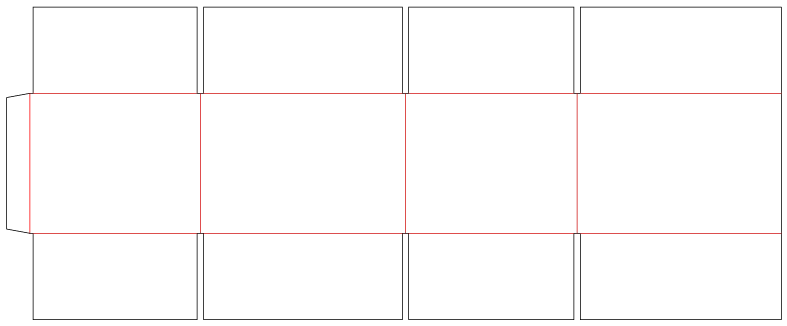
This was a great help to me but the business and our suppliers seemed to have evolved over the past year and require a template that's a little different. I was wondering if this script could be altered in such a way where it does the same thing but the template it generates is just a little different. Instead of basic boxes it would be the same as the attached/below image.


The concept is the same as the amazing script in the link from last year only now the template has slots which are 8mm in space. Also the join tab on the left end is slightly angled. I'm also not sure if the lines could be separate colours like the below as well?


Any help to know if this is possible would be much appreciated!


This topic has been closed for replies.
Correct answer femkeblanco

Instead of adding a third prompt, I've combined the input in one window.  A word of caution (which I should have mentioned before): Spaces are used to separate the values, so any unnecessary spaces (e.g. after the last value) will cause an error. 


var w1 = new Window("dialog");
var text1 = w1.add("statictext", undefined, "Enter values (in mm) separated by spaces");
var group1 = w1.add("group");
    group1.orientation = "row";
var group2 = group1.add("group");
var text2 = group2.add("statictext", undefined, "Widths (4 values)");
var text3 = group2.add("statictext", undefined, "Heights (3 values)");
var text4 = group2.add("statictext", undefined, "Glue tab width (1 value)"); 
var group3 = group1.add("group"); 
    group3.orientation = group2.orientation = "column"; 
    group3.alignChildren = group2.alignChildren = ["left","center"]; 
var input1 = group3.add("edittext", undefined, "100 100 100 100"); 
var input2 = group3.add("edittext", undefined, "100 100 100"); 
var input3 = group3.add("edittext", undefined, "30"); 
    input3.preferredSize.width = input2.preferredSize.width = input1.preferredSize.width = 110; 
var button1 = w1.add("button", undefined, "OK"); 
w1.show();

var gap = 8;
var inputWidths = input1.text;
var inputHeights = input2.text;
var f = 2.83465;
var widths = inputWidths.split(" ");
for (var i = 0; i < widths.length; i++) {
    widths[i] = Number(widths[i]) * f;
}
var heights = inputHeights.split(" ");
for (var i = 0; i < heights.length; i++) {
    heights[i] = Number(heights[i]) * f;
}
if (widths.length == 4 && heights.length == 3) {
    var sumWidths = 0;
    for (var i in widths) {
        sumWidths += widths[i];
    }
    var sumHeights = 0;
    for (var i in heights) {
        sumHeights += heights[i];
    }
    var doc = app.activeDocument;
    var ABR = doc.artboards[0].artboardRect;
    var paths = doc.pathItems;
    var top1 = ABR[3] / 2 + sumHeights / 2;
    for (var j = 0; j < heights.length; j++) {
        var left1 = ABR[2] / 2 - sumWidths / 2;
        for (var i = 0; i < widths.length; i++) {
            var top = top1, left = left1, width = widths[i], height = heights[j];
            if (j == 0 || j == 2) {
                left += (gap / 2) * f;
                width -= gap * f;
            }
            var rect = paths.rectangle(top, left, width, height);
            rect.name = "rect" + (j + 1) + "." + (i + 1);
            left1 += widths[i];
        }
        top1 -= heights[j];
    }
    var glueTab = paths.add();
    var topR = paths["rect2.1"].position;
    var bottomR = [topR[0], topR[1] - paths["rect2.1"].height];
    var topL = [topR[0] - Number(input3.text) * f, topR[1] - 6 * f];
    var bottomL = [bottomR[0] - Number(input3.text) * f, bottomR[1] + 6 * f];
    glueTab.setEntirePath([topR, bottomR, bottomL, topL, topR]);
    for (var i = 1; i < 5; i++) {
        paths["rect2." + i].strokeColor = doc.swatches["CMYK Red"].color;
        paths["rect2." + i].zOrder(ZOrderMethod.BRINGTOFRONT);
    }
} else {
    alert("Wrong values were entered.  The sketch is 4 boxes wide and 3 boxes high.  Enter 4 widths and 3 heights.");
}

 

4 replies

femkeblanco
Legend
April 13, 2022

See if this works for you.  You can change the gap and the prompt defaults by changing the numbers in the first three lines. 

var gap = 8;
var inputWidths = prompt("Enter four widths (in mm) separated by spaces", 
    "100 100 100 100", "Widths");
var inputHeights = prompt("Enter three heights (in mm) separated by spaces", 
    "100 100 100", "Heights");
var f = 2.83465;
var widths = inputWidths.split(" ");
for (var i = 0; i < widths.length; i++) {
    widths[i] = Number(widths[i]) * f;
}
var heights = inputHeights.split(" ");
for (var i = 0; i < heights.length; i++) {
    heights[i] = Number(heights[i]) * f;
}
if (widths.length == 4 && heights.length == 3) {
    var sumWidths = 0;
    for (var i in widths) {
        sumWidths += widths[i];
    }
    var sumHeights = 0;
    for (var i in heights) {
        sumHeights += heights[i];
    }
    var doc = app.activeDocument;
    var ABR = doc.artboards[0].artboardRect;
    var paths = doc.pathItems;
    var top1 = ABR[3] / 2 + sumHeights / 2;
    for (var j = 0; j < heights.length; j++) {
        var left1 = ABR[2] / 2 - sumWidths / 2;
        for (var i = 0; i < widths.length; i++) {
            var top = top1, left = left1, width = widths[i], height = heights[j];
            if (j == 0 || j == 2) {
                left += (gap / 2) * f;
                width -= gap * f;
            }
            var rect = paths.rectangle(top, left, width, height);
            rect.name = "rect" + (j + 1) + "." + (i + 1);
            left1 += widths[i];
        }
        top1 -= heights[j];
    }
    var glueTab = paths.add();
    var topR = paths["rect2.1"].position;
    var bottomR = [topR[0], topR[1] - paths["rect2.1"].height];
    var topL = [topR[0] - 30 * f, topR[1] - 6 * f];
    var bottomL = [bottomR[0] - 30 * f, bottomR[1] + 6 * f];
    glueTab.setEntirePath([topR, bottomR, bottomL, topL, topR]);
    for (var i = 1; i < 5; i++) {
        paths["rect2." + i].strokeColor = doc.swatches["CMYK Red"].color;
        paths["rect2." + i].zOrder(ZOrderMethod.BRINGTOFRONT);
    }
} else {
    alert("Wrong values were entered.  The sketch is four boxes wide and three boxes high.  Enter four widths and three heights.");
}
Bria5EB3
Bria5EB3Author
Known Participant
April 14, 2022

This really is great. Pretty much does everything we need it to. My colleague noted one thing to me though and I really don't have much of an idea when it comes to scripting and code but would it be possible to have the 'glue tab' also editable in size or have it set to a specific set of sizes eg: 30, 35 or 50? As those are the 3 sizes that are used with 30 being the most common.


Overall, this looks amazing though!

femkeblanco
femkeblancoCorrect answer
Legend
April 14, 2022

Instead of adding a third prompt, I've combined the input in one window.  A word of caution (which I should have mentioned before): Spaces are used to separate the values, so any unnecessary spaces (e.g. after the last value) will cause an error. 


var w1 = new Window("dialog");
var text1 = w1.add("statictext", undefined, "Enter values (in mm) separated by spaces");
var group1 = w1.add("group");
    group1.orientation = "row";
var group2 = group1.add("group");
var text2 = group2.add("statictext", undefined, "Widths (4 values)");
var text3 = group2.add("statictext", undefined, "Heights (3 values)");
var text4 = group2.add("statictext", undefined, "Glue tab width (1 value)"); 
var group3 = group1.add("group"); 
    group3.orientation = group2.orientation = "column"; 
    group3.alignChildren = group2.alignChildren = ["left","center"]; 
var input1 = group3.add("edittext", undefined, "100 100 100 100"); 
var input2 = group3.add("edittext", undefined, "100 100 100"); 
var input3 = group3.add("edittext", undefined, "30"); 
    input3.preferredSize.width = input2.preferredSize.width = input1.preferredSize.width = 110; 
var button1 = w1.add("button", undefined, "OK"); 
w1.show();

var gap = 8;
var inputWidths = input1.text;
var inputHeights = input2.text;
var f = 2.83465;
var widths = inputWidths.split(" ");
for (var i = 0; i < widths.length; i++) {
    widths[i] = Number(widths[i]) * f;
}
var heights = inputHeights.split(" ");
for (var i = 0; i < heights.length; i++) {
    heights[i] = Number(heights[i]) * f;
}
if (widths.length == 4 && heights.length == 3) {
    var sumWidths = 0;
    for (var i in widths) {
        sumWidths += widths[i];
    }
    var sumHeights = 0;
    for (var i in heights) {
        sumHeights += heights[i];
    }
    var doc = app.activeDocument;
    var ABR = doc.artboards[0].artboardRect;
    var paths = doc.pathItems;
    var top1 = ABR[3] / 2 + sumHeights / 2;
    for (var j = 0; j < heights.length; j++) {
        var left1 = ABR[2] / 2 - sumWidths / 2;
        for (var i = 0; i < widths.length; i++) {
            var top = top1, left = left1, width = widths[i], height = heights[j];
            if (j == 0 || j == 2) {
                left += (gap / 2) * f;
                width -= gap * f;
            }
            var rect = paths.rectangle(top, left, width, height);
            rect.name = "rect" + (j + 1) + "." + (i + 1);
            left1 += widths[i];
        }
        top1 -= heights[j];
    }
    var glueTab = paths.add();
    var topR = paths["rect2.1"].position;
    var bottomR = [topR[0], topR[1] - paths["rect2.1"].height];
    var topL = [topR[0] - Number(input3.text) * f, topR[1] - 6 * f];
    var bottomL = [bottomR[0] - Number(input3.text) * f, bottomR[1] + 6 * f];
    glueTab.setEntirePath([topR, bottomR, bottomL, topL, topR]);
    for (var i = 1; i < 5; i++) {
        paths["rect2." + i].strokeColor = doc.swatches["CMYK Red"].color;
        paths["rect2." + i].zOrder(ZOrderMethod.BRINGTOFRONT);
    }
} else {
    alert("Wrong values were entered.  The sketch is 4 boxes wide and 3 boxes high.  Enter 4 widths and 3 heights.");
}


pixxxelschubser
Community Expert
Community Expert
April 11, 2022

Script customization will definitely require a detailed explanation of how the glue tab is constructed (it is not a rectangle).


The gaps are probably not a big problem. But here the information would be useful whether it is always three rows, or whether there are variations here as well.

Bria5EB3
Bria5EB3Author
Known Participant
April 11, 2022

Agreed,


The Gaps: Could be the top and bottom boxes less 4mm each side except for the last boxes. These slots are 8mm.


The Glue Tab: Could perhaps start as a rectangle but have the top and bottom left anchor points moved down by 6mm for the angle as attached.


femkeblanco
Legend
April 11, 2022

I can check it out towards the end of the week.  

Mylenium
Legend
April 11, 2022

You'd just need to add some inputs for the gaps and tab design and duplicate the loops for the boxes. Shouldn't be too difficult...


Mylenium