Participant
February 6, 2020
Answered

Export for JPG Challenge at 1200x627 will come out as 1200x628

  • February 6, 2020
  • 2 replies
  • 1012 views

I have an artboard in Illustrator set up at 1200x627 and the X and Y coordinates are at zero. But when I do an export for screens my file size exported is 1200x628. Anybody got a fix on this particular sizing?
This topic has been closed for replies.
Correct answer Ton Frederiks

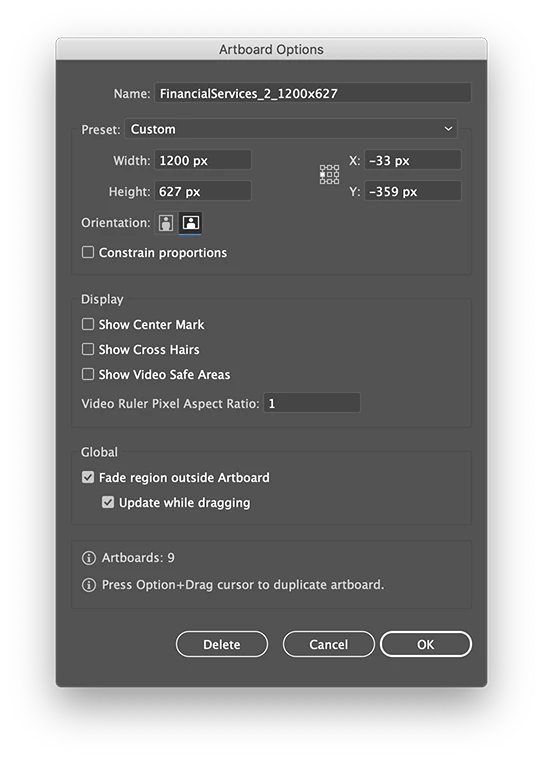
Tom, you work from the center left X/Y.

Which will give you fractions if you look at the upper left X/Y.

Always check if the upper left X/Y contains fractions.


2 replies

Ton Frederiks
Community Expert
Community Expert
February 7, 2020

Thanks for sharing, Tom.

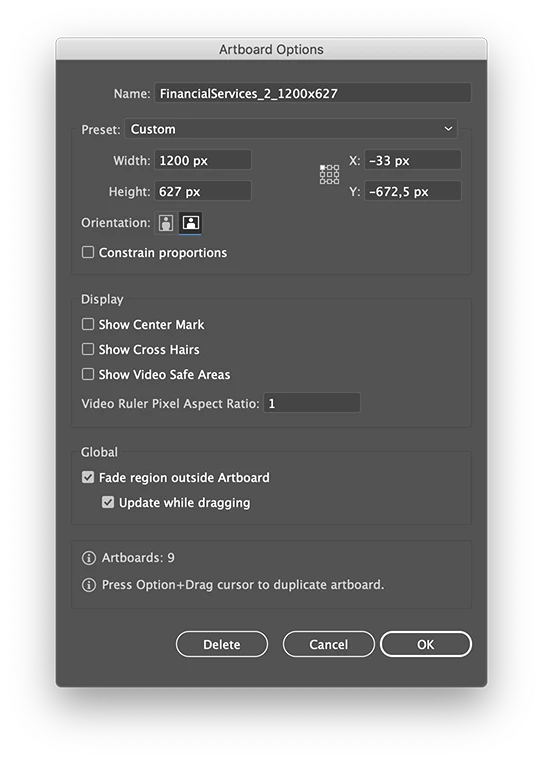
There are fractional values that will cause the additional pixels.

Have a look at the Y coordinates.

Fractional pixel values will be rounded because fractional pixels cannot exist.

You can easily fix it by rearranging the artboards (click the Rearrange All Artboards option in the Artboards panel or change the values manually)

tomkwolikAuthor
Participant
February 10, 2020

What is weird is how the file gives you different X/Y coordinates from what I sent you, I had removed all those .xx numbers before. Anyway, I went ahead and removed them again, did the rearrange artboards you suggested and did the COMMAND, OPTION, E, export and I still got the 1200x628 JPG size.


So thinking that maybe something was off I went ahead and deleted all the artboards except the 1200x627 one. I then set those X/Y coordinates to 0. I did the same export and my JPG was still 1200x628.  Even if I create an artboard at 1200x627 from scratch, zero out the X and Y values, I get the same result.

Ton Frederiks
Community Expert
Ton FrederiksCommunity ExpertCorrect answer
Community Expert
February 10, 2020

Tom, you work from the center left X/Y.

Which will give you fractions if you look at the upper left X/Y.

Always check if the upper left X/Y contains fractions.


Ton Frederiks
Community Expert
Community Expert
February 6, 2020

I suppose you are working in points or pixels.

Do you export the Artboard or the art?

If you double click the Artboard tool, what do the Upper left X/Y coordinates show?


tomkwolikAuthor
Participant
February 6, 2020

This file is set up in Pixels. The X & Y coordinates are set to 0.
I do OPTION, COMMAND, E, and export for screens, and I export the artboard.

Ton Frederiks
Community Expert
Community Expert
February 6, 2020

Can you share that .ai file? You can remove the content that is not needed to show the problem.