
Will Price
Inspiring
March 24, 2022
Answered

Export for screens adding an extra 1px in height to every alternate file?

  • March 24, 2022
  • 2 replies
  • 548 views

This is odd, but does anybody else get a random 1px added to some exports from illy?


My artboards are the same size, same file and background graphic. Export for screens, set to the artboard, and X&Y snapped perfectly. Half are perfect; the other half has an added 1px.


I've tried making it all fit exactly and adding some artwork outside the bleed. Same result each time.


Exports below for comparison...



It's a bit annoying. I don't want to have them edit them in photoshop.


Any tips?


Thanks,

Will
This topic has been closed for replies.
Correct answer Will Price

It needs to snap top left, not middle...


2 replies

Ton Frederiks
Community Expert
Community Expert
March 24, 2022

Do you measure X/Y from the upper left reference point?

Do you have Global Rulers turned on?

If so, you can align all artboards to non fractional pixel coordinates by using the Rearrange All Artboards button in the Artboards panel.

Will Price
Inspiring
March 24, 2022

I usually default the X&Y coordinates top-left, but something went wrong somewhere.

Rearrange is excellent, but I have different artboard types ordered in columns for easy editing. I need them where they are.

Just something to bear in mind when using illy for digital artwork.


Thanks for the tip.


Ton Frederiks
Community Expert
Community Expert
March 24, 2022

Good to hear you've got it solved.

Will Price
Inspiring
March 24, 2022

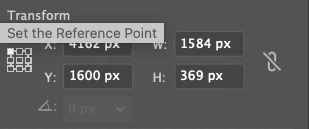
I found a few other similar posts suggesting that the X&Y must be set to the middle position like so...


This gives me an extra 1px on all of my exported files. I don't get it.

Will Price
Will PriceAuthorCorrect answer
Inspiring
March 24, 2022

It needs to snap top left, not middle...