


Participant
July 6, 2021
Answered

Export for screens not working - "unable to export the following files"

  • July 6, 2021
  • 6 replies
  • 8567 views

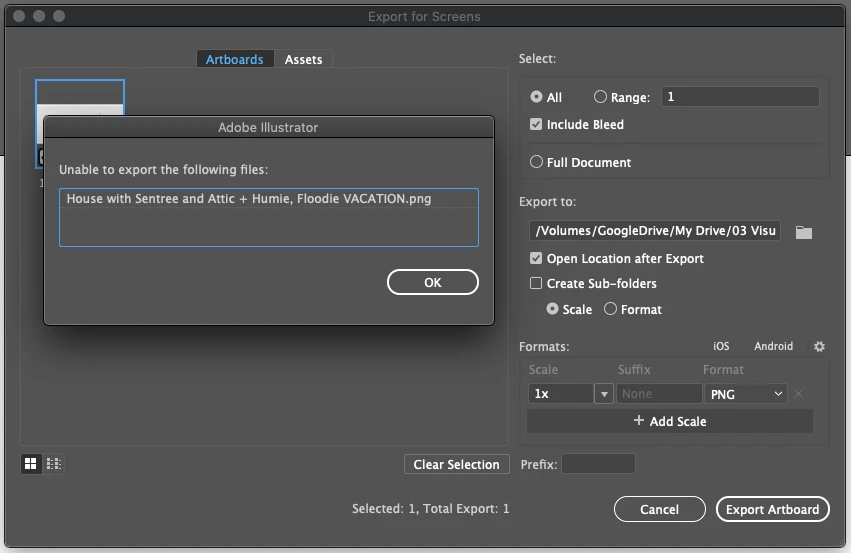
I have been having a problem recently with the Export for Screens option not functioning. It seems no matter what I try, I am consitantly getting the same error and nothing happens. I can save out each individual artboard, but this is a huge waste of time. Has anyone else had this problem? Any ideas on how to solve it?
Correct answer mark_2138

I was having the same issue, tried several things like saving as jpg vs png and was not having any luck... BUT

I figured out that my artboard names all used the "&" so I renamed the artboards without it and everything was back to normal. 

I notice you have "+" and "," in your file name. Might try deleting those characters!

6 replies

Participant
August 28, 2025

My solution: I had recently renamed the PDF settings preset, so the fix was to click the gear and select the preset again with the new name.

Participating Frequently
July 27, 2025

I was just having this problem too.


The first time it happened, I moved the Artboard's art onto it's own independent layer, and then decided to update the name to something better while I was there, and it exported just fine. So, I thought it was because of the layer thing.


Then the second time it happened, I tried moving the artwork onto its own layer, but then it kept failing, so I decided to search google and landed here.  Saw the correct answer pointing out that special characters in the Artboard name were causing their problem, but when I looked at mine, I didn't have any special characters in the Artboard names, and it still wouldn't export!


I was about to give up for the night, but then I noticed that I had a space as the first character in all my Artboard names. So, I deleted that, and boom... It exported no problem! Turns out, that's what fixed it for me the first time, but I didn't realize it.
Either way, if anyone else is still having issues, check and make sure you don't have a space as your Artboard name's first character.

mark_2138Correct answer
Participant
June 6, 2025

I was having the same issue, tried several things like saving as jpg vs png and was not having any luck... BUT

I figured out that my artboard names all used the "&" so I renamed the artboards without it and everything was back to normal. 

I notice you have "+" and "," in your file name. Might try deleting those characters!

Inspiring
March 7, 2025

Hi @defaultzvqsx3fjwri0 hope you are doing fine !


Try resetting Illustrator preferences (ctrl + alt + shift on launch)


Also check file permissions, export location and available disk space. If the issue persists, update Illustrator or try exporting in a different format.

Community Manager
March 11, 2025

Hello @Enthusiastic_Palette5EBD,

Would you mind confirming if Illustrator behaves this way with all files, if this happens when exporting to a specific folder location, and a screenshot/screen recording of the problem (if possible) so I can better assist you?

Looking forward to hearing from you.


Anubhav

Participant
November 15, 2024

I have the same problem, however, I tried saving it to my Desktop and it doesn't work. I think that it's too big since the artboard is about 10000x10000 pixels. I want to show some of my friends an unfinished train map by only exporting on PDF.

Community Manager
November 15, 2024

Hello @Patrick594852,

I'm sorry to hear about your experience. Would you mind sharing more details, like the OS/Illustrator version, and if Illustrator behaves this way with all files, so I can better assist you?

Also, kindly try copying the objects/layers from this file to a new one and then try saving as a PDF to see if it helps.

Looking forward to hearing from you.


Anubhav

Participant
March 7, 2025

Hello Anubhav! I'm facing the similar issue. I'm not able to export my assets to svg format. I'm currently using Illustrator version 29.3.1(64 bit) & my OS is:

Edition: Windows 11 Home Single Language
Version: 24H2
OS Build: 26100.3194

My laptop is ROG Strix G513QE

Doug A Roberts
Community Expert
Community Expert
July 6, 2021

Does it work if you try a different folder or your desktop?

Participant
July 6, 2021

It does work if I save it to the desktop... still a time waste having to move it to the appropriate folder. It doesnt seem to want to go anywhere other than the desktop.