francescop7393192
Participating Frequently
April 26, 2019
Question

export higt quality pdf

  • April 26, 2019
  • 11 replies
  • 1056 views

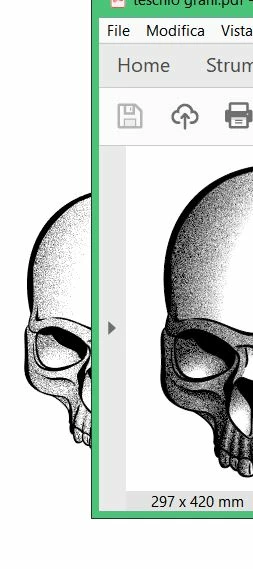
Hi everyone, I'm trying to export a design in pdf but I have problems in resolution. I used the high quality print preset. why is it different? thank you.

    This topic has been closed for replies.

    11 replies

    Legend
    April 28, 2019

    If you have an image made from a pattern of black and white, but the dots are smaller than the pixels on screen or on the printer, it's a big problem. What should we see? Different software have different ways of handling this for example

    - black wins

    - white wins

    - average colour

    - random pixel wins

    Such designs are great but you have to design for a particular use - best to design for a single printer, or a web graphic. A PDF is almost never a good use of such a special design.

    Inspiring
    April 27, 2019

    Try flatten the pixel objects - set resolution to "other" and 600.
    Export to PRESS (pdf default) and change downsample  to 600 for pictures over 650...

    francescop7393192
    Participating Frequently
    April 27, 2019

    even if I selected expand path? is there a way to fix it? Thanks again

    Monika Gause
    Community Expert
    Community Expert
    April 27, 2019

    Acrobat seems to render those pixels differently. And depending on the zoom size in Illustrator and whatever resolution settings you did when exporting the PDF it might also look differently.

    And no: you can't fix that. It's a raster based effect, so your result is a pixel image. Or rather some mixed result: The linework might be still vector (depending on what exactly you did with it).

    Larry G. Schneider
    Community Expert
    Community Expert
    April 27, 2019

    Might “Enhance Thin Lines” being on in Acrobat have something to do with this?

    francescop7393192
    Participating Frequently
    April 27, 2019

    I don't know what happens

    francescop7393192
    Participating Frequently
    April 27, 2019

    The noisy gradient was created with a normal gradient to which an effect was applied from the gallery. everything has been reported in vector. the PDF is opened with adobe acrobat reader.
    I thought I answered John Mensinger.

    Monika Gause
    Community Expert
    Community Expert
    April 27, 2019

    francescop7393192  schrieb

    The noisy gradient was created with a normal gradient to which an effect was applied from the gallery.

    That is not "a vector".

    Those effects are pixel based. So in Illustrator you still have the paths, but everything that makes them look the way they do is pixel based. And when you export this to any other format than AI, you have no vector path at all. There are pixels in your file.

    francescop7393192
    Participating Frequently
    April 27, 2019

    Yes, exactly. Same problem in print. If I print directly from illustrator there are no problems

    Monika Gause
    Community Expert
    Community Expert
    April 27, 2019

    Exactly how did you create that noisy gradient? That's not a vector element.

    In which application do you viw the PDF (and print it) - doesn't look like Acrobat.

    Can you please show screenshots in a size that allows us to see something.

    And also please answer the questions by John Mensinger.

    francescop7393192
    Participating Frequently
    April 27, 2019

    Thanks for the support guys.

    The artwork is a vector, it has transparencies and I saved as. I work with illustrator cc and the color mode is CMYK.

    the problem occurs when zooming out and the artwork becomes a black outline, which does not happen with illustrator.

    sorry for my english.

    Legend
    April 27, 2019

    So it looks ok when you zoom in? Definitely not resolution. Close up, is the artwork made up of many small black marks/dots/lines/patterns?

    John Mensinger
    Community Expert
    Community Expert
    April 26, 2019

    We'll need more details.

    • What version of Illustrator?
    • What is the Document Color Mode?
    • How is the artwork constructed?
      • Vector?
      • Raster?
      • Transparency?
      • Live effects?
    • You characterize it as "export" to PDF; did you Save As...?
    Inspiring
    April 26, 2019

    Is the difference you see that your pdf is 'CMYK hi res print settings' and your ai doc is working as RGB ?

    hammer0909
    Community Expert
    Community Expert
    April 26, 2019

    I can't see how you built the file, but I'm wondering if it could be your Document Raster Effects Settings? Choose Effect > Document Raster Effects Settings and adjust the value to see if that makes a difference.