


Participating Frequently
February 6, 2025
Answered

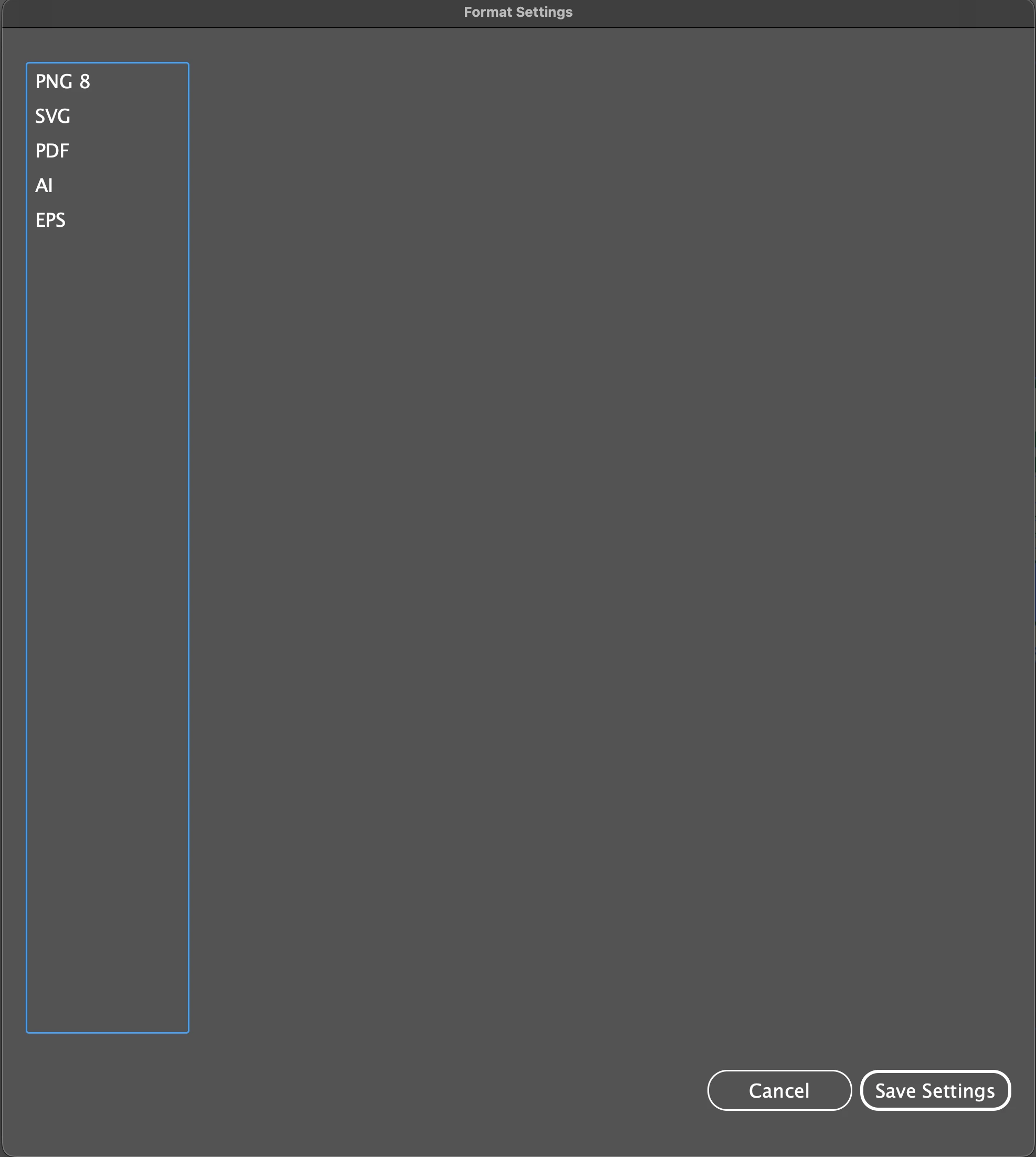
Export Selections Format Settings Missing Illustrator 29.8.1

  • February 6, 2025
  • 7 replies
  • 1690 views

Hey guys,


I have been experiencing this bug when accessing the 'format settings' window. When I go to export assets in the Export Selection window and then press the Format Settings options, half of my options are missing, including the PNG 24 option. I've tried reinstalling Illustrator to see if it would fix the issue, and it did for a day, but then it happened again. Im running the latest version and on MacOS Tahoe. Please note that this issue was also occurring on macOS Sanoma. Hope someone can help! 

Thanks

Frankie
Correct answer 28303571hpz9

Testing on macOS Sequoia 15.6.1 (24G90)

I was able to get the items to reappear by resetting preferences, but it seems the settings are not being followed anyway. I have an image that contains a transparent portion, and the export settings are set to transparent, but the exported image mattes with white.


NVM, it actually is working, just forgot about the default subfolder thing... sry

7 replies

mgdh
Participating Frequently
October 23, 2025

Please HELP
I use to export transparent PNGs through the asset export window. But now, when I go in the advanced settings to have the background transparent, it's not possible anymore. There is no PNG-24 available anymore, I can do transparency with PNG-8 only. What happened? They just removed it? Why? 

Ton Frederiks
Community Expert
Community Expert
October 23, 2025
Anubhav M
Community Manager
Community Manager
November 3, 2025

Hello everyone,

The team has requested additional information. Kindly make a zip file of your Illustrator preferences folder and share a link to the file after uploading it to a file-sharing service for further investigation.

For macOS

• Go to the following locations

• ~/Library/Preferences


For Windows

- Go to Location C:\Users\%USERPROFILE%\AppData\Roaming\Adobe


Looking forward to your response.
Anubhav

Participant
October 22, 2025

Did you solve this? I get the same thing and have no clue what's going on. What do you mean "the subfolder thing"? Thank you!

alexy22084847
Participant
September 26, 2025

When exporting artboards the format settings for PNG are missing. I see PNG 8, but not PNG. I am unable to export artboards as a transparent PNG unless I use PNG 8. I know the settings for PNG used to be there. Have they moved or is this a bug? I'm using Illustrator 29.8.1

Abhishek Rao
Community Manager
Community Manager
September 26, 2025

Hi everyone,


Thanks for sharing your observations on this. The product team recommended trying a reset of your Illustrator preferences after first taking a backup. You can find the steps here: https://adobe.ly/484DdNm. After testing, you can restore your older preferences to check if the issue returns.

It would also help if you could confirm whether you’re on macOS Tahoe 26 when this happens, so we can narrow things down further.


Looking forward to hearing your updates.

Abhishek

Participant
September 26, 2025

Testing with default preferences shows all the formats, but after restoring the preferences the issue returns. I'm on Sequoia 15.7

Ton Frederiks
Community Expert
Community Expert
September 26, 2025

You may want to report it as a bug here:

https://illustrator.uservoice.com/

Harshika Verma
Community Manager
Community Manager
September 26, 2025

Hi All,


Thank you for reporting the issue, and we're truly sorry for the inconvenience caused. I’m seeing the same behavior on my end, and have reached out to the team to confirm whether this is a known bug. We’ll keep you updated here as soon as we have more information.


Thanks,

Harshika

Inspiring
November 15, 2025

Hello @HARSHIKA_VERMA , do you have any updates on this issue? I am facing it with the latest public version of illustrator.

Participant
September 25, 2025

Also having this problem. Reverting to previous version did work, but that is not a good longterm option for me. Reinstalled newest version and setting options all apeared correctly until I tried to save my workspace set up - the options are gone again.

Participating Frequently
September 26, 2025

Hey, that is exactly what happened to me when I tried what you did! its a bit frustrating but will have to wait until another update comes out and see if its been fixed.

Participant
September 20, 2025

I am also encountering this issue. Any solutions?

Participating Frequently
September 21, 2025

Hi Lucian, i had to install an older version 29.7.1 of Illustrator to fix the issue! 

Participating Frequently
September 29, 2025

I had the same problem (in the Asset Export panel PNG disappeared of setting dialog box). I also had weird prefix displayed in the panel when I choose  png or JPEG formats (-8 for the png 8 format, -100 for jpeg).

- Windows 11 24H2
I reverted to 29.71 and it solved the problem. 

Participant
February 6, 2025

I was recently reading through the following article about the asset export panel.


https://helpx.adobe.com/illustrator/using/collect-assets-export-for-screens.html


In the "Exporting assets (Asset Export panel workflow)" section of that page, it shows the format settings, and I see that EPS and AI are options for exporting files. It looks like this:


However, when I look at at the asset export format settings on my own computer, I see that everything is the same, with the exception that I do not have the option to export as EPS or AI.


Are there specific settings/options somewhere that I have to enable to get EPS and AI to show up as export file types in the asset export panel? I'm using Adobe Illustrator 2025 (29.1), so it's the newest version available.


Participant
February 6, 2025

Disregard this post, as I can't figure out how to delete it. I see that version 29.2 apparently enables these options.