jeffreye38338035
Known Participant
April 13, 2017
Question

Export Sublayers to JPG

  • April 13, 2017
  • 2 replies
  • 3586 views

Hello,

I'm trying to find a script that can export sublayers to JPG files. I did find some scripts that work but they only look at the top-layers, not at the sublayers.

My Illustrator files looks like this:
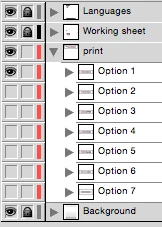
What I want is a a script that will export the sub-layers in the layer Print into individual JPG files. The filename will be the name of the file itself + the layer name of that specific layer. So Filename_Option 1.jpg etc... Sometimes we have a second layer with sublayers that also needs to be exported to JPG's. I'm thinking to make an Action that first will delete the layers Languages, Working sheet and Background leaving only the layers in place that needs to be exported. But I can't find a script that can export the sub-layers.

This is the script I could find that almost does the job: Scripting Illustrator: Export Layers as Images

But this script only exports the layer Print and does not look at the sublayers in it.

I hope someone can help!

Jeffrey

This topic has been closed for replies.

2 replies

Silly-V
Legend
April 13, 2017

Try this script out, it exports a jpeg with all default options.

#target illustrator

function test(){


  var doc = app.activeDocument;

  var destPath = (doc.path != "")? doc.path : "~/Desktop";

  var hiddenTopLayers = [], thisTopLayer;

  for(var i=0; i<doc.layers.length; i++){ // hide all visible top-level layers

    thisTopLayer = doc.layers;

    if(thisTopLayer.name != "Print" && thisTopLayer.visible == true){

      thisTopLayer.visible = false;

      hiddenTopLayers.push(thisTopLayer);

    }

  };

  var printLayer = doc.layers.getByName("Print"), thisSubLayer, thisSubLayer2;

  for(var i=0; i<printLayer.layers.length; i++){ // go through every "Print" sublayer and hide all others to show only the one

    thisSubLayer = printLayer.layers;

    for(var j=0; j<printLayer.layers.length; j++){

      thisSubLayer2 = printLayer.layers;

      if(j == i){

        thisSubLayer2.visible = true;

      } else {

        thisSubLayer2.visible = false;

      }

    };

     // export the file with all default options

    doc.exportFile(File( destPath + "/" + doc.name.replace(/\.\w{2,3}$/, '') + "_" + thisSubLayer.name ), ExportType.JPEG, new ExportOptionsJPEG());

  };

  for(var i=0; i<doc.layers.length; i++){ // make visible all previously-hidden top-level layers

    doc.layers.visible = true;

  };

};

test();

jeffreye38338035
Known Participant
April 14, 2017

Thanks but this script doesn't seem to work. I tried it in Illustrator CS4 and in the newest Illustrator CC. I'm not into the scripting.

I just pasted this into a .jsx script file and then went to Illustrator > File > Scripts > Other Script to load this. Maybe I'm doing something wrong?

Silly-V
Legend
April 15, 2017

Hmm, I did notice a mistake at the end of the script, which should not affect the general ability though. Do you have your "Print" layer in the document? And, is it saved - because if it's new and not saved, the files will be exported to the desktop.

Om Nath Jha
Legend
April 13, 2017