


Participant
May 22, 2020
Answered

Export Tiled Artboard as PDF and Retain Layers.

Hi There, 

I'm working with Illustrator CS6. I'm drafting sewing patterns in several sizes which sometimes are larger than A4.

I need to export these layers into 4 x A4 PDFs tiled from my larger artboards, as they are to be part of a complete A4 document. I am able to tile the artboard and not retain layers in the PDF or retain layers in the PDF and not tile the artboard.

I have tried printing to postscript and converting in distiller. and have tried exporting and saving as to PDF with tiles in more ways than I can remember.

Any advice would be greatly appreciated.

If this isnt possible.. is there a way I can seperate my A2 artboard into 4 A4 and split my objects with them?

This topic is closed to new replies. Start a new post to keep the conversation going.
Ton Frederiks
Ton FrederiksCorrect answer
Community Expert
May 22, 2020

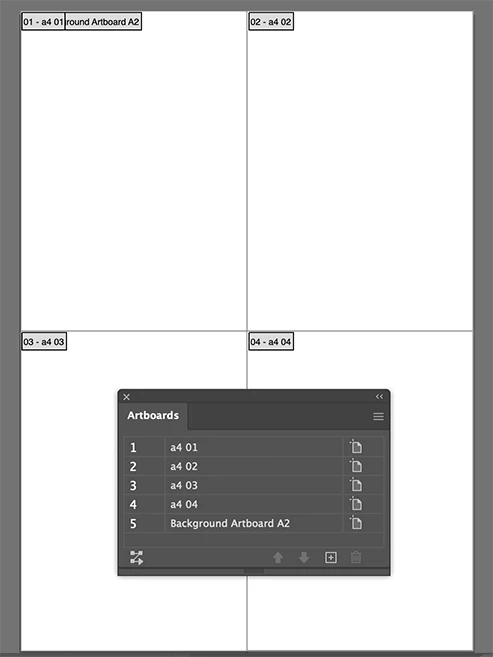
Yes, you can create 4 A4 rectangles and convert each to artboards (Object > Artboards > Convert to Artboards).

You can keep the large artboard too,

Save as PDF

8 replies

Ton Frederiks
Community Expert
Community Expert
May 22, 2020

I did resave my link as a CS6 compatible file.

Translate
Ton Frederiks
Community Expert
Ton FrederiksCommunity ExpertCorrect answer
Community Expert
May 22, 2020

Yes, you can create 4 A4 rectangles and convert each to artboards (Object > Artboards > Convert to Artboards).

You can keep the large artboard too,

Save as PDF

Translate
Participant
May 23, 2020

Brilliant! Thankyou so much, I had a feeling I was over thinking it xD 

Much appreciated 🙂

Translate
Ton Frederiks
Community Expert
Community Expert
May 23, 2020

Good to hear that helped.

Translate