
Participant
October 12, 2019
Question

Exported file off-center
  • October 12, 2019
  • 3 replies
  • 4085 views


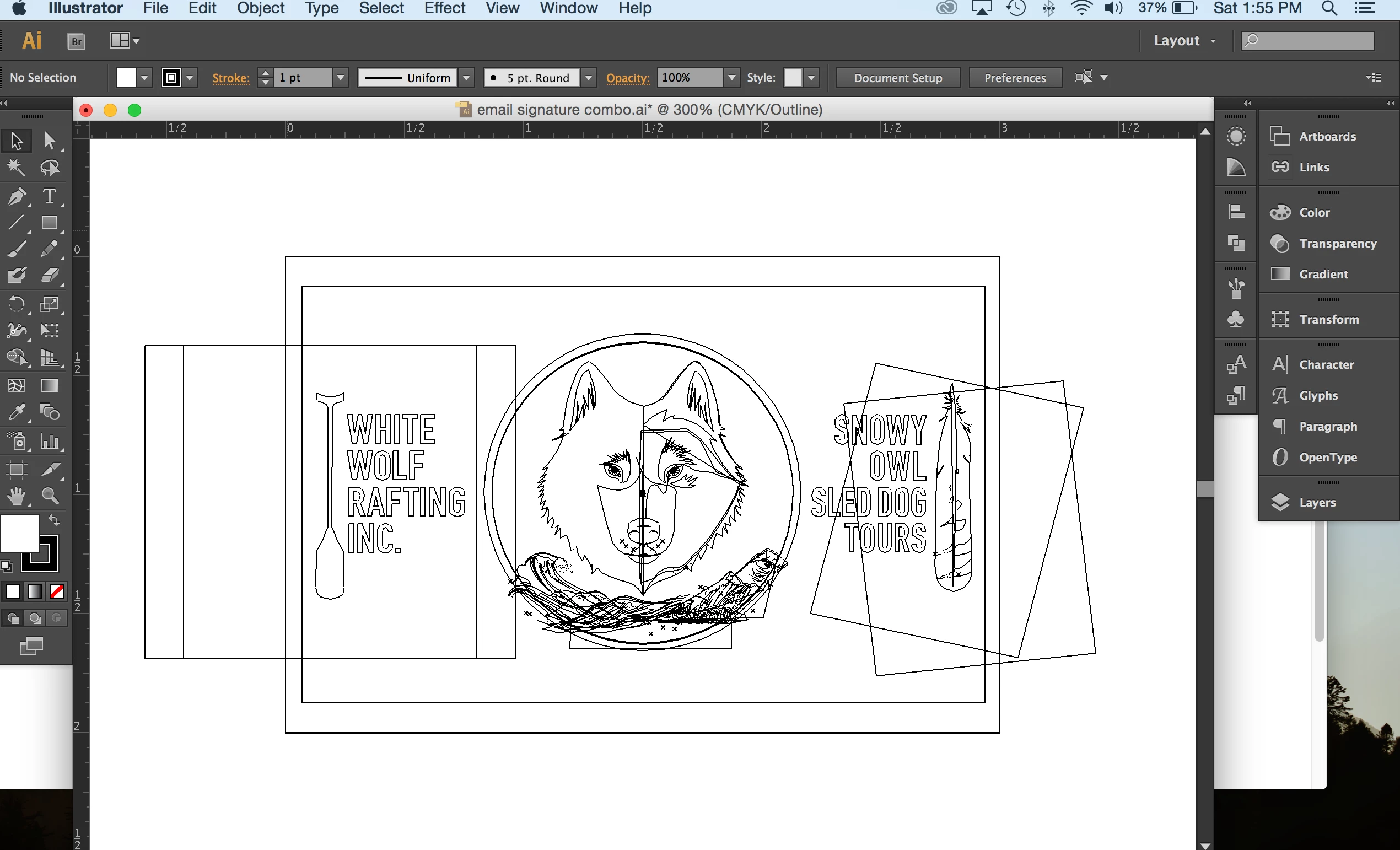
I know that my file is not exporting centered due to the feather and paddle graphics, which extend outside the artboard. These graphics were created with real photographs, and then made into clipping masks, in order to use real life textures on my graphic outlines. How can I make this file export centered? I don't know how. 

    This topic has been closed for replies.

    3 replies

    キィィ─!!!
    Participating Frequently
    October 13, 2019

    taymgreen0, Hello!

    I guess from the attached image,
    Are you confused with "print area" and "artboard"?
    If it is my mistake, I'm sorry.

    Participant
    October 19, 2019

    Hi,


    I screenshot the 'print area' view, as i couldnt figure out why when saving my image it was not centered. I am hoping to use this as an email signature, and when i save it and export it, either with artboard or not, my image is not centered. I figured it was because of these clipping masks which show they are outside the artboard, when viewed in print area mode.


    Any advice?


    Thanks! 

    キィィ─!!!
    Participating Frequently
    October 19, 2019

    taymgreen0, thank you for your reply!
    I think the first thing you need to do is make the artboards right.
    At present, I think your art board is very wide.
    Old illustrator users often make mistakes. The old illustrator art board was the work area, but the current illustrator art board is the finishing area.
    First, use the artboard tool to match the artboard area to the area you want to export.
    Then export in the artboard area.

    tromboniator
    Community Expert
    Community Expert
    October 12, 2019

    Can you not simply crop those images at the artboard line? Select one at a time and choose Crop Image in the Control panel, Properties panel, contextual menu, or Object menu, adjust cropping as needed, and press enter/return to verify.


    Peter

    Participant
    October 19, 2019

    Hi, thanks for the advice. I tried searching the program for 'crop image' and searching the control panel and couldn't find anything. I found 'creat trim marks' but wasnt sure how to apply this to the imge. Can I apply trim marks to the artboard edges perhaps?

    Sorry, could you be more clear, I am new with this program. I really appreciate your help! I am using Illustrator CS6.

    tromboniator
    Community Expert
    Community Expert
    October 20, 2019

    My apologies. I neglected to ask which version you are using. Apparently you do not have the crop function. If you have Photoshop you could crop it there. There may be other applications native to your operating system that offer cropping.


    Peter

    Monika Gause
    Community Expert
    Community Expert
    October 12, 2019

    Check "use artboard" when exporting.

    Participant
    October 12, 2019
    Hi Monika, I did do that as well. It didnt work. I even tried making a clipping mask around the entire work and doing it this way and it did nothing.
    Monika Gause
    Community Expert
    Community Expert
    October 12, 2019
    Maybe the artboard isn't set up correctly.