
Participant
August 5, 2021
Question

Exported Illustrator CMYK JPEG image file turns negative when opened in Photos app on Windows 10

  • August 5, 2021
  • 3 replies
  • 3057 views

I've got an artwork I want to save as JPEG but it turns out negative when i view it in the windows image viewer:
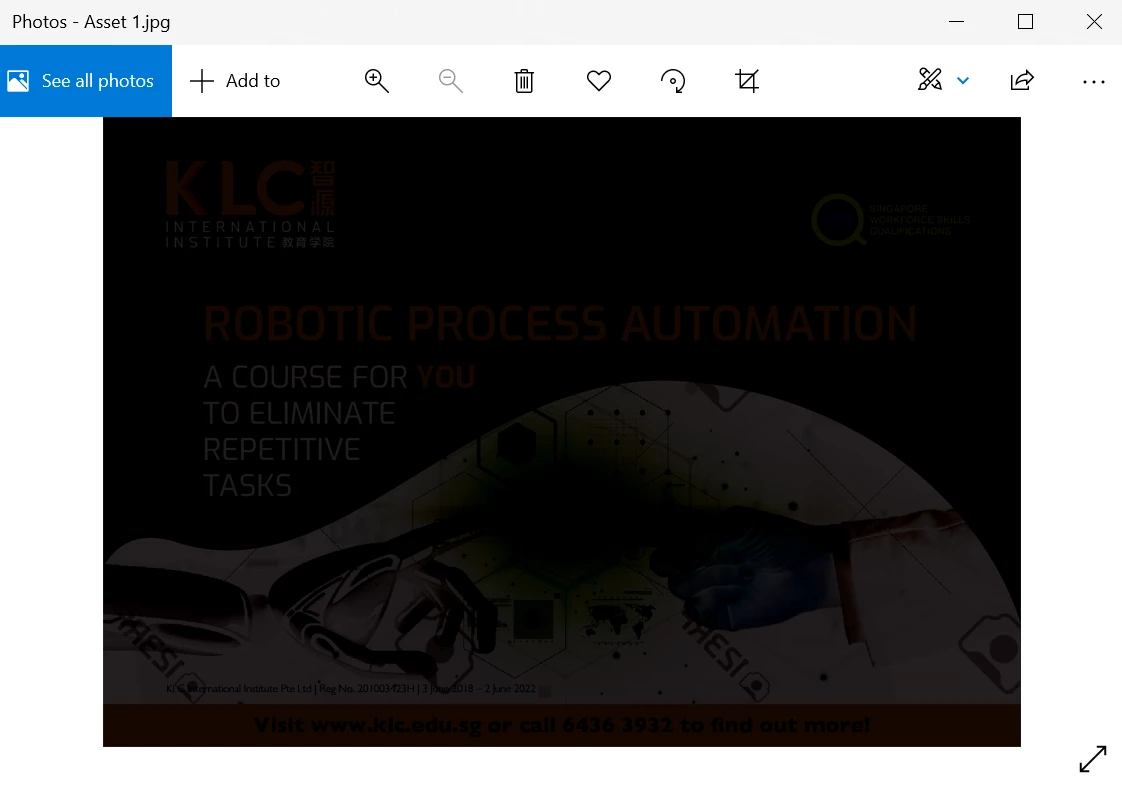

 

I've tried using the "Export to Screen" option and Asset Export but both gives me the same thing. PDF version works fine and is viewable (I blackened out the personal infos): 



I looked up issue relating to this but this doesnt seem to be a problem that anyone faces? Any help would be appreciated, thank you!


{Renamed by MOD}

This topic has been closed for replies.

3 replies

Anshul_Saini
Community Manager
Community Manager
August 24, 2021

Hi there,


Sorry to hear about this trouble. Some users have reported a similar issue. Recently, there was a bug CMYK images turned black while viewing them in the Windows Photos app, but they looked fine in Paint or Windows Photo Viewer apps. I would suggest you try one of these workarounds until it gets fixed by the Microsoft Windows Product team:

  • Export images in RGB as suggested by @Ton Frederiks 
  • If you want to export the images in the CMYK profile only, then uncheck the Embed ICC Profile option.


  • Open the images by default in the Windows Photo viewer app.

Let us know if you need any further assistance; we'd be happy to help.


Thanks & Regards,

Anshul Saini

Ton Frederiks
Community Expert
Community Expert
August 5, 2021

Is it a CMYK Illustrator document? Many apps do not like CMYK jpegs.

If that is the case, convert (temporarely) to RGB before exporting.

Participant
August 24, 2021

I had the same exact probem, and this worked for me.

Thank you!!

John T Smith
Community Expert
Community Expert
August 5, 2021

There are 20 programs in a full subscription, plus other non-subscription programs
Please post the exact name of the Adobe program you use so a Moderator may move this message to that forum

Julia5D10Author
Participant
August 5, 2021

sorry, forgot to mention that this issue is in adobe illustrator