

amandap24849149
Participant
September 6, 2017
Answered

exported png is pixelated - HELP!

  • September 6, 2017
  • 2 replies
  • 13124 views

Every time I try to export this as a png file it ends up pixelated and it's making me crazy.
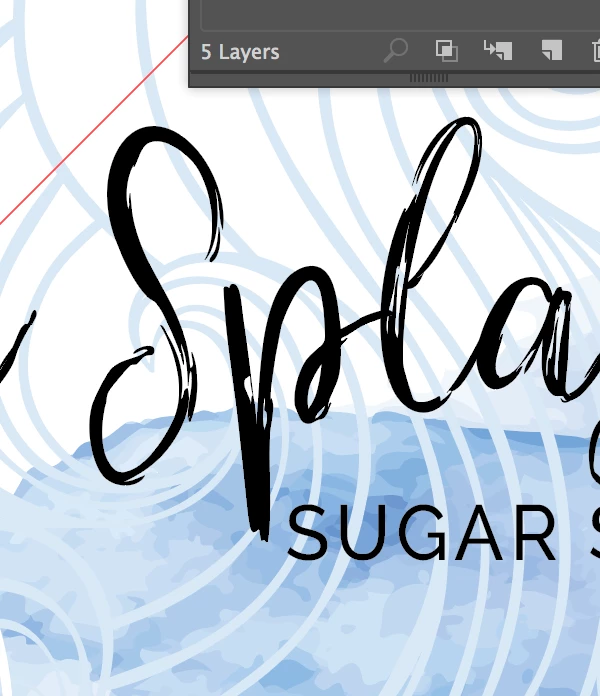
Here it is in Illustrator

Here it is exported.

I have the resolution set to 300.  What is happening??

This topic has been closed for replies.
Correct answer Monika Gause

A PNG is a pixel format, so some pixels should be expected.

You will need to turn on antialiasing.

2 replies

Ton Frederiks
Community Expert
Community Expert
September 6, 2017

How far are you zoomed in in Illustrator?

Check View > Pixel Preview to get a better idea of the resulting export.

Monika Gause
Community Expert
Monika GauseCommunity ExpertCorrect answer
Community Expert
September 6, 2017

A PNG is a pixel format, so some pixels should be expected.

You will need to turn on antialiasing.

Participant
December 27, 2022

How anitialiasing turn on?

Monika Gause
Community Expert
Community Expert
December 27, 2022

What are you doing? Exporting artwork? Or something else? Are there pixel images in your artwork and what is the problem you expect to solve? Just asking because this thread is 5 years old. And also because the answer depends on it.
