Inspiring
March 9, 2023
Answered

exportFile doesn't work with NoUI document

  • March 9, 2023
  • 1 reply
  • 1356 views

trying to create a "NoUI" document and export as SVG like this:


opendoc = app.documents.addDocumentNoUI();
opendoc.exportFile(file, ExportType.SVG);


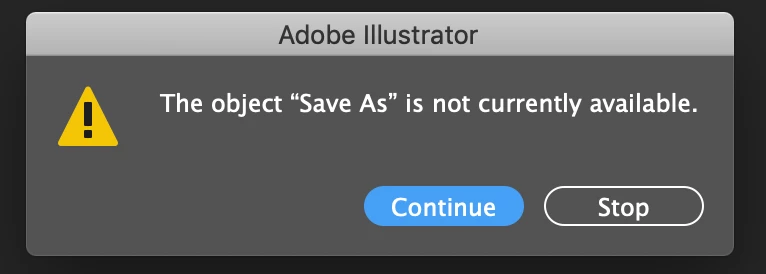
I get this error in AI


I can't think of any other way to export an SVG via script. Obviously there are scripting things that don't work with NoUI documents, but it seems like this one should. Am I doing something wrong?

This topic has been closed for replies.
Correct answer m1b

nice idea! I had some very strange results trying to use it. At first I was getting errors like I expected, but then after tweaking some of the options (filenames, ItemToExport, etc), I was able to get it to work for awhile. But after a couple rounds of tests, it inexplicably stopped exporting anything again. Sometimes erroring, sometimes not. Very strange. Anyway, here's the code that worked for me at one point:

opendoc = app.documents.addDocumentNoUI();
var tempfile = File("~/Desktop/test/test.ai")
  opendoc.saveNoUI(tempfile);
var options = new ExportForScreensOptionsWebOptimizedSVG();
    options.coordinatePrecision = 3;
    options.cssProperties = SVGCSSPropertyLocation.ENTITIES;
    options.fontType = SVGFontType.OUTLINEFONT;
    options.rasterImageLocation = RasterImageLocation.EMBED;
    options.svgId = SVGIdType.SVGIDREGULAR;
    options.svgMinify = false;
    options.svgResponsive = false;

var itemToExport = new ExportForScreensItemToExport();
    itemToExport.artboards = '1';
    itemToExport.document = false;
var tempfile2 = File("~/Desktop/test2/test2.svg");
opendoc.exportForScreens(tempfile2, ExportForScreensType.SE_SVG,options,itemToExport);

FYI, I've found that if I run .saveNoUI() before .exportForScreens() it will throw an error on .exportForScreens(), but if I don't run .saveNoUI() first, it will fail silently. Which doesn't make a lot of sense either.
Anyway, would you be able to try this code and tell me what results you get? I'm very confused by the results I've seen...


Hi @sam272, I tried your script and here's some things I found (after just a few simple tests—not extensive!). Each test performed after a restart of Illustrator app.

1. The export seems to work okay when there is a normal UI document open.

2. If no normal UI docs are open, the script throws Error: an Illustrator error occurred: 129 ('Å')

3. When I comment out "opendoc.saveNoUI(tempfile);" then export works even if there are no normal documents open.

4. When I wrap the code in this:

var dummyDoc = app.documents.addDocumentWithDialogOption("Art & Illustration");
/* ... the script ... */
dummyDoc.close(SaveOptions.DONOTSAVECHANGES);

 to test if it is possible to make it work by having a document open, I got either

(a) an error on dummyDoc.close (disturbing!) but the SVG export worked, or

(b) Illustrator crashed, or

(c) it worked... one time...  I think.


Another thing I noticed: the "NoUI" methods are "private". These methods don't appear in the object model viewer for a Document object. Have a look in the debugger panel in VSCode when you have a document in a variable to inspect. Nothing.


Anyway, I got to be honest here—you are braver than me if you plan to use this NoUI stuff. 🙂 Great to explore though.

- Mark

1 reply

m1b
Community Expert
Community Expert
March 10, 2023

I don't think you are doing anything wrong. Here is a test case, comparing noUI document with UI document, both using the same exportFile and SVGOptions:

(function () {

    testDoc(app.documents.addDocumentNoUI(), 'addDocumentNoUI', 'closeNoUI');
    testDoc(app.documents.addDocumentWithDialogOption("Art & Illustration", false), 'addDocumentWithDialogOption', 'close');

    function testDoc(doc, label, closeMethodName) {

        $.write('export test "' + label + '": ');

        var t = doc.textFrames.add();
        t.contents = label;

        var exportFolder = Folder(Folder.desktop + '/Test/');
        if (!exportFolder.exists)
            exportFolder.create();

        doc.exportFile(exportFolder, ExportType.WOSVG, new ExportOptionsWebOptimizedSVG());

        if (File(exportFolder.fsName + '/' + doc.name + '.svg').exists)
            $.writeln('success!');
        else
            $.writeln('failed: no exported file found.');

        // close
        doc[closeMethodName](SaveOptions.DONOTSAVECHANGES);

    };

})();


Please run this script with no documents open and see what you see in the console. I get this:

export test "addDocumentNoUI": failed: no exported file found.
export test "addDocumentWithDialogOption": success!

 Strange that no errors occur for me. The exportFile call just silently fails for me. I'm running AI 27.3.1 MacOS 13.2.1.


After reading this post, and now yours, I wonder if the No UI Document API is just a stub, with almost no implemented features. I'd love to know if anyone has been using it in production code for anything useful. @Silly-V?

- Mark

sam272Author
Inspiring
March 10, 2023

Thanks for your help! And yea, I get the dialog box error with your script as well. Running AI 24.2.3 MacOS 10.14.6.


From what I've been able to see, most things seem to work properly with NoUI Document, except for some things that kind of make sense for them not work - like app.activeDocument and selectObjectsOnActiveArtboard - and also there are workarounds for those. But I can't think of any workaround way to export an SVG without exportFile. You can save an AI file with saveNoUI but it seems like they forgot about putting in an exportNoUI method.


I'm trying to use NoUI to speed up my workflow where I programmatically create and export large batches of SVGs (according to @Silly-V's tests it could be up to 2x faster than normal). Any ideas for a workaround way to export SVGs?

m1b
Community Expert
Community Expert
March 11, 2023

@sam272 that's interesting! Have you tried exportForScreens? See a script I wrote for this answer for an example of SVG exporting. I'd like to know if that works with the NoUI doc.

- Mark