
HeyThereHowAreYou
Participant
November 28, 2018
Question

Exporting a logo vom Illustrator - Inaccurancies in resolution

  • November 28, 2018
  • 3 replies
  • 420 views

Dear Adobe-forum,

to begin with, thank you for having me!

I am currently getting started with using Illustrator for logo creation and such stuff.

Therefore I rebuilt our companies logo and am experiencing some unforeseeable difficulties.

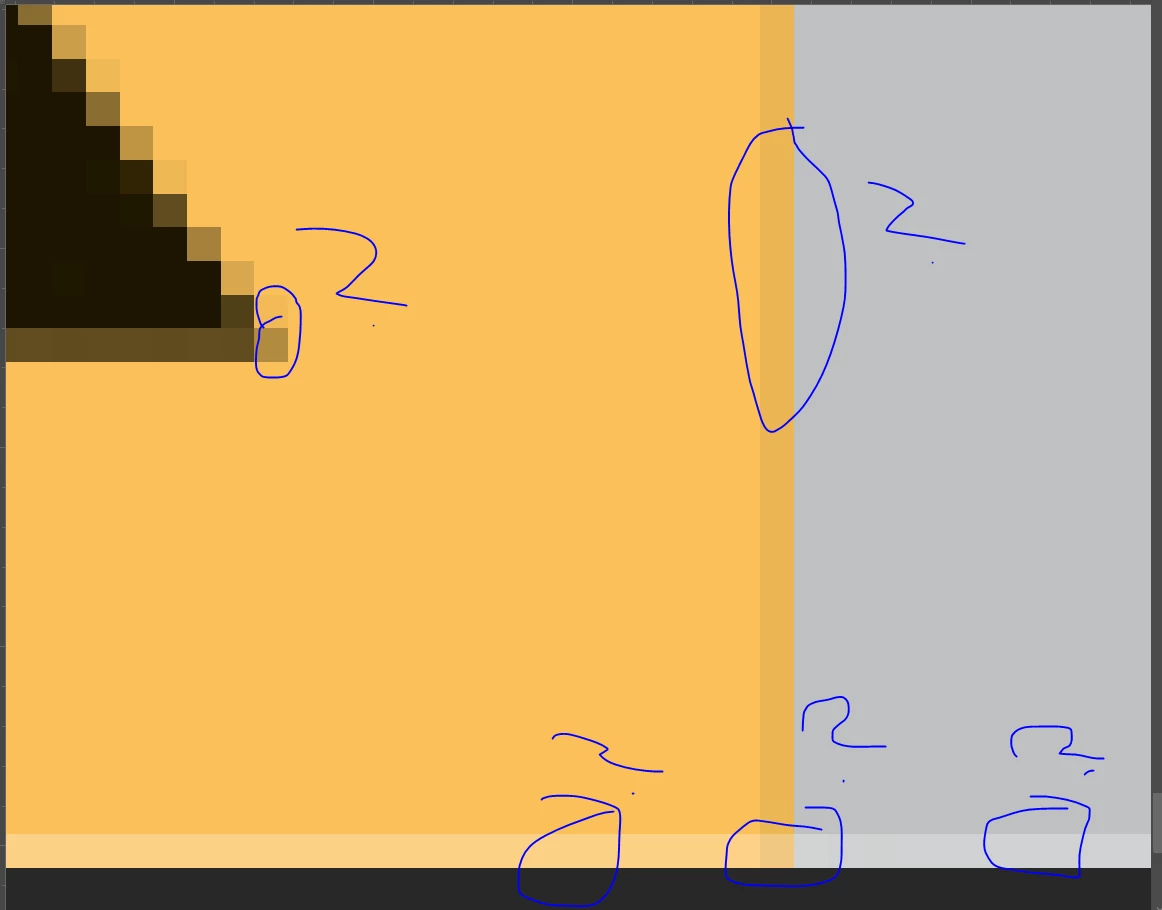
As you can see in the attached screenshot, exporting the logo as an .jpg, I allways get those overlays or inaccurancies.

Is this avoidable? If yes, how?

I am looking forward to your replys!

Thank you very much
    This topic has been closed for replies.

    3 replies

    Inspiring
    November 28, 2018

    Looks like you are seeing anti-aliasing.
    Here's a brief explanation of what that means. 
    Photoshop Elements Help | Aliasing & Anti-aliasing


    And here's a blog post about working with that setting.
    Real World Illustrator: To anti-alias or not to anti-alias? That is the (blurry) question...

    ryan_edwards
    Inspiring
    November 28, 2018

    Doug A Roberts
    Community Expert
    Community Expert
    November 28, 2018

    Are your objects aligned to the pixel grid? Are you creating documents at their intended pixel dimensions?