
Asmaa036
Participating Frequently
August 7, 2024
Question

Exporting black from illustrator to pdf for print is grey

  • August 7, 2024
  • 6 replies
  • 2811 views

I made a black business card cmyk (75 , 68 , 67 , 90) 

I saved it in jpg it came out rich black.

My client wanted it in pdf format to easily print it 

At first the pdf showed the rich black as dark grey 

Until i solved the problem from illustrator itself i saved the pdf as follows :
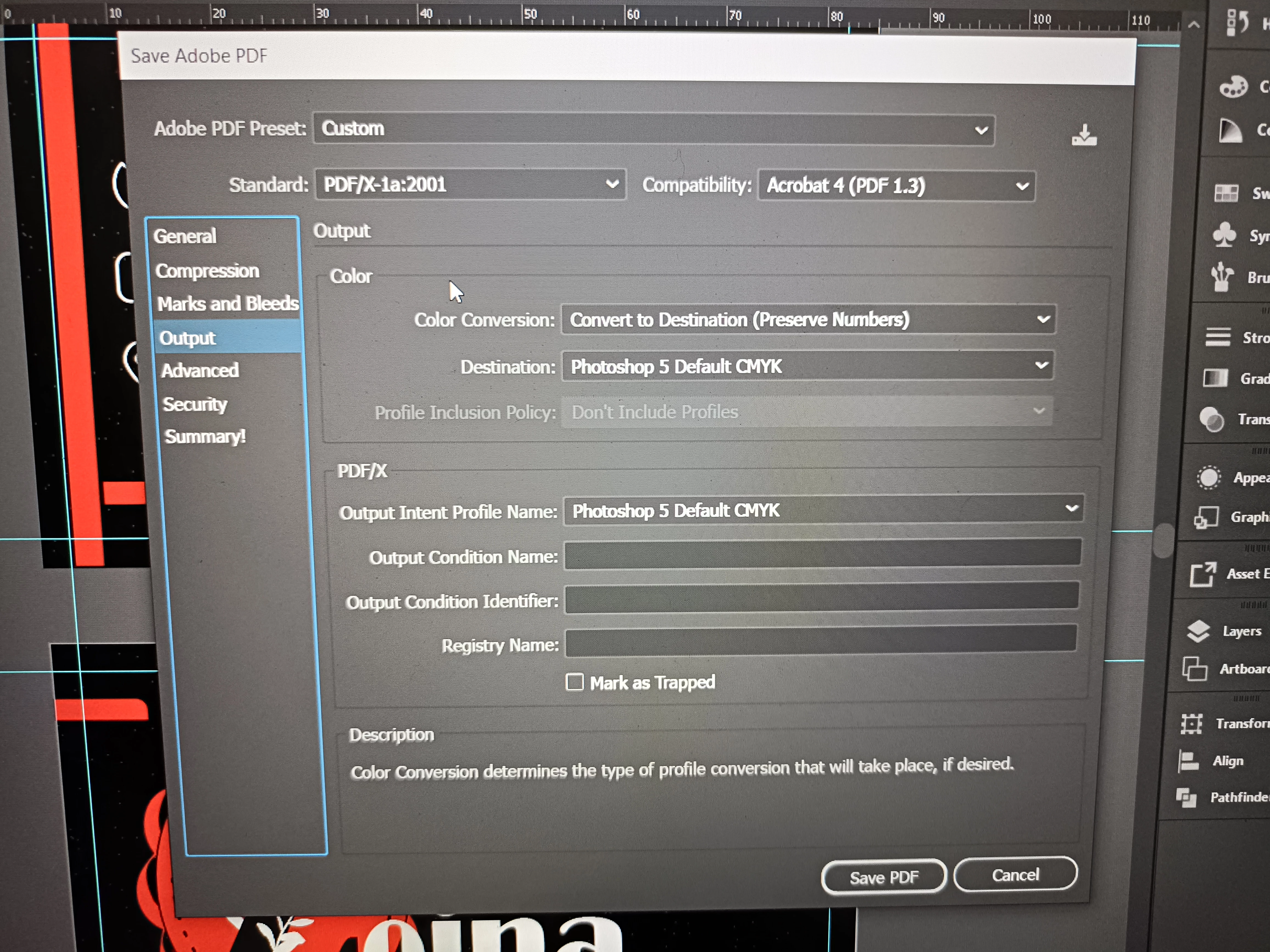
Standard: PDF/X-1a:2001 

Output> Color conversation: convert to destination (preserve numbers)

Destination: Photoshop 5 Default cmyk 


The pdf showed the card in rich black as intended 

But when i tried to print it, it came out as dark

grey how can i fix this ??? 

(I chose "let the printer determine colors" and "Discoloured background correction") 
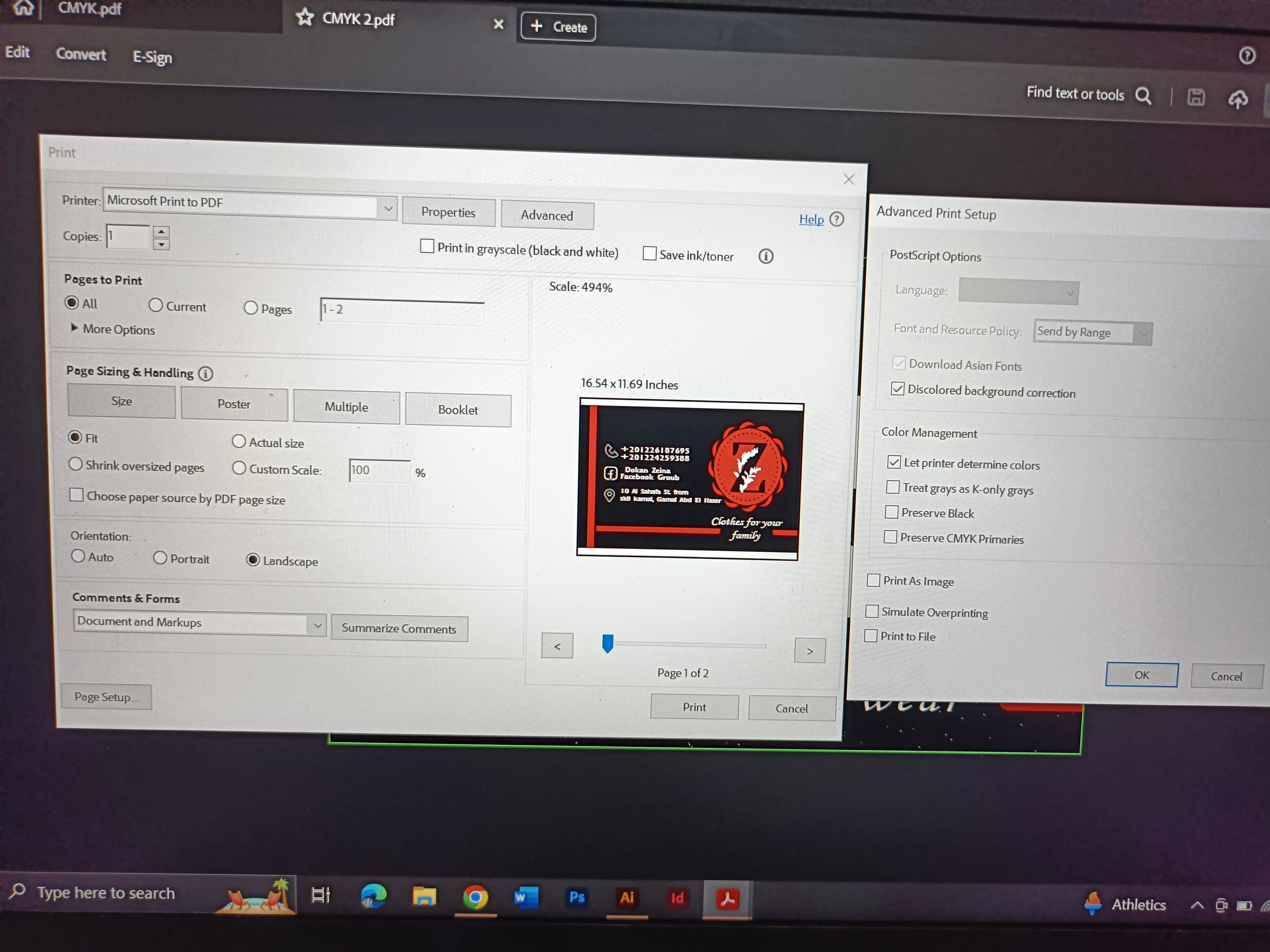
I attached a pic of the card 

I tried explaining everything as possible i have a deadline so i need help urgently, please !

This topic has been closed for replies.

6 replies

Inspiring
August 9, 2024
quote

black business card cmyk (75 , 68 , 67 , 90) 

That's exactly the problem. Try CMYK= 30/30/25/100.

Community Expert
August 9, 2024

There isn't anything wrong with a C:75, M:68, Y:67, K:90 mix for a rich black. That's a standard "300%" total ink mixture. If the original poster is running into technical problems trying to get that ink mixture to work they would have the same problem trying to use C:30, M:30, Y:25, K:100.

Inspiring
August 12, 2024

It is difficult to achieve deep black without using 100% K. 90% K is just dark gray. Of course I agree with all the above comments. However, a reasonable build of black is the basis from which I would start.

Ton Frederiks
Community Expert
Community Expert
August 7, 2024

And why Photoshop 5 default CMYK? That was used before Photoshop started using color management with ICC profiles.

Asmaa036
Asmaa036Author
Participating Frequently
August 7, 2024

I read it in acrobat or illustrator community as a solution to show rich black as it is in pdf 


Jacob Bugge
Community Expert
Community Expert
August 7, 2024

Asmaa,


I believe that the Advanced Setting "Let printer determine colors" can only make matters (even) worse, the two alternative options "Preserve ..." at least correspond to your intention of preserving the black.


And why Microsoft Print to PDF in the first place?

Asmaa036
Asmaa036Author
Participating Frequently
August 7, 2024

I will try your suggestion i didn't know it could make it worse 

As i said my client wanted the file in pdf format in order to print it 

Monika Gause
Community Expert
Community Expert
August 7, 2024

THe final art should be a PDF.

In order to prevent black getting rich black when exporting to pixel formats, in the preferences > Appearance of black turn off "Output all blacks as rich black" for exporting and display.

Asmaa036
Asmaa036Author
Participating Frequently
August 7, 2024

I intentionally made the design with rich black and i have these settings set up "output black as rich black"

When i finished i saved it as pdf in order to print as my client requested but it was printed dark grey 

Community Expert
August 7, 2024

Did you create the card design in Illustrator? Is the artwork vector-based? If so, it doesn't make any sense at all to export a copy of the artwork in JPEG format and then put that JPEG image inside a PDF. It's no wonder the rich black values are getting lost. Not only that, but the print quality is probably going to be soft rather than razor sharp, due to the pixels rather than vectors.


A business card like that should be created as a CMYK-based Illustrator document. The vector objects will be preserved, as will the rich black ink settings. Usually saving a PDF with Illustrator's default settings (which typically append Illustrator data to the PDF file) will deliver the best results. That's what I use in large format printing.

Asmaa036
Asmaa036Author
Participating Frequently
August 7, 2024

I don't know if i can add these info after already posting but 

Yes it was created with illustrator and the art is vector based. 

The jpeg format is only to show the original design.

i made 2 pdf files (one with the default settings and one with the settings i sent above) 

And i repeat i only made this unnecessary step to show the client the original design correctly in pdf.

Monika Gause
Community Expert
Community Expert
August 7, 2024

I think you need to learn about printing. And color management.

How was this printed? In Offset or on an office printer?


If you set your appearnace of black to rich black then you will never see what happens. 

John T Smith
Community Expert
Community Expert
August 7, 2024

You need to ask program questions in the forum for the program you are using
To ask in the forum for your program please start at https://community.adobe.com/
Moving from Using the Community (which is about the forums) to the correct forum

Asmaa036
Asmaa036Author
Participating Frequently
August 7, 2024

I'm using illustrator and acrobat. Which community should i ask on ?