morganab83119868
Participant
June 5, 2020
Answered

Exporting file with gradient (color to opacity) from Ai to PNG

  • June 5, 2020
  • 1 reply
  • 3788 views

Hi!

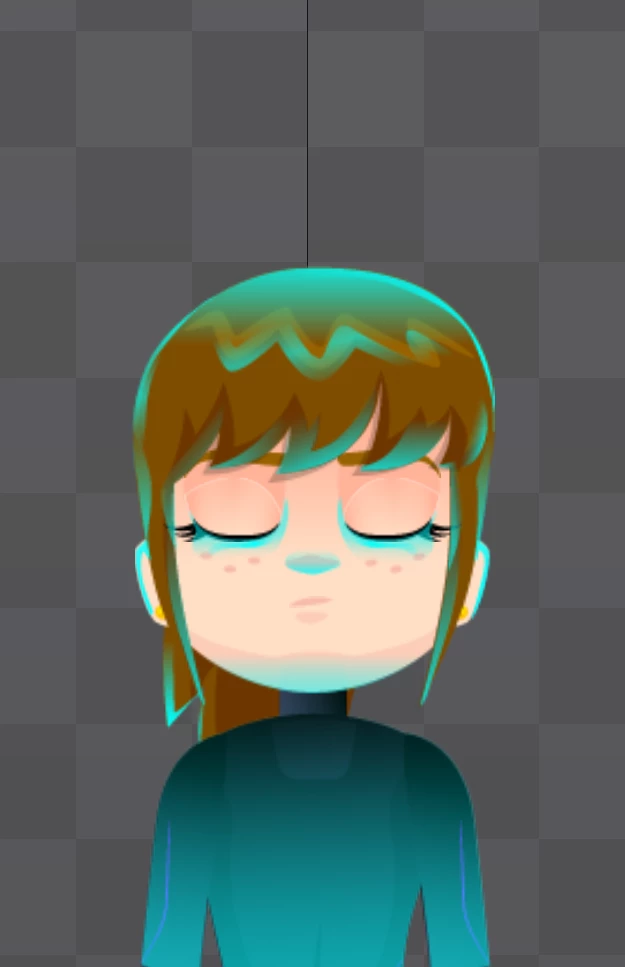
I'm working with a character in Ai and she needs a light on her body going from cyan to transparency. I need to export most of her body parts in different layers, including this light. The issue is when I export the layer to png, it doesn't look the same. I've also tried from PSD to PNG-8, PNG-24, exporting for web, but still not the same.

In Ai didn't apply any kind of effect, apart from the gradient


Please help! 😞


To the left, the file in Ai, and the right, the character with its layers in PNG

This topic has been closed for replies.
Correct answer Mylenium

It simply looks like you are using some blending mode, which of course will be lost when you export the layer separately because the underlying pixels that determine the result of the blending operation chnage or disappear entirely. That's just math. If that's indeed the case, you need to forego such trickery and re-create the effect using normal mode or by manually flattening the blending operatrion against whatever color you deem appropriate.


Mylenium

1 reply

Mylenium
MyleniumCorrect answer
Legend
June 5, 2020

It simply looks like you are using some blending mode, which of course will be lost when you export the layer separately because the underlying pixels that determine the result of the blending operation chnage or disappear entirely. That's just math. If that's indeed the case, you need to forego such trickery and re-create the effect using normal mode or by manually flattening the blending operatrion against whatever color you deem appropriate.


Mylenium