
Known Participant
December 4, 2017
Answered

Exporting Selections With Transparency

  • December 4, 2017
  • 4 replies
  • 40726 views

Hi,

I've been having trouble figuring out how to export selections from an Illustrator file with a transparent background.

Exporting is now defaulting to a white background.

For texts blocks with enclosed characters (e.g. o, d, q) this is a problem.

I tried to reset the artboard options, but the preference is not there.

Any advice would be great.

Thanks

Matt
    This topic has been closed for replies.
    Correct answer Doug A Roberts

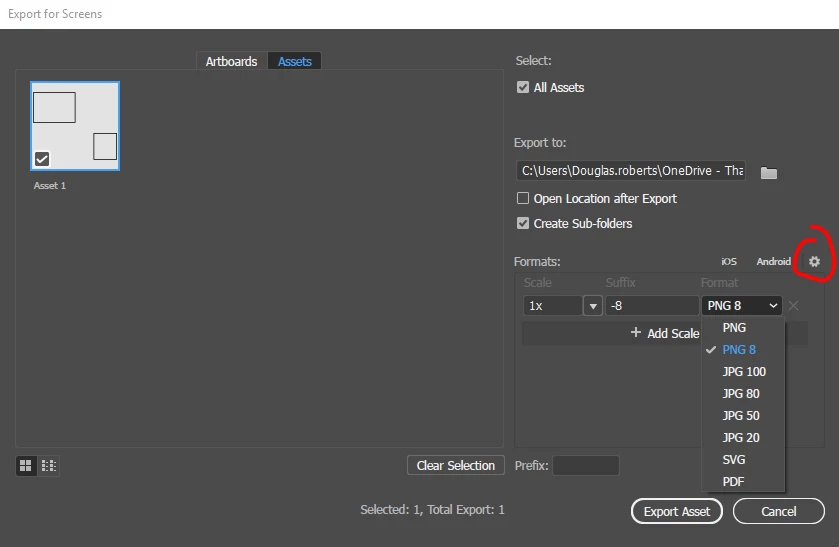
    when you select 'export selection', you get the asset export screen, correct? where you set the formats you want to export, there's a drop-down list of presets. to adjust the options for those, click on the little gear symbol:

    4 replies

    Known Participant
    December 6, 2017

    Hi Douge,

    Yes, that is it!!

    I can't believe I missed that.

    Thanks so much!

    Matt

    Participant
    July 1, 2020

    I had this issue too today -- it was so frustrating to find this out, as I spent hours debugging my website and backend thinking the transparency had been lost there.   Adobe, you have to make this option easier to find (not hidden in a tiny wheel)!

    Known Participant
    December 5, 2017

    Hi Douge,

    Thanks very much.

    The only problem is that when I select items apart from other items on an artboard, I can't seem to find the same export options.

    Doug A Roberts
    Community Expert
    Doug A RobertsCommunity ExpertCorrect answer
    Community Expert
    December 5, 2017

    when you select 'export selection', you get the asset export screen, correct? where you set the formats you want to export, there's a drop-down list of presets. to adjust the options for those, click on the little gear symbol:

    Known Participant
    December 5, 2017

    Hi,

    I'm using Adobe Illustrator CC 2017

    I select multiple objects (lines, circe, text), right-click, then export those together.

    I normally export as a png file for illustrator images.

    Normally I've not had a problem with the background.

    It has always exported with a transparent background.

    I'm not sure how to fix this.

    Here are two screenshots

    Doug A Roberts
    Community Expert
    Community Expert
    December 5, 2017

    what export settings are you using? for example...

    Monika Gause
    Community Expert
    Community Expert
    December 4, 2017

    Which version, which system?

    How exactly are you exporting?

    Which file format are you exporting?

    Can you show a screenshot? AI file, export dialog, result