Participant
November 14, 2019
Answered

Exporting to SVG via script changes your file name

  • November 14, 2019
  • 1 reply
  • 881 views

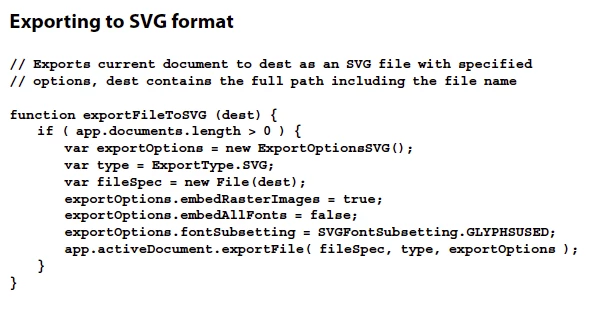
Using the example code for exporting to SVG via javascript that is in the SDK manual, the file name of the working document is changed to a .SVG (which is really annoying). If you call File-Export As and use the menu, the behavior is that you get the SVG, but your current working file is not renamed (remains a .ai file). This is much more desirable behavior. Can you please change the javascript call to be the same as the menu commands?


To reproduce, use the code attached in the photo. See that your current file is now changed to a .svg instead of a .ai. 


This topic has been closed for replies.
Correct answer Inventsable

Hi, what version of Illustrator are you running? I don't get this behavior:


function exportFileToSVG(path) {

  // Replace current file extension with .svg
  var name = app.activeDocument.name.replace(/\.[\w]*/, ".svg");

  // Then export file without modifying the activeDocument (desired behavior)
  app.activeDocument.exportFile(
    new File(path + name),
    ExportType.WOSVG,
    new ExportOptionsWebOptimizedSVG()
  );
}


 I personally really dislike the Javascript PDF guide you're quoting, and tend to use ai.aenhancers as my go to reference and guide because it's far more convenient, easily searchable, has better examples, and is a lot more beginner friendly.

1 reply

Inventsable
InventsableCorrect answer
Legend
November 15, 2019

Hi, what version of Illustrator are you running? I don't get this behavior:


function exportFileToSVG(path) {

  // Replace current file extension with .svg
  var name = app.activeDocument.name.replace(/\.[\w]*/, ".svg");

  // Then export file without modifying the activeDocument (desired behavior)
  app.activeDocument.exportFile(
    new File(path + name),
    ExportType.WOSVG,
    new ExportOptionsWebOptimizedSVG()
  );
}


 I personally really dislike the Javascript PDF guide you're quoting, and tend to use ai.aenhancers as my go to reference and guide because it's far more convenient, easily searchable, has better examples, and is a lot more beginner friendly.

carolynuyAuthor
Participant
November 20, 2019

This worked great! Thanks Inventsable!