Participant
January 29, 2025
Answered

[ExtendScript] Illustrator- How to Shear a text

  • January 29, 2025
  • 2 replies
  • 233 views

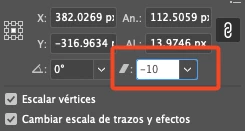
I’ve been trying for several days to apply shear to text using ExtendScript, but I haven’t been able to get any results. In the GUI, I simply change the value to 7, and that’s it. However, I can’t find a way to do it in the code. This is the property that I want to use with ExtendScript


Correct answer Charu Rajput

Hi @Jaime33551855kfcj - Please try the following


function applyShearTransform(value) {
    actionString = [
        '/version 3',
        '/name [ 5',
        '	5365742031',
        ']',
        '/isOpen 1',
        '/actionCount 1',
        '/action-1 {',
        '	/name [ 5',
        '		5368656172',
        '	]',
        '	/keyIndex 0',
        '	/colorIndex 0',
        '	/isOpen 1',
        '	/eventCount 1',
        '	/event-1 {',
        '		/useRulersIn1stQuadrant 0',
        '		/internalName (ai_plugin_transformPalette)',
        '		/localizedName [ 15',
        '			5472616e73666f726d2050616e656c',
        '		]',
        '		/isOpen 1',
        '		/isOn 1',
        '		/hasDialog 0',
        '		/parameterCount 2',
        '		/parameter-1 {',
        '			/key 1954115685',
        '			/showInPalette 4294967295',
        '			/type (enumerated)',
        '			/name [ 6',
        '				53686561723a',
        '			]',
        '			/value 4',
        '		}',
        '		/parameter-2 {',
        '			/key 1986096245',
        '			/showInPalette 4294967295',
        '			/type (unit real)',
        '			/value ' + value.toFixed(1),
        '			/unit 591490663',
        '		}',
        '	}',
        '}'
    ].join('\n')
    var f = new File(Folder.desktop + "/shear.aia");
    if (f.exists) {
        f.remove();
    }
    f.open('w')
    f.write(actionString)
    f.close()
    app.loadAction(f)
    app.doScript('Shear', 'Set 1')
    app.unloadAction('Set 1', '');
    f.remove();
}

applyShearTransform(7);



2 replies

Charu Rajput
Community Expert
Charu RajputCommunity ExpertCorrect answer
Community Expert
January 29, 2025

Hi @Jaime33551855kfcj - Please try the following


function applyShearTransform(value) {
    actionString = [
        '/version 3',
        '/name [ 5',
        '	5365742031',
        ']',
        '/isOpen 1',
        '/actionCount 1',
        '/action-1 {',
        '	/name [ 5',
        '		5368656172',
        '	]',
        '	/keyIndex 0',
        '	/colorIndex 0',
        '	/isOpen 1',
        '	/eventCount 1',
        '	/event-1 {',
        '		/useRulersIn1stQuadrant 0',
        '		/internalName (ai_plugin_transformPalette)',
        '		/localizedName [ 15',
        '			5472616e73666f726d2050616e656c',
        '		]',
        '		/isOpen 1',
        '		/isOn 1',
        '		/hasDialog 0',
        '		/parameterCount 2',
        '		/parameter-1 {',
        '			/key 1954115685',
        '			/showInPalette 4294967295',
        '			/type (enumerated)',
        '			/name [ 6',
        '				53686561723a',
        '			]',
        '			/value 4',
        '		}',
        '		/parameter-2 {',
        '			/key 1986096245',
        '			/showInPalette 4294967295',
        '			/type (unit real)',
        '			/value ' + value.toFixed(1),
        '			/unit 591490663',
        '		}',
        '	}',
        '}'
    ].join('\n')
    var f = new File(Folder.desktop + "/shear.aia");
    if (f.exists) {
        f.remove();
    }
    f.open('w')
    f.write(actionString)
    f.close()
    app.loadAction(f)
    app.doScript('Shear', 'Set 1')
    app.unloadAction('Set 1', '');
    f.remove();
}

applyShearTransform(7);


Best regards
RobOctopus
Inspiring
January 29, 2025

I do not think this is possible in a simple way from Extendscript.


I do however think you can do this by making a one-time action to load via scripting, using the action to shear, then deleting it. Untested, but just my hunch