



JSpisak
Participating Frequently
April 20, 2026
Question

Extreme File Sizes with Linked Raster Images

  • April 20, 2026
  • 3 replies
  • 185 views

Last week, I ran into what seems to be massive file bloat when I am saving files with linked raster images that’s making my files completely unusable. These are stable, well-tested files that weren’t a problem previously. It’s happened with other files recently, but this time I did some testing.


This particular workflow that I’ve been using for years is for wallpaper, where panels are 25” wide at variable heights. I keep a library of prepped pattern tiles that get imported into the Illustrator file and tiled to fill the height and width of the full panel count. These are a mix of vector and raster at various sizes.


Depending on material, there are two layouts - overlap (panels overlap the previous by 0.75”) and buttseam (panels meet at the edges). Initial setup for overlap has one artboard for each panel where they lay over each other to pull bleed and overlap from the neighboring panel. Buttseam has 2 panels per artboard which are right next to each other so that bleed comes from the neighboring panels. They’re saved to pdf with a specific preset.
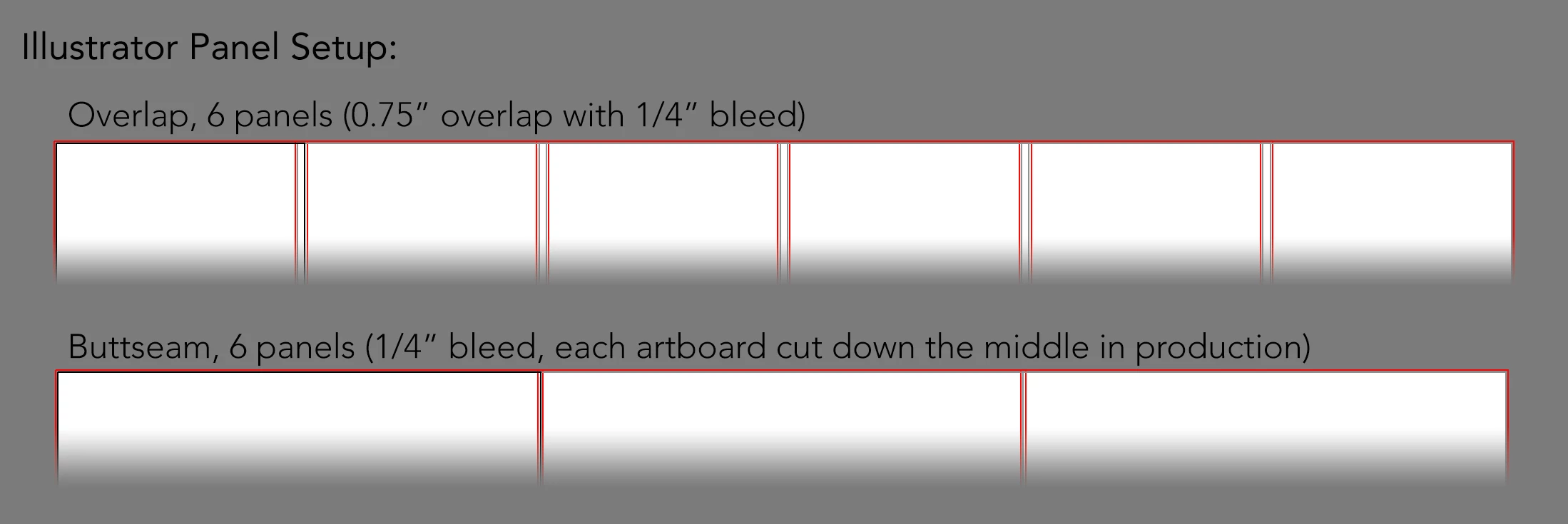
Visual for the panel/artboard layouts


These pdfs are then imported into InDesign templates. This step:

1) Gives the panels registration dots for cutting that match a premade library of die files.

2) Cuts off the excess length of the crop marks from Illustrator.

3) Places the overlap setup in a 2-up format for the printers.


For this job, InDesign refused to import my PDF from Illustrator. It was then that I saw my PDF was a whopping 3.38 GB in Finder. An older job file from May of 2025 that’s from Illustrator version 29.5 is 192 MB - same linked jpg, same panel height, same panel count as the current job. So, I ran a test in Illustrator 2025 (now 29.8 after updates), and it was also 3.38 GB. Then I tried Illustrator 2024 (28.7) and got 189 MB.
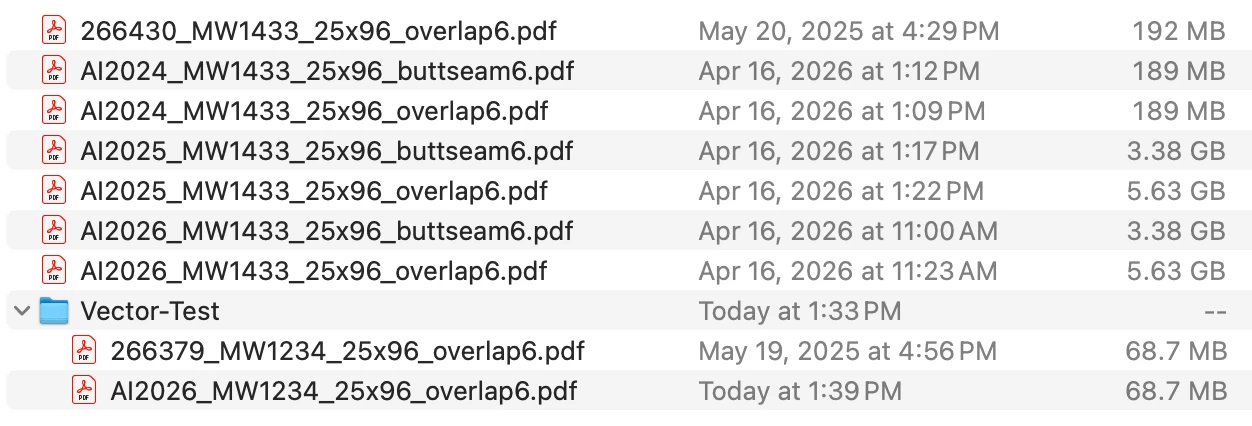
Old job file plus version tests for the same raster pattern (plus vector test)


I also tested this with a vector pattern for which I found an older file from the same timeframe, and the new file was exactly the same size as older one. So, this just seems to be the raster files, and I’m seeing this drastic rise in file size between my 29.5 and 29.8 versions. Did something change in the way files are saved in the updates to 2025 that’s carrying through to 2026?


Notes:

Raster files all use the same linked jpg: 75” x 47.28” at 150ppi; 89.4mb in Finder

All of the tests were saved with the same pdf preset.

All of the files were created on the same machine - iMac (2020) on Sequoia 15.7.4

    3 replies

    Community Expert
    April 23, 2026

    If the artwork is repeating is it possible to set up the tiling work in the RIP/printing application rather than manually putting the pattern together? I’m guessing the PDF that is being created is embedding multiple copies of the same image as if they’re separate images. Note: this reply got moved out of the discussion tree where it was meant to be located.

    JSpisak
    JSpisakAuthor
    Participating Frequently
    April 23, 2026

    Our current one doesn’t. I sent a bunch of files to another company as a test, and they were unsuccessful. We’re in the process of a slow move to another, and I don’t know yet if it will be able to do it. The hangup for the RIPs seems to largely be the overlap, but I’m stuck with that.


    And yes, I’m sure that’s exactly what it’s doing. There are mural designs as well, and I have to cut those down into panel-sized chunks, fully separated, or they won’t go through the RIP. Prior to finding the difference in file sizes between versions, I cut this pattern down that way and only repeated vertically, just to get the job out the door. This hasn’t been a problem with the patterns until recently. They’re much smaller than the murals and touch fewer panels.

    Community Expert
    April 24, 2026

    I wonder what kind of RIP the printing company is using. At my workplace Onyx Thrive is our primary RIP application; it controls four large format printers (we have RasterLink Pro running on a Mimaki flatbed printer). It’s pretty easy to set up printing tiles, adjust overlap, etc. in Onyx.

    Anubhav M
    Community Manager
    Community Manager
    April 21, 2026

    Hello ​@JSpisak 


    I’m sorry to hear about your experience. Would you mind sharing a sample packaged AI file along with screenshots of the export settings used and the file size after the export, so we can check this with the team?
     

    Looking forward to hearing from you.
    Anubhav

    JSpisak
    JSpisakAuthor
    Participating Frequently
    April 21, 2026

    Thank you. I sent a dropbox link to your messages.

    Anubhav M
    Community Manager
    Community Manager
    May 5, 2026

    Hello ​@JSpisak 


    I tried to replicate this behavior on my end with the shared image but could not. Would you mind trying to manually reset Illustrator's preferences and checking if it helps:


    • Close all Adobe applications.

    • Go to the following locations

    • ~/Library/Caches

    • ~/Library/Application Support/Adobe

    • ~/Library/Preferences

    • Rename Adobe Illustrator, com.adobe.illustrator and Adobe Illustrator 30 Settings folders to Adobe Illustrator.old, com.adobe.illustrator.old and Adobe Illustrator 30 Settings.old

    • Launch Illustrator from the Creative Cloud.


    Note: Location starting with this "~" sign indicates the User Library, which is hidden. So, you need to copy & paste the exact path in spotlight search or from Finder Menu > Go > Go to Folder > Paste the location in the dialog box like this:


    Disclaimer: Please note that renaming preferences folders will remove all the custom settings, and Illustrator will launch with default settings. You can also save a backup of the folders in case you want to. The location is mentioned above.


    Looking forward to hearing from you.
    Anubhav

    Community Expert
    April 21, 2026

    Are the PDF files being saved with the preserve Illustrator editing capability setting checked on? That setting appends Illustrator data to the PDF. It's also possible it may embed images into the document rather than link them. If the images get embedded they may be saved in "inflated" form, either uncompressed or lossless compressed. Either way, they'll consume more disc space than the original JPEG image. The document's raster effects setting can affect file sizes.

    JSpisak
    JSpisakAuthor
    Participating Frequently
    April 21, 2026

    Yes, Illustrator editing is on. There are times I need to change or check those files, so it’s part of the pdf preset they all share. And, it’s been in place for years, so it would also be on the older job file with the 2025 timestamp. I don’t know why it would make so much of a difference from Illustrator 2024/early 2025 to Illustrator 2026/late 2025.

    Community Expert
    April 22, 2026

    I’m not sure what has been changed between Illustrator versions 2024 to 2026 (v28 vs v30). I can recall seeing somewhat similar file size behavior with exported PDF files in previous versions of Illustrator -although I haven’t seen something as extreme as a file size going from 198MB to over 3GB.

    My own remedy for the problem is to keep the original Adobe Illustrator .AI file as the master file. Copies that I save in PDF are typically meant for large format printing/cutting work; it’s not necessary for those PDF files to be editable so I remove the Illustrator Editing Capability setting (which removes the Illustrator data and cuts down the file size). I’ll embed any linked images before saving the PDF file and either use lossless LZW compression or high JPEG compression settings for the images when they’re saved in the PDF.

    As I said earlier, the document raster effects settings in the Illustrator file can make a giant impact on file sizes. Elements like live drop shadows will be turned into raster images in the PDF. An Illustrator layout in a large format size, but with a default document raster effects setting of 300ppi will create huge file sizes. In large format a 300ppi setting is sheer overkill. Settings like 150ppi or 72ppi would be more appropriate. Certain projects, like billboard faces, have to be produced in scale rather than full size. The raster effects setting has to be adjusted for that.