DRock22
Inspiring
January 12, 2021
Answered

Eyedropper tool missing

  • January 12, 2021
  • 15 replies
  • 16522 views

Wondering if anyone else is having this issue with the latest Illustrator update (25.1) on windows 10. 
My eyedropper tool is completely gone. When I go to edit the toolbar, the eyedropper tool does not show up in the list. I can't even use the keyboard shortcut to activate it. 
Correct answer HeatherS87

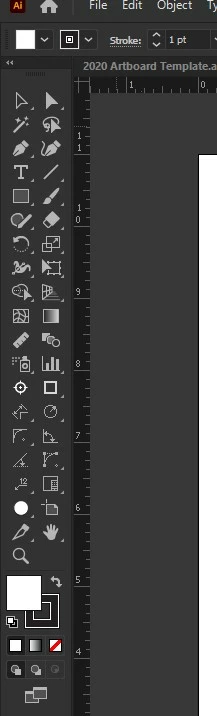
I can't upload their PDF file with instructions, so I'm uploading a jpg of it, and including the text from the workaround here.


The mentioned plugins reside in C:\Program Files\Adobe\Adobe Illustrator 2021\Plugins\
Esko\Data Exchange\Inspection Setup and C:\Program Files\Adobe\Adobe
Illustrator 2021\Plug-ins\Esko\Notes


15 replies

Monika Gause
Community Expert
Community Expert
January 14, 2021

Do you all have third party plugins installed?

Participant
January 14, 2021

Only Esko. However, I deleted and reinstalled it. Still no eyedropper.

Monika Gause
Community Expert
Community Expert
January 15, 2021

What happens when youuninstall it - is the eyedropper then present?


Is Esko already compatible for that version?

Participant
January 14, 2021

I am also having this issue.

Participating Frequently
January 14, 2021

I am having the same issue with this newest update (25.1)

DRock22
DRock22Author
Inspiring
January 14, 2021

Finally someone else! So I'm not going crazy! 

Participant
March 24, 2021

mine too, the eyedropper is gone and I'm going crazy this tool is missing now.

DRock22
DRock22Author
Inspiring
January 14, 2021

Well, the eyedropper tool is gone again... 

Monika Gause
Community Expert
Community Expert
January 14, 2021

Did you already reboot the computer?

What happens when you go to Window > Tools > Advanced?

What happens when you reset the preferences. This will erase yll your settings: https://helpx.adobe.com/illustrator/using/setting-preferences.html

DRock22
DRock22Author
Inspiring
January 14, 2021

Yes, I have rebooted the computer. I've rolled back Illustrator to the previous version (which doesn't have this issue), and re-updated Illustrator. The first time Illustrator opens after updating, the eyedropper tool is there. After reboot, it's gone.
The tools are already in avanced mode. The screen shot in in the "default" advanced mode. No eyedropper and the tools are not grouped together the same either (measure tool and inspection setup which are usually grouped with the eyedropper). 
I have reset the prefrences and I still get the same problem. The first time Illustrator opens after updating, the eyedropper tool is there. After reboot, it's gone. 

Monika Gause
Community Expert
Community Expert
January 12, 2021

So when you go to Window> Tools > Advanced, the eyedropper still does not appear?

Did you reset the preferences when updating?

DRock22
DRock22Author
Inspiring
January 12, 2021

No, it was not showing up at all. And no, I didn't reset the prefrences. I ended up rolling back to the previous version of Illustrator and then updating again and it fixed the problem. This site wouldn't let me edit or delete this post. 

Monika Gause
Community Expert
Community Expert
January 12, 2021

Thank you for the information.

Please mark your own answer as the solution. It will help others.