


watermelon5
Inspiring
Oct 6, 2024 3:20 PM UTC
Answered

Eyedropper tool not picking up colors

I've checked the eyedropper tools settings and it is set as follows:
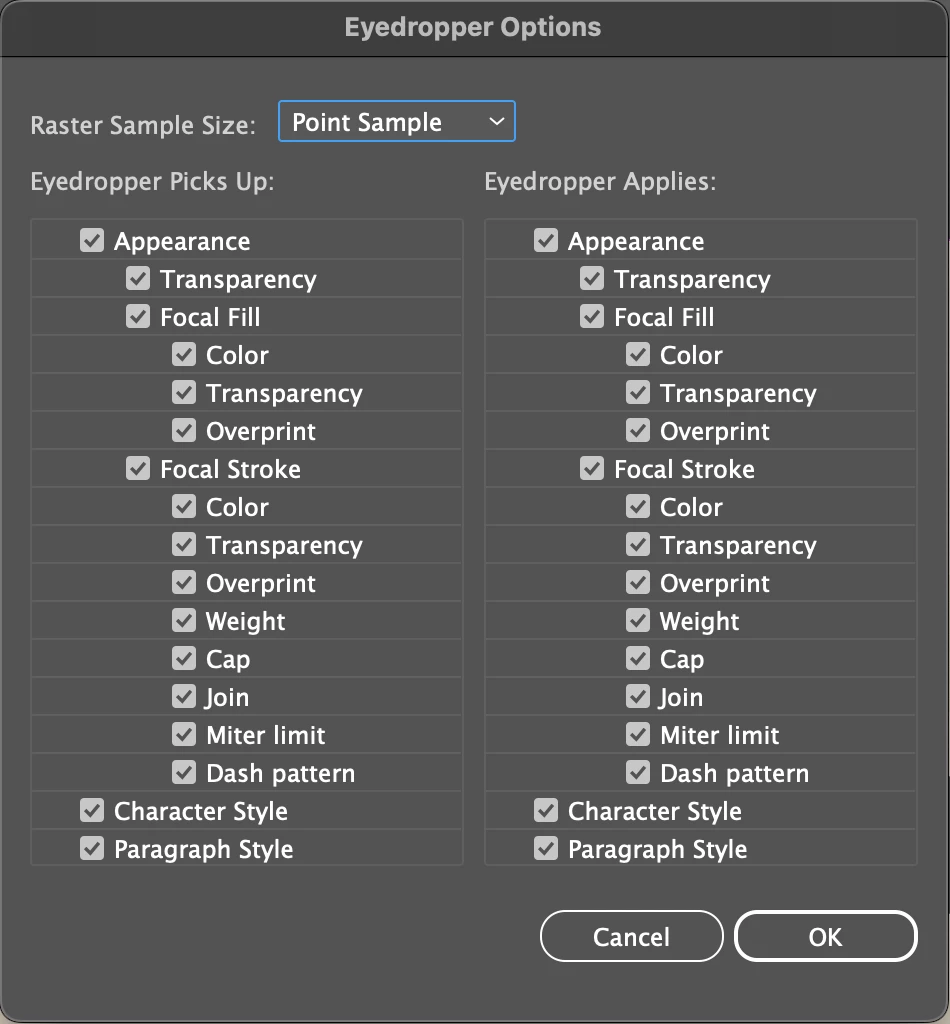


I'm trying to select only a portion of my text to change as a highlight color, not the entire text box. I can only select the entire text box in order to change the color. Something similar is also happenning with objects. I can't change the color unless I convert it into a compound object.


This is what happens when I try selecting individual text in my live text box tool.

 

This topic is closed to new replies. Start a new post to keep the conversation going.
Ton Frederiks
Ton FrederiksCorrect answer
Community Expert
Oct 6, 2024 3:47 PM UTC

Can you try it with the Appearance checkboxes unchecked?

5 replies

Ton Frederiks
Community Expert
Ton FrederiksCommunity ExpertCorrect answer
Community Expert
Oct 6, 2024 3:47 PM UTC

Can you try it with the Appearance checkboxes unchecked?

Translate
watermelon5
Inspiring
Oct 6, 2024 11:23 PM UTC

🎈🎊🎉 You solved it. 🎉🎊🎈


However, I don't understand. I thought it must be checked. It would seem I DO want my eyedropper to pick up color and everything mentioned.

Translate
Ton Frederiks
Community Expert
Community Expert
Oct 6, 2024 11:40 PM UTC

Good to hear that helped, but to be honest, I find it confusing too. I'll leave it to someone smarter to explain it.

Translate
Monika Gause
Community Expert
Community Expert
Oct 6, 2024 3:27 PM UTC

Do you hold down the Shift key when clicking on the circle?


Also: check the Appearance panel. You have probably applied a couple additional fills to the text object.

Translate
watermelon5
Inspiring
Oct 6, 2024 11:03 PM UTC

No. I don't hold the shift key.

There are no fills in my appearance panel.

Translate