
Participating Frequently
October 12, 2024
Answered

Eyedropper Tool Placing Fills Below Contents In Appearance Panel

  • October 12, 2024
  • 2 replies
  • 372 views

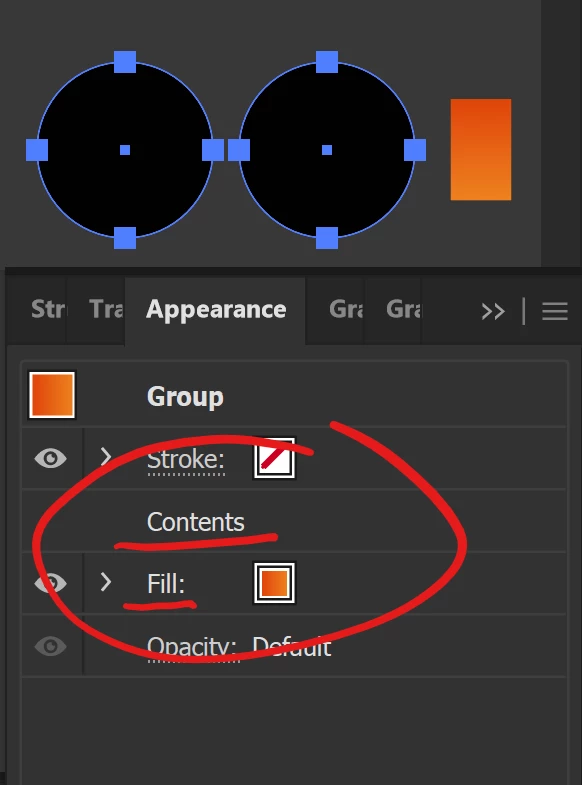
After two updates ago, I noticed that using the Eyedropper tool to get fills and gradients will take it from the donor element, but it places the fill below the Contents layer in the Appearance Panel, making it seem that the Eyedropper tool is not working. I believe this is a bug, as it only began this behavior after an update about a month ago.

Here is a screenshot of the behavior after using Eyedropper tool to apply the orange gradient to the black circles:
 

This topic has been closed for replies.
Correct answer Ton Frederiks

If you turn off Appearance in the Eyedropper options, it will work as you expect.

2 replies

Monika Gause
Community Expert
Community Expert
October 12, 2024

There hasn't been a change of behaviour in ages: https://youtu.be/JPXXGqch4BY 

Ton Frederiks
Community Expert
Ton FrederiksCommunity ExpertCorrect answer
Community Expert
October 12, 2024

If you turn off Appearance in the Eyedropper options, it will work as you expect.

Participating Frequently
October 12, 2024

Thank you, so much! I thought I was going crazy, haha.

I don't know how or when that got checked, but you fixed my headache. 

Thank you.

Ton Frederiks
Community Expert
Community Expert
October 12, 2024

Good to hear that helped.