Known Participant
April 6, 2022
Question

EYEDROPPER tool won't pick up character attributes!

  • April 6, 2022
  • 3 replies
  • 432 views

hi everyone!,

Please help me. Eyedropper suddenly stopped picking up character attributes. Please take a look at the image. Character and Paragraph are marked. I don't know what is happening. 
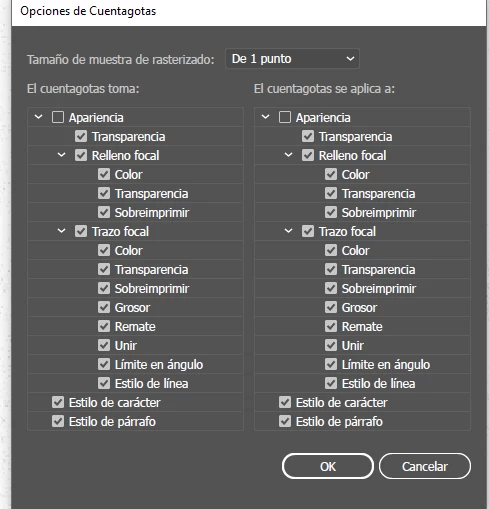


Thanks for your help!

Nat

This topic has been closed for replies.

3 replies

Known Participant
April 7, 2022

well, it seems for some reason the top 2 boxes didn't get checked even if I did check them and pressed OK. Everytime I opened the attributes they were unchecked. Reinstalled Illustrator and now everything works fine.


Thanks for your help!


Nat

Met1
Legend
April 6, 2022

Suddenly, or after an update?

Either way try a prefs reset...

Known Participant
April 7, 2022

Done!, and still happening. I don't know what to do.


Nat

Met1
Legend
April 7, 2022

Is it document specific?

If you quit, restart and create a new doc does it happen there too?

And, I have to ask this, it is live text you are trying to sample and not outlined?

Are you using the TYPE attribute to color the text or the regular CHARACTER one?

Might help if you sent a screenshot with text selected and attributes panel open.

I may be wrong but I think selecting text with the TYPE attribute instead of CHARACTER in attributes makes the eyedropper tool wonky as you could have several fills and strokes - it certainly is for me, I have to make a graphic style to apply all instances, but I might be using the eyedropper tool wrong!

Monika Gause
Community Expert
Community Expert
April 6, 2022

When you check those top 2 boxes, does it still not work?

Known Participant
April 6, 2022

Hi!

Yes, and still the same behavior.


Nat