

RoHering89
Participant
October 27, 2024
Question

Falla en fuentes

  • October 27, 2024
  • 3 replies
  • 306 views

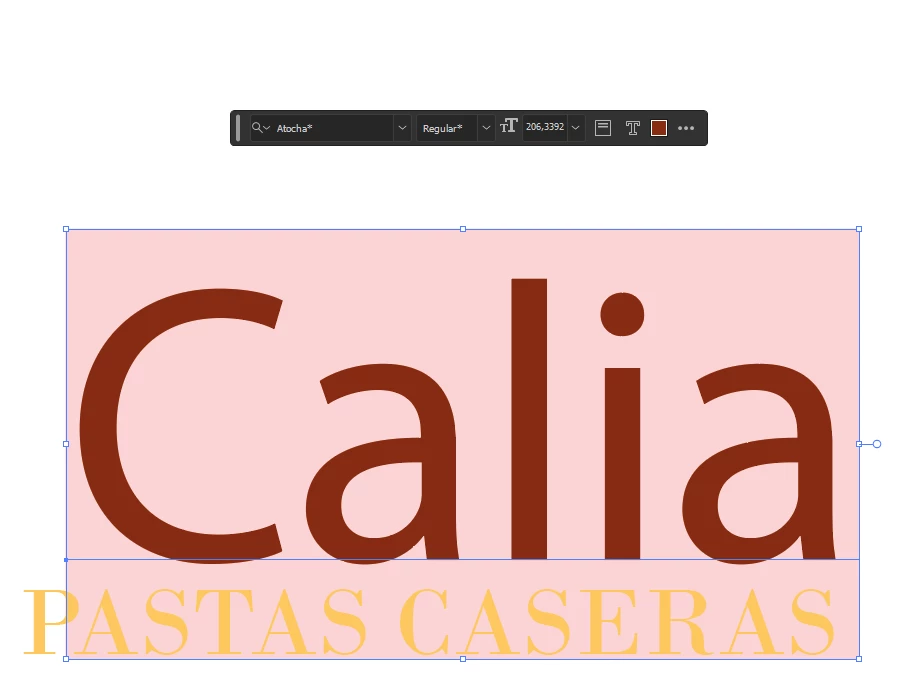
Hace un par de semanas estoy teniendo problemas con las fuentes. Por ejemplo las descargo, se instalan y las utilizo en Adobe Illustrator. El problema es que cuando lo abro nuevamente al otro dia ya no funcionan, se encuentran desinstaladas. Ademas aparecen con un asterico al lado del nombre. Seria fantastico que puedan solucionar ese inconveniente. Muchas gracias
This topic has been closed for replies.

3 replies

creative explorer
Community Expert
Community Expert
October 27, 2024

@RoHering89 I'm using a MacBook Pro and install fonts through Font Book. These fonts load correctly in Adobe Illustrator on my system. To avoid the asterisk issue, ensure the fonts remain installed and enabled in your Font application until you're finished using them in your project. Removing or disabling fonts can cause unexpected display problems.

m
Community Manager
October 28, 2024

Hello @RoHering89,

I am sorry to hear about your experience. I hope Ton, Bill and Michael's suggestions helped resolve the problem. If not, kindly share the Font name and foundry, and if you are using a 3rd party font manager, so I can check it with the team.

Looking forward to hearing from you.


Anubhav

Bill Silbert
Community Expert
Community Expert
October 27, 2024

I have found that problems with keeping Adobe Fonts activated can be fixed by signing out of your Adobe ID in the Creative Cloud Desktop app and then signing back in again. I know that sounds like you're just kicking it in the side but somehow this process usually works for me.

Ton Frederiks
Community Expert
Community Expert
October 27, 2024

Did you check the Preferences > File Handling > Auto Activate Adobe Fonts?