mc-0071
Participant
November 5, 2019
Question

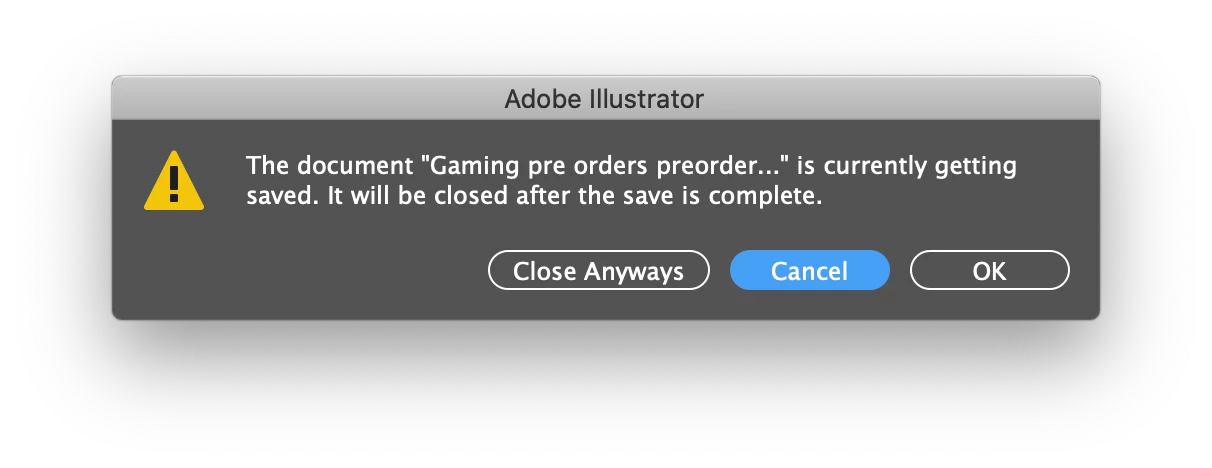
Feedback for Illustrator UI ("Close Anyways" Doesn't sound professional!)

  • November 5, 2019
  • 10 replies
  • 2014 views


{Renamed By MOD}

10 replies

Participant
August 18, 2025


This is the same error could you people please fix it at the earliest it is irritating


Abhishek Rao
Community Manager
Community Manager
August 18, 2025

Hi @Irshad231675651dxr,


Thanks for reporting this. Could you share which version of Illustrator and OS you're on, along with the OS details? If you're not already on the latest release, please update Illustrator and check if the issue still appears. If it does, try signing out of the Creative Cloud Desktop app, restarting your machine, and signing back in. Also, please test if the same behavior occurs in any other Creative Cloud app when trying to save. This will help narrow things down.


Looking forward to your update.

Abhishek

Participant
January 14, 2020


This is embarrassing.

Not sure which is worse, getting saved or Anyways. How did this happen? Nevermind, please demote the A to lowercase and drop the infuriating s. I am going crazy seeing that box pop up all day. Oh, and I would suggest being saved. Getting is another of those anyways-type words when used in that context. Not great.

Monika Gause
Community Expert
Community Expert
January 14, 2020

Maybe you should update your software, because this has already been addressed in a fix.

Participant
December 5, 2019

Thank you. It sounds that way because it is not a word. I was pretty disturbed at the use of "anyways" in a professional software application. 

Participating Frequently
November 28, 2019

This has now been fixed in the latest update! "Close Anyways" is no longer even an option.

Thank you Adobe for listening you little tinker.

Ton Frederiks
Community Expert
Community Expert
November 28, 2019

Dialog changed in update 24.0.1

Participating Frequently
November 28, 2019

I am really angry about this.

Participant
November 24, 2019

This "feature" is an excellent example of Adobe's ongoing attempts to expand its market to novice users by stating the obvious with pop-ups, tooltips, tutorials, etc. The apps are increasingly cumbersome and needlessly complicated. 

michaelo34340957
Participant
November 13, 2019

It's irritating me every time i see it! Half expecting the next update to say something like this:

Participant
November 13, 2019

Yes! Exactly. Glad I'm not the only one dumbfounded by this. BUT my bigger question is why do we even need this dialog box in the first place? Can't AI just save the thing and we close it? We clearly want to close the document, so aren't we always going to prefer "Save Anyways?"

Seems unecessary. Just close the document. How you choose to save it is, like, your business, er whatever.

Monika Gause
Community Expert
Community Expert
November 13, 2019

Illustrator 2020 saves in the background, so you can do something else why it's saving your huge file. You can just open a new document or switch tabs, but you might not want to just "close anyway" a document that is currently being saved.

Rishabh_Tiwari
Legend
November 5, 2019

Hi there,


Thanks for reaching out. I will pass on your feedback to our Product team and you can do that too by upvoting the request and sharing your comments here: https://illustrator.uservoice.com/


This is the best way of communicating with the Engineering and Product Management teams regarding issues and suggestions so they can be implemented in future releases. 


Let us know if this helps or if you need any further help.

 

Regards

Rishabh


Participant
November 12, 2019

Agree with this. When I saw it, I first thought, "Well, that's not even grammatically correct!" Which it isn't. The word is "anyway". 


But even "anyway" could be confusing to some.

John Mensinger
Community Expert
Community Expert
November 12, 2019

It's not just that either. ". . . is currently getting saved." is wrong as well. The file is being saved.

Monika Gause
Community Expert
Community Expert
November 5, 2019

This is Illustrator 2020, right?

You might want to read the what's new document.

https://helpx.adobe.com/illustrator/using/whats-new/2020.html#background_save

mathmaker
Participant
November 11, 2019

Did you suggest this because Adobe should have used their new spellcheck feature? OP is pointing out a grammar error in the UI.