
Answered
fenêtre 3D et matière
Bonjour,
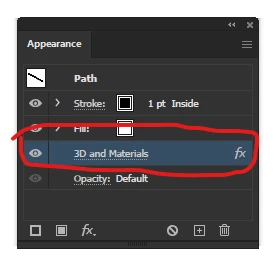
Je travaille sur un projet en 3D isométrique et je souhaiterais savoir si après avoir aplliqué un effet 3D extrusion isométrique, il est possible de revenir à son visuel en 2D (qui a servi de base à la 3D) pour le modifier ? Lorsque je clique dessus effectivement je peux voir les poignéees et les déplacer/ modifier mais en mode contour et je voudrais revoir mon visuel 2D complet sans effets 3D. Y'a-t-il une fonction comme ça pour desactiver les effets 3D temporairement afin de pouvoir revenir sur le visuel de base ?
 AdChoices