MahaB82A
Legend
December 6, 2022
Answered

Fill color issue

  • December 6, 2022
  • 2 replies
  • 1368 views

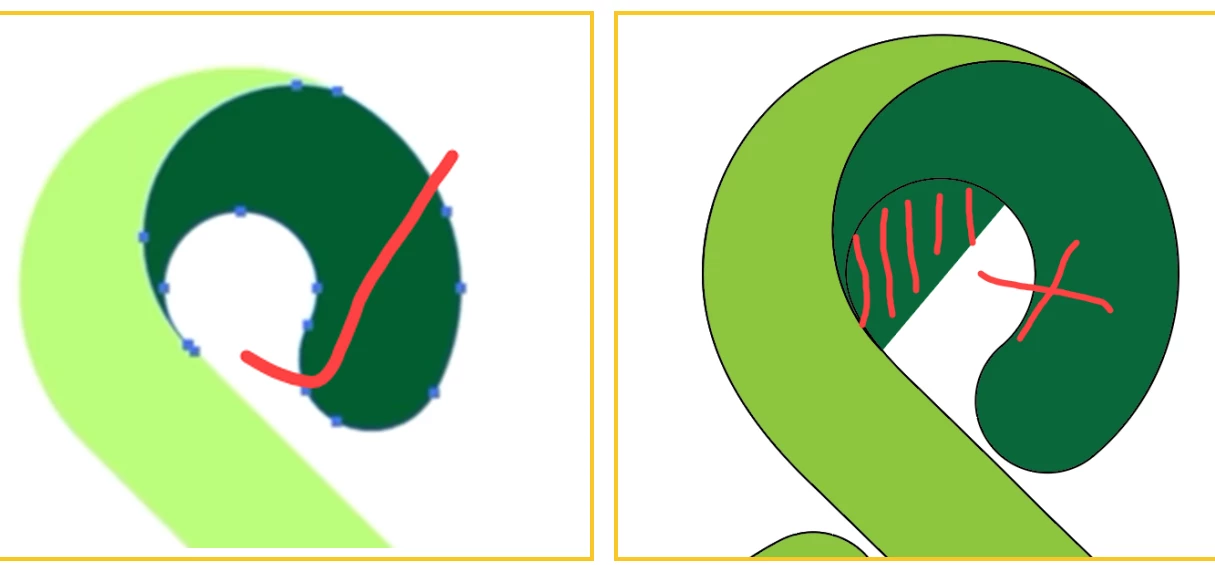
This dark green fill color does not come as like in the tutorial. What is the reason for that?

Tutorial

time 4.5


This topic has been closed for replies.
Correct answer RvdT

Select dark green shape. Press Ctrl + J (join)

2 replies

Doug A Roberts
Community Expert
Community Expert
December 7, 2022

I would guess there is an open path at that half moon section. If you select just that part by the fill and move it around, what do you see?

MahaB82A
MahaB82AAuthor
Legend
December 7, 2022

Is there any hot key to make tiny movement?

Doug A Roberts
Community Expert
Community Expert
December 7, 2022

You can use the arrow keys. But why a tiny movement? All you need to do is establish that an unwanted or unconnected path is there.

Monika Gause
Community Expert
Community Expert
December 6, 2022

There are gazillions of ads in that tutorial so I can only guess that in the tutorial they use an RGB document, while yours is CMYK

MahaB82A
MahaB82AAuthor
Legend
December 7, 2022

When you start the artboard there is a option to select this. Do you know at this how to change it?