

Participant
January 26, 2018
해결됨

Filling different paths

  • January 26, 2018
  • 5 답변들
  • 1206 조회

Hi,

I just created some paths, by drawing and "siccoring", but now I have the problem that I can't properly color the spaces between.

All I get is this:
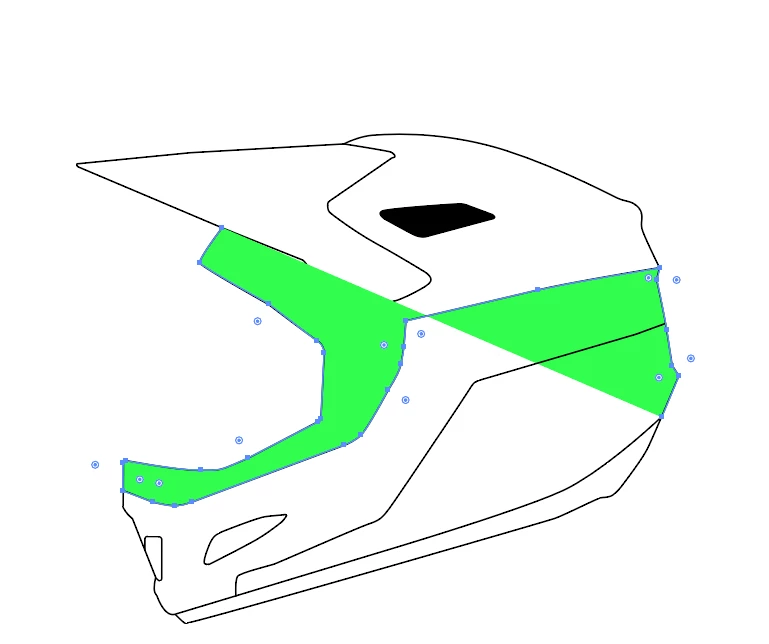
Can I fix this? or do I have to redo the whole thing?

이 주제는 답변이 닫혔습니다.
최고의 답변: michelew83603738

Maybe, I was just  wrongly guessing the visor is a complete shape, but partly hidden under that green open path fill, that is crashing across the helmet,


You could select everything an create a Live Paint Group and then fill your shapes. Object>Live Paint>Make then use the live paint tools hiding under the Shape Builder Tool

5 답변

wrensauer
Inspiring
February 7, 2018

Hi Glemau,

Did any of our ACP's suggestions above help resolve the fill issue for you? Let us know if you need further assistance.

Best,

Wren

macpawel
Participating Frequently
January 27, 2018

The easiest method is using Live Paint - Select whole graphic - and convert it into Live Paint Group (CTRL+Alt+X)

Then use Live Paint Bucket (K) to fill areas you need.

This wayyou don't need to make any changes

pawel

hammer0909
Community Expert
Community Expert
January 26, 2018

You're getting that appearance because you're working with open paths. The sections don't complete themselves and therefore the fill is bleeding outside of the bounds that you're trying to color. Close those paths or make new ones and it should behave more like what you're expecting.

Bill Silbert
Community Expert
Community Expert
January 26, 2018

I assume you mean "Scissoring" the word that you've used has a Google definition that relates to porn. At any rate I'm not sure what process you have used to do your drawing with the that would use the scissors tool but the problem that you're having here is that you are trying to fill open paths. If you close the paths then you can add a fill within the drawn shapes. Some of what you have here could also be fixed using the Shape Builder Tool How to create shapes using the Shape Builder tool in Illustrator or the Live Paint Bucket Tool How to create and work with Live Paint groups in Illustrator .

Ray Yorkshire
Participating Frequently
January 26, 2018

Use the Shape Builder tool

Select the  areas  and hover the mouse over and click to make shapes

Kurt Gold
Community Expert
Community Expert
January 26, 2018

More probably than not the Shape Builder will not work properly in that case (take a look at how the green filled path is constructed and take a look at the "giant" gaps).

Parts of this sketch have to be rethought in order to use the Shape Builder or Live Paint reasonably.

Ray Yorkshire
Participating Frequently
January 26, 2018

Maybe, I was just  wrongly guessing the visor is a complete shape, but partly hidden under that green open path fill, that is crashing across the helmet,