Known Participant
January 24, 2022
Question

Filling with color open areas between shapes / paths

  • January 24, 2022
  • 2 replies
  • 742 views

Dear Community,


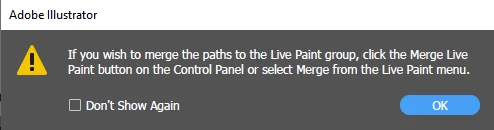
I am new to Illustrator and I am trying to understand how to fill with color an open area between shapes / paths. I have the image below, a spiral which 'touches' two different paths. I would like to fill in the white area, but do not manage, not even with the Live Paint Bucket tool, where I get the message below. Any suggestion? Many thanks.

 

This topic has been closed for replies.

2 replies

pixxxelschubser
Community Expert
Community Expert
January 24, 2022

For testing purposes, you can work with a copy of your current file.

Then select everything and create a Live Paint group. And then continue with the coloring...

https://helpx.adobe.com/illustrator/using/live-paint-groups.html

Known Participant
February 1, 2022

Thanks for the answer. I am getting a bit fluent with this, hopefully I will know how to use properly. Still nedd to understand how to not mess up paths when dealing with a Live Paint Group.

Doug A Roberts
Community Expert
Community Expert
January 24, 2022

Have you tried following the instructions in the message?

It indicates that your selection includes paths that are not part of the live paint group.

Known Participant
January 24, 2022

Hi and thanks for the reply.

Actually no, because I did not even understand what he was saying.

But now I understood that the 'Control Panel' is actually the 'Object' menu, did as the Message Box was saying and solved the issue.

Other issues popped up, however, like I cannot fill in a path, now, or some paths have disappeared under the fill of the Live Paint Bucket and so on...

I believe I need to look into it a bit more 🙂

Thanks for you help anyway, appreciated!

Doug A Roberts
Community Expert
Community Expert
January 24, 2022

The Control panel (or Control bar) is this:


If you can't see it in your workspace, it can be acivated under Window > Control.

The Object menu is what the message refers to when it says 'the Live Paint menu' (Object > Live Paint > Merge)