Participant
October 28, 2022
Answered

Filling wrong section

  • October 28, 2022
  • 3 replies
  • 959 views


sssss

So I just started using illustrater yesterday and I set myself a practice drawing.

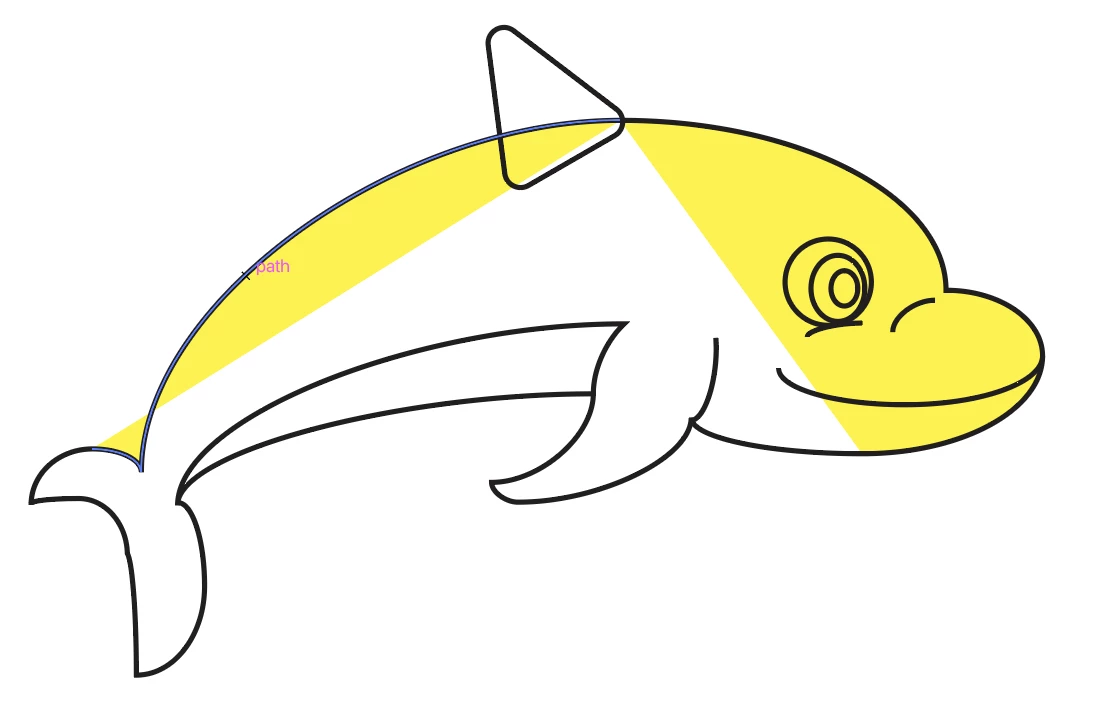
I'm wondering how I fill the correct areas? As seen in the image the wrong parts have been filled.

If somone could give some insight, thank you.

This topic has been closed for replies.
Correct answer Bill Silbert

The manner in which the color is appearing shows that you have drawn an open path. An open path is one that does not connect the first and last anchor points drawn. When you try to fill an open path it will place the color haphazardly as shown in your screen shot. In order to get a solid fill you must finish (connect the end points) the path which will then become a closed path. For further definition about open and closed paths see https://graphicdesign.stackexchange.com/questions/86468/open-path-outlines-and-closed-path-outlines-adobe-illustrator.

3 replies

Bill Silbert
Community Expert
Bill SilbertCommunity ExpertCorrect answer
Community Expert
October 28, 2022

The manner in which the color is appearing shows that you have drawn an open path. An open path is one that does not connect the first and last anchor points drawn. When you try to fill an open path it will place the color haphazardly as shown in your screen shot. In order to get a solid fill you must finish (connect the end points) the path which will then become a closed path. For further definition about open and closed paths see https://graphicdesign.stackexchange.com/questions/86468/open-path-outlines-and-closed-path-outlines-adobe-illustrator.

Jacob Bugge
Community Expert
Community Expert
October 28, 2022
Monika Gause
Community Expert
Community Expert
October 28, 2022

You need to draw those shapes as a whole.

So the body need to be one shape

Then you stack the other shapes on it.


You could use the Live paint tool to fix your fills, but it won't be the same.

In order to fix your shapes, you need to connect them with the pen tool.