
Participant
May 17, 2019
Answered

Find and change mutliple texts in illustrator and make them bold?

  • May 17, 2019
  • 5 replies
  • 5879 views

Hi!

I work with files that require the language abbrevs. to be in "Flama Medium bold". Can someone help me with a script that could do this in illustrator? I know very little about scripting or writing a script..sooo.. trying my luck here.

For example, in a text box there would be "EN: / FR: / ES: / PT: etc..." All of these would need to be formatted to the bold text. Is there a way to do this without me going in and selecting them one by one and making them bold? As in is there a way that's kinda like the find and replace where I could put in all the words that needs to be bold and have it do it for me? 

Here's another small example of what I'm talking about. Some of the contents can go for many languages.

US: PALM CONTENT: 100% CABRETTA LEATHER / BACK: US: 64% GOATSKIN LEATHER / 36% CABRETTA  LEATHER / OTHER: 85% GOATSKIN LEATHER / 15% NYLON / CA: COMPOSITION DE LA PAUME: 100% CUIR  CABRETTA / ARRIERE: 64% PEAU DE CHÈVRE / 36% CUIR CABRETTA / AUTRE: 85% PEAU DE CHÈVRE / 15%  NYLON / PT: COMPOSIÇÃO DA PALMA: 100% COURO DE CABRITO / PARTE POSTERIOR: 64% PELE DE  CABRA / 36% COURO DE CABRITO / OUTROS: 85% PELE DE CABRA / 15% NYLON

"US: PALM CONTENT:" would need to be bold.  Then "CA: COMPOSTION DE LA PAUME:" would need to be bold and so on.

Thank you!

~Yvy
This topic has been closed for replies.

5 replies

yewan0711Author
Participant
May 20, 2019

Thank you everyone for responding and taking the time to answer this question!! I will try everything and see how things work.

yewan0711Author
Participant
May 20, 2019

*Que Music - Does a little party dance* Thank you it works!!! WooohooOOo!

I tried this one - ai_re_v1.5.zxp but I couldn't get this one to open? However the other one works so I'm a happy camper.

Stephen Marsh
Community Expert
Community Expert
May 21, 2019

Glad your happy!

I was trying to write a magic grep/regular expression that would "do it all" but had no luck, so I had to resort to typing out the literal text separated by a | pipe character.

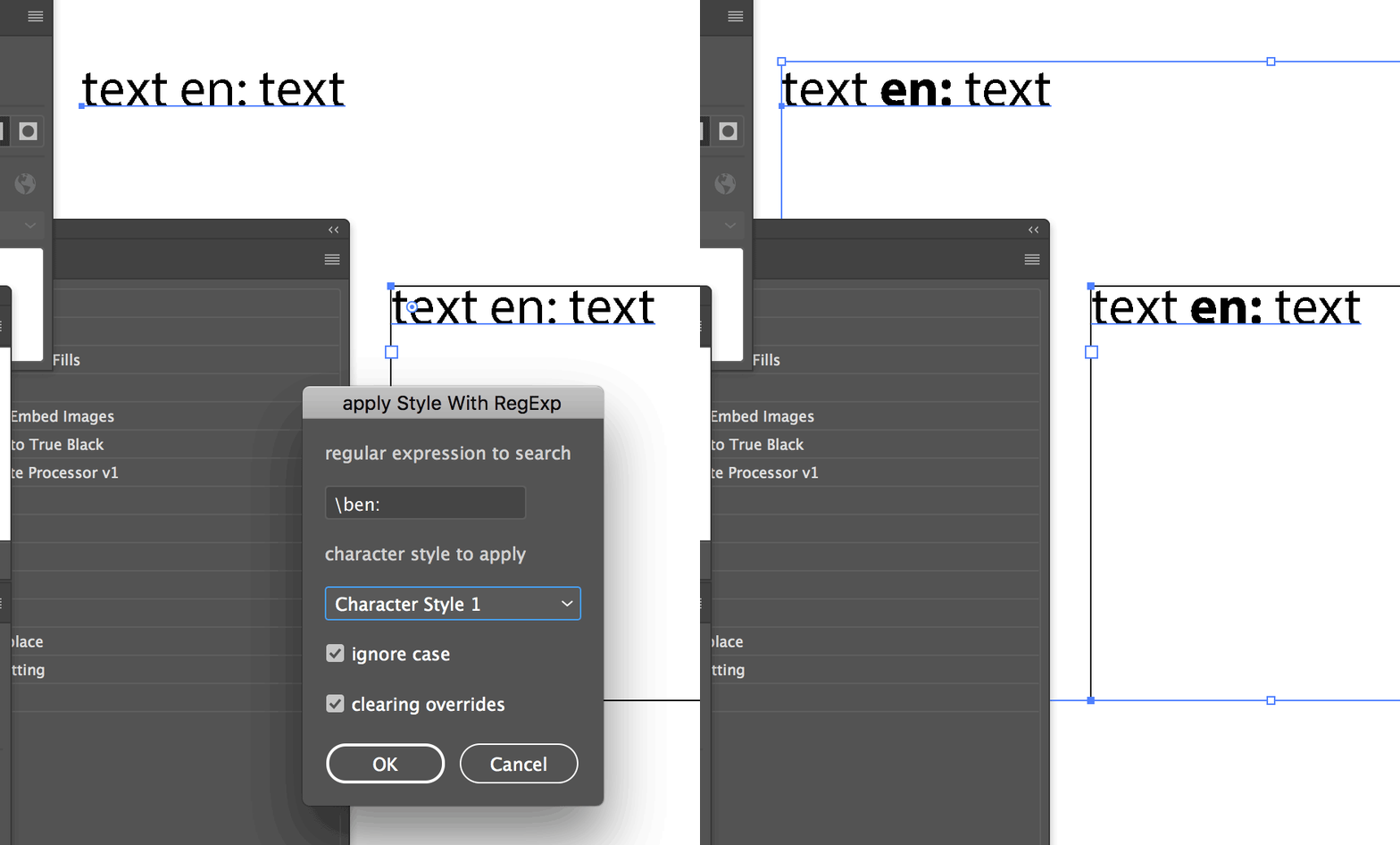
Yes, that second option is best as it combines both a regex find with a character style replace in one operation.

The .zxp was only for a regex based find/replace panel, you stil had to manually change the character over after the regex selected all of the text. You need Adobe's extension manager or a 3rd party extension manager to install .zxp files, which are often problematic to install.

Stephen Marsh
Community Expert
Community Expert
May 18, 2019

Look what I found:

Re: Text Replacement script

ai_re/_installation_file at master · dumbm1/ai_re · GitHub

Select all text objects, enter in the regex pattern into the extension panel, select all matches, then change the font or character style.

If you don't know or can't work out a regex pattern, simply type in the literal text to make bold, separate multiple texts with the pipe | symbol (shift \).

Known Participant
December 17, 2021

This script is very good!

If it adds a selection range option, it's perfect.

1. character
2. text
3.document

pixxxelschubser
Community Expert
Community Expert
May 18, 2019

yewan0711  schrieb

…Can someone help me with a script that could do this in illustrator …

moved from Illustrator to Illustrator Scripting

A script based replacing or formatting is not so easy as eg in InDesign.

However – for the beginning: RegExp search and replace, keep original text formatting

Have fun

Stephen Marsh
Community Expert
Community Expert
May 18, 2019

This can be semi-automated with an action to find and replace a specific string of text, then change the character formatting. However it would need to be repeated for each word and each language, so far from ideal but better than a fully manual workflow.

Ideally, you would have a regular expression based script that could search for a text pattern, then replace the selected text with new formatting or better using a character style. Sadly I don't have such a script premade in my collection and this is may be beyond my current skills.

This is a basic native/standard feature in InDesign, however, Illustrator has a long way to go to catch up.