
william_f_m22090609
Participant
January 4, 2019
Answered

Find missing tools in Illustrator's custom toolbar.

  • January 4, 2019
  • 11 replies
  • 86647 views

I'm running Illustrator version 23.0.1 on Windows 10 Pro.


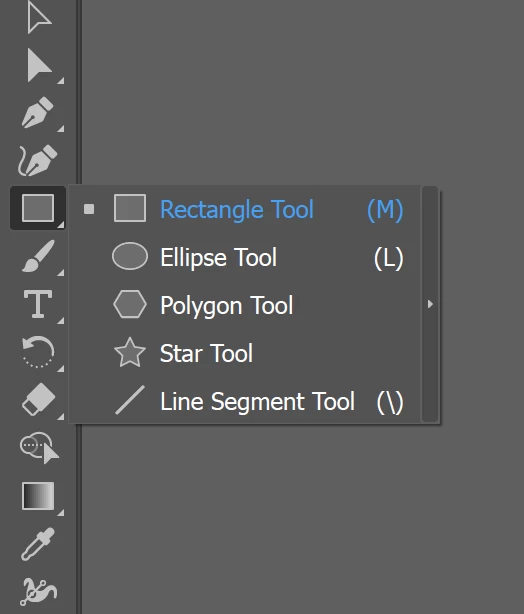
All of the sudden, the rounded rectangle tool is missing and I cannot find or recover it. When I options-click the rectangle tool, the rounded rectangle tool simply does not appear as an option, only the rectangle tool, ellipse tool, polygon tool, star tool, and line segment tool. There is also a small arrow that I can click but all that does is detach these options from the toolbar.


{Renamed by MOD}
This topic has been closed for replies.
Correct answer Bill Silbert

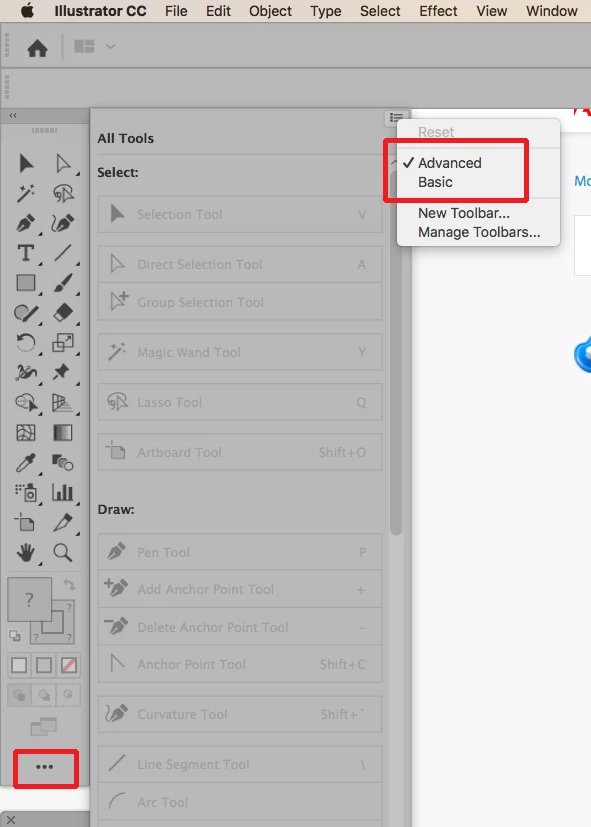
Illustrator CC 2019 has a new feature called Customizable Tools. This means that it is easy to actually misplace a tool. To reset click on the three dots at the bottom of the tool panel and then click on the pull-down menu icon at the top right of the window that appears and choose either Advanced or Basic to reset the tools. Advanced will make sure that all tools are present (see screen shot):

For more information about customizable tools see You Tube video Illustrator CC 2019 (23) : Customizable toolbars tutorial - YouTube .

11 replies

Eric Dumas
Community Expert
Community Expert
January 4, 2019

Hi,

I would try 2 options.

First, you can reset your preferences How to set preferences in Illustrator

Second, you can customise your toolbox How to work with tools in Illustrator