Inspiring
February 22, 2022
Answered

find replace by list

  • February 22, 2022
  • 1 reply
  • 592 views

Hi

I have a world map in English that I have to change the country and bodies of water names to Polish. I have an XLS file of the translations.

I have already looked at all the previous posts and tried each one to no avail.

Is there a script to find/replace by a list, or a script where I can input all the find text and replace text to do this automatically?

I need this kind of urgently (today is Feb, 22, 2022). Thanks in advance.
This topic has been closed for replies.
Correct answer femkeblanco

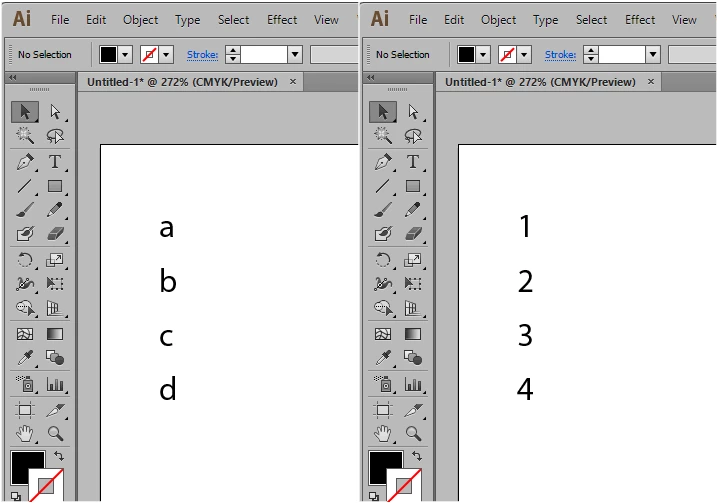
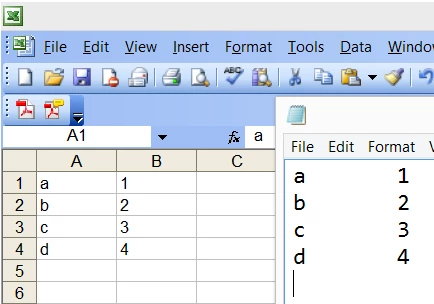
I don't know about reading xls files, but if you copy xls columns into a txt file, columns are separated by tabs and rows are separated by new lines.  The snippet below will read a txt file and change the textFrame contents from the first column to the second column.


var file1 = File.openDialog("prompt", "*.txt");
file1.open("e");
var contents1 = file1.read();
file1.close();
var contents2 = contents1.split("\n");
var contents3 = [];
for (var i = 0; i < contents2.length; i++) {
    contents3[i] = contents2[i].split("\t");
}
var frames = app.activeDocument.textFrames;
for (var i = 0; i < frames.length; i++) {
    for (var j = 0; j < contents3.length; j++) {
        if (frames[i].contents == contents3[j][0]) {
            frames[i].contents = contents3[j][1]
        }
    }
}


1 reply

femkeblanco
femkeblancoCorrect answer
Legend
February 22, 2022

I don't know about reading xls files, but if you copy xls columns into a txt file, columns are separated by tabs and rows are separated by new lines.  The snippet below will read a txt file and change the textFrame contents from the first column to the second column.


var file1 = File.openDialog("prompt", "*.txt");
file1.open("e");
var contents1 = file1.read();
file1.close();
var contents2 = contents1.split("\n");
var contents3 = [];
for (var i = 0; i < contents2.length; i++) {
    contents3[i] = contents2[i].split("\t");
}
var frames = app.activeDocument.textFrames;
for (var i = 0; i < frames.length; i++) {
    for (var j = 0; j < contents3.length; j++) {
        if (frames[i].contents == contents3[j][0]) {
            frames[i].contents = contents3[j][1]
        }
    }
}


rcoda1Author
Inspiring
February 22, 2022

THANK YOU SO MUCH! Can I buy you a coffee or a cocktail or something?


femkeblanco
Legend
February 22, 2022

Thanks.  With scripting you always expect a problem, so see if it works for you. If it does, I'm good.