

Find the Text Justification of an Area Text/Point Text
Hi Chaps,
I've written some piece of code to find the text justification of some simple text objects in an artboard.
for(var j = 0; j < subLayers.textFrames.length; j++)
{
var strContent = subLayers.textFrames
.contents; if (subLayers.textFrames
.kind == 'TextType.POINTTEXT' || subLayers.textFrames .kind == 'TextType.AREATEXT') {
if (strContent != '')
{
var fontName = subLayers.textFrames
.textRange.characterAttributes.textFont; var textSize= subLayers.textFrames
.textRange.characterAttributes.size; var textJustification = subLayers.textFrames
.story.textRange.justification; $.writeln(":::::IN displayFontInfo() function:::::: textJustification :::::"+textJustification);
var justificationTYPE;
var regularExpCheckLeft = /LEFT/;
var regularExpCheckRight = /RIGHT/;
var regularExpCheckCenter = /CENTER/;
if (regularExpCheckLeft.exec(textJustification))
justificationTYPE = 'L';
if (regularExpCheckRight.exec(textJustification))
justificationTYPE = 'R';
if (regularExpCheckCenter.exec(textJustification))
justificationTYPE = 'C';
$.writeln(":::::IN displayFontInfo() function:::::: justificationTYPE :::::"+justificationTYPE);
var regularExpressionCheck = /SemiBold/;
$.writeln(":::::IN displayFontInfo() function:::::: subLayers.textFrames
.kind :::::"+subLayers.textFrames .kind ); }
else
{
//Do Nothing
}
}
else
{
alert("Is the text type (Area Text / Point Text) proper in the document, please check and re-run);
This works when the text frame is either Left,Right or Centre aligned.
But there are some other cases which needs to be handled like Top Right, Top Centre, Bottom Right, Bottom Centre.....
As shown in the below figure, which I'm breaking my head to see how I can implement those with the existing api
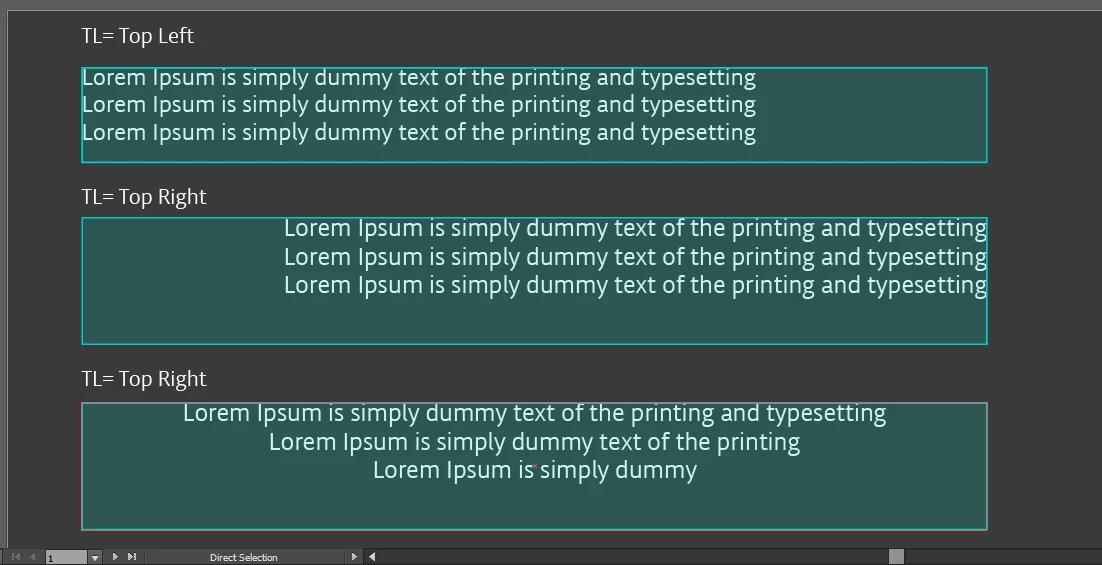
Green boxes are my requirement text frames, and the one on top is what I want to display with script.
My script should be capable enough to find the text how is it aligned and should display the respective alignment.
Is it something achievable?
-Suneel
 AdChoices